Patient Monitor User’s manual
7-12
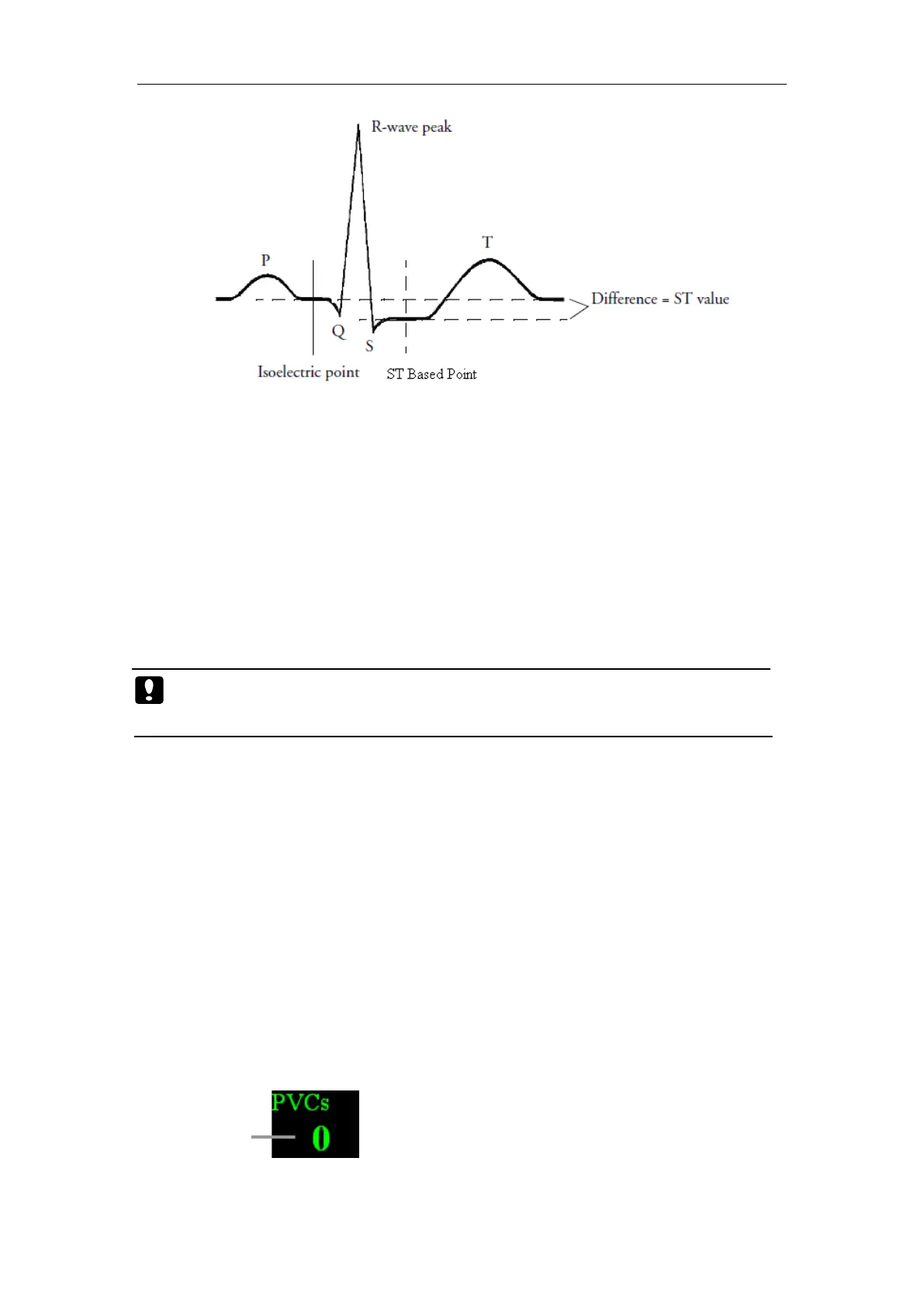
In the ST analysis menu, select【Adjust ST point】, the QRS complex
will be displayed on the popped up window, the two vertical lines indicate
the position of ISO point and ST point. Set the R wave peak as the reference
point for ST measurement.
The ST measurement points and ISO point need to be adjusted when you
start monitoring, and if the patient's heart rate or ECG morphology changes
significantly.
You can select【ISO】or【ST】and then adjust the point right and left.
Caution: When conducting ST analysis, the system will not consider
abnormal QRS complex.
7.7 Arrhythmia Monitoring
Arrhythmia analysis provides information on your patient’s condition,
including heart rate, PVC rate, rhythm, and ectopics.
7.7.1 Switching Arrhythmia Analysis On and Off
Select【ARR Analysis】in ECG setting menu, and set【ARR Analysis】
to【On】or【Off】.
7.7.2 PVCs Display
PVC Count



 To Next Page