18
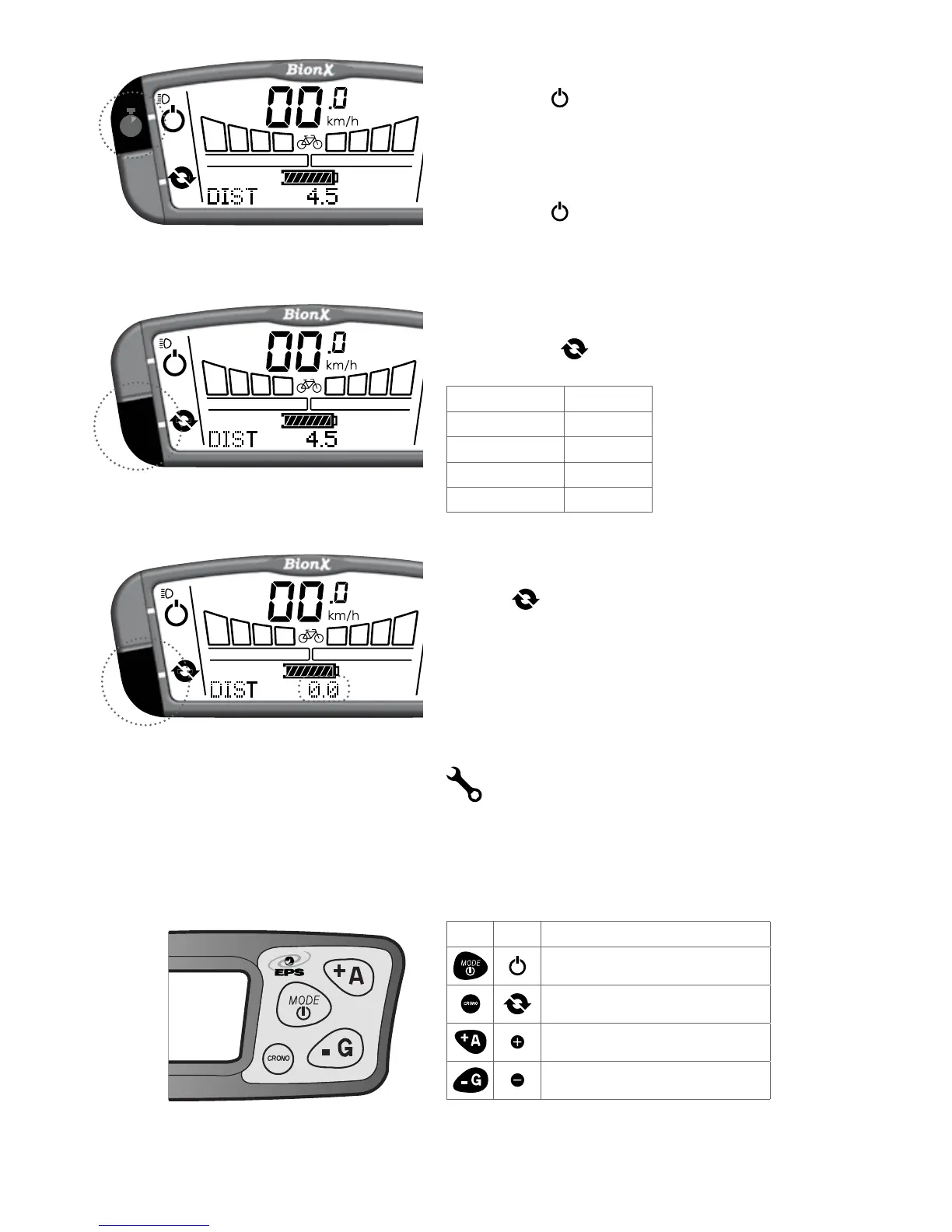
Turn on backlight and bicycle light (if applicable)
Push and hold key for 4 seconds - display backlight
andbicyclelight(ifavailable,batteryintegrated)are
turned on.
Turn off backlight
Push and hold key again for 4 seconds.
Select the cycling computer functions
Briefly push the key to change between:
Trip Distance DIST
Odometer ODO
Clock CLOCK
Average Speed AVSPD
Chronometer CHRONO
To reset the cycle computer functions
Holdthe key for a few seconds to reset the distance,
chronometer, or average speed values to zero.
Please contact your BionX dealer for service.
For the G1 console, substitute mode for power, and
crono for cycle. The assistance toggle remains the same.
G1 G2
Mode/PowerbecomesPower
Crono becomes Cycle
Remains the same
Remains the same
If you require more information on the G1 console,
please contact your dealer.
4s


 To Next Page