21
Removing and Installing the Rear Wheel
We recommend the removal and installation of the rear wheel to be done by a qualified dealer.
Should you have to do this yourself, please follow the instructions below:
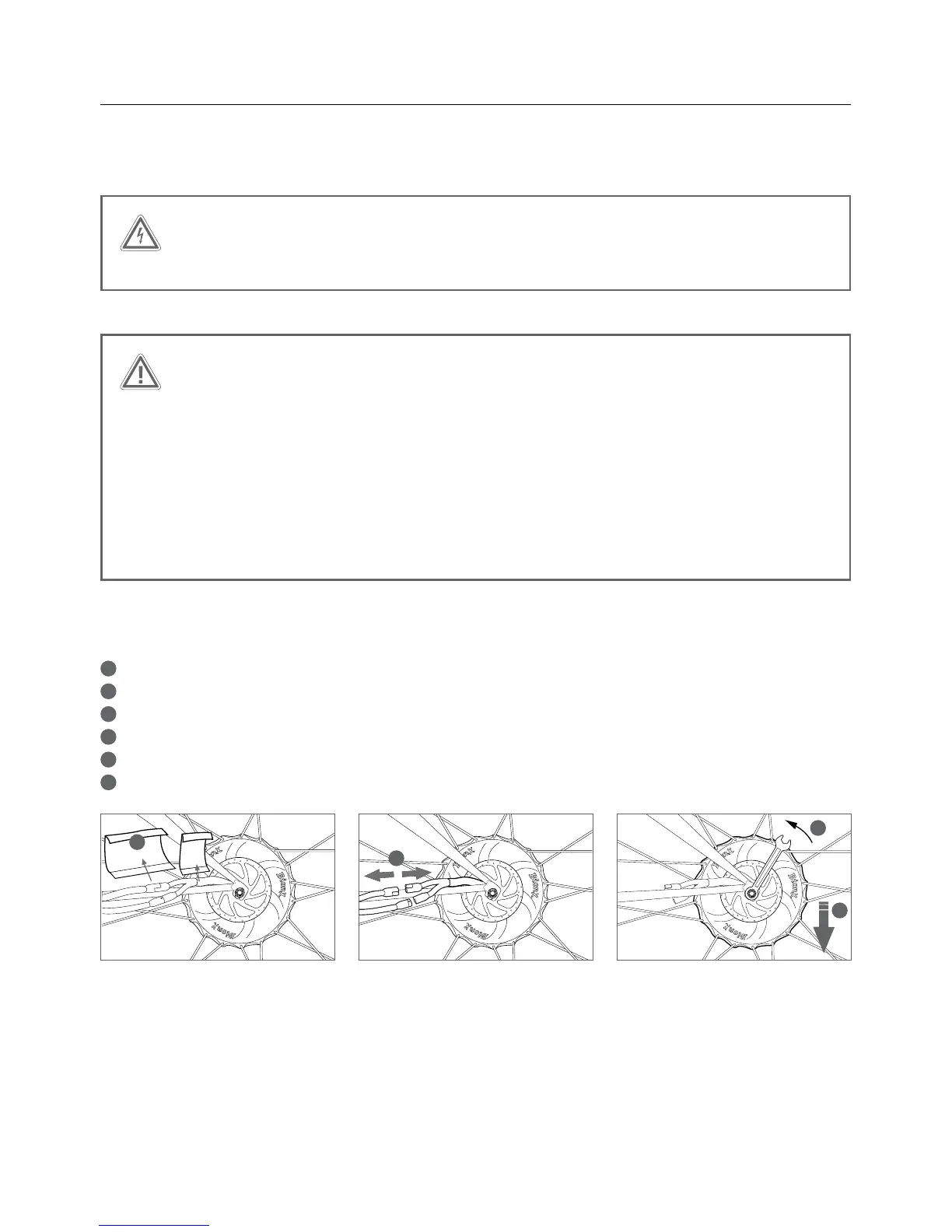
To Remove the rear wheel
1
Makesurethatthesystemisturnedoffviatheconsole(noillustration)
2
Remove the neoprene covers
3
Unplugthetwocableconnectionsthatleadtothemotor
4
Disconnectthecableguidefromtherearwheelbrake(onlyonbicycleswithrimbrakes,notshown)
5
Loosen the axle nut on the rear wheel using a 15mm ring wrench
6
Slide the rear wheel downwards, out of the dropout
WARNING
Always turn off the propulsion system prior to plugging in or unplugging the motor cables.
CAUTION
It is essential that the axle nuts are tightened with a torque of 40Nm/30lb-ft; this assures
that the propulsion system functions properly. Ensure the torque reaction collar is fully
inserted into the dropout. The notch on the non-drive side must also be facing in the direc-
tion of 6 o’clock (within 5° either way). If this notch placement is incorrect, please consult
your dealer.
If your bike is equipped with hydraulic disc brakes: Do not pull the brake lever with the
brake disc on the rear wheel removed from the caliper. Insertion of the wheel can be
difficult or impossible as the brake pads will prevent brake disc from sliding in place.


 To Next Page