17
Operating the BionX Propulsion System
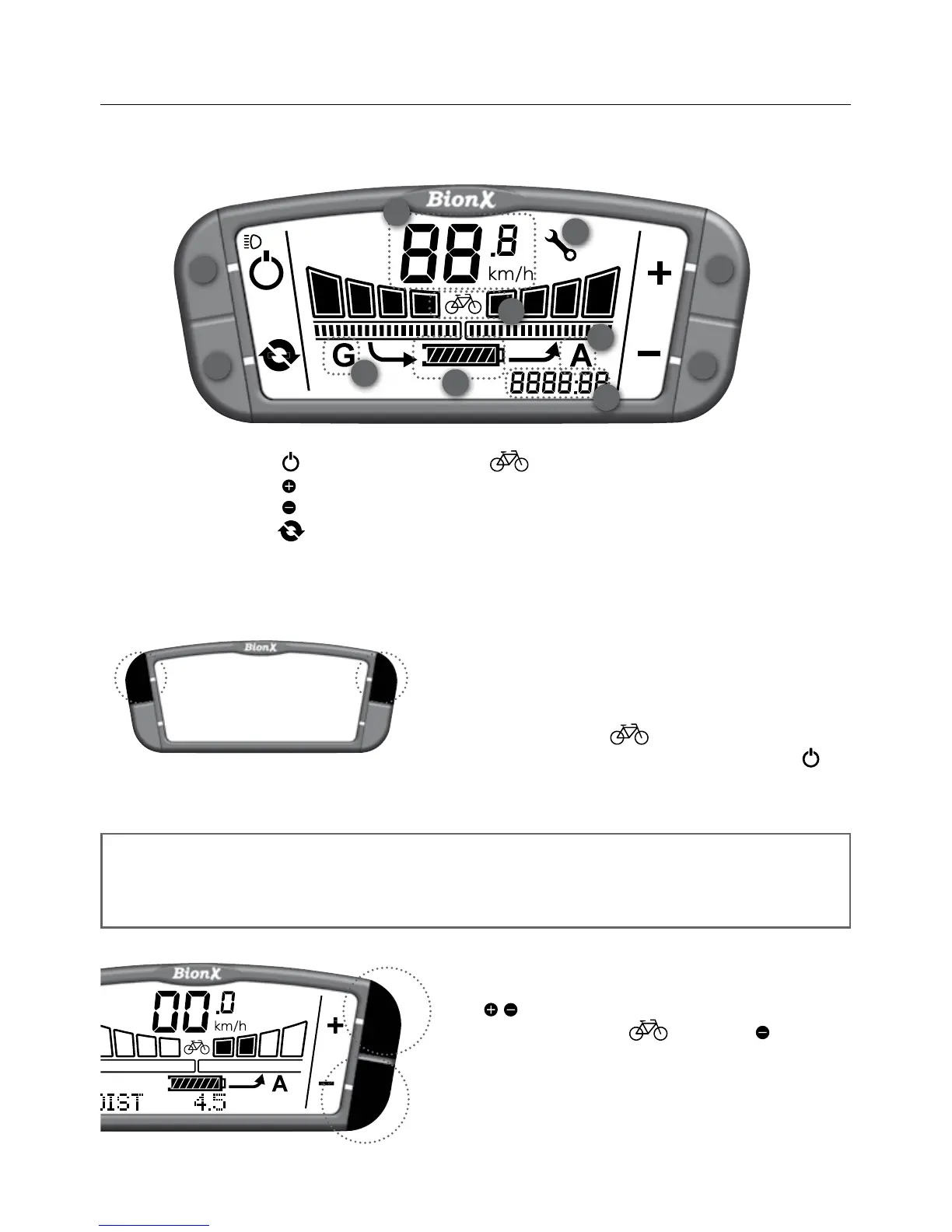
Turn the system on
Briefly push either top button on the console. The
battery will beep 4times and you will see a countdown,
this is the system perfoming a self check. After startup,
the system is always in mode(nomotorassist/
bike operation). To turn the system off, briefly push .
Thebatterywillbeep5times.After5minutesof“no
operation”thesystemturnsoffautomatically.
Select assistance/generate level
Push / keyformore/lessassist(seebar“elds1-4”
abovedisplay“A”).From mode push key to
enter continuous generate mode.
10
9
21
4 3
7
5
8
6
1. Power
2. Key
3. Key
4. Cycle
5. State of charge
indicator
6. (bicycle)mode
7. Speedometer
8. Tripdistance/averagespeed/
chronometer/odometer/clock
9. Assistlevel(A)
10.Generatelevel(G)
11. Wrench symbol
G2 Console
NOTE
The system performs a self check approximately every hour. Do not be alarmed if the
system turns itself on briefly, and off again, or if the touch port flashes momentarily.
11


 To Next Page