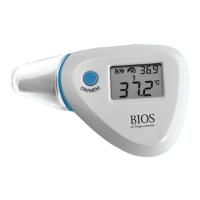
7. FEVER ALARM
If the thermometer detects a body temperature greater than 37.5°C / 99.5°F
in either the Ear or Forehead modes it will make a long beeping sound followed
by 3 short beeps, indicating a potential fever.
8. MEMORY STORAGE
When in ‘power on’ mode, press ‘ON/MEM’ to view the stored temperatures.
The stored temperatures are indicated with the .
Keep pressing ‘ON/MEM’ to scroll through each stored temperature.
• The thermometer stores 9 sets of temperature measurements.
9. MEASURING TEMPERATURE UNDER SCAN MODE
1. Power On: Press the ‘ON/MEM’ button.
2. After the power is on, press and hold the ‘ON/MEM’
button and then at the same time press the ‘SCAN’
button once for the to appear on the display (see
Figure 6).
3. Hold the thermometer against the desired surface to be measured and
press the ‘SCAN’ button to obtain the real time temperature. If you
press and hold the ‘SCAN’ button the temperature will be continuously
updated.
10



 To Next Page