SETTING SEqUENCE
HOUR > MINUTES > YEAR > MONTH > DAY > Then leave the setting
screen.
NOTE: The device will automatically shut off if left idle for more than
one minute. The LCD will show the date, time, and room temperature
continuously.
5. DIRECTIONS FOR USE – EAR MODE
1. If Forehead Probe is attached, remove following the steps below:
Attaching or Removing Forehead Probe: On the backside of the
thermometer you will see a small arrow close to the head. When
removing or attaching the forehead probe line up the arrow on the
device head with the arrow on the probe. Only when the arrows
are aligned will the probe attach or remove. Always make sure the
probe is clean and not damaged.
2. Power On: Press the ‘ON/MEM’ button.
3. The default mode for the thermometer is the ear
mode when the forehead probe has been removed.
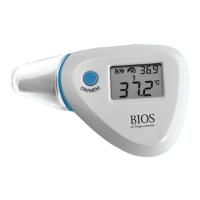
The thermometer is ready for use after you see the
icon on the display screen and hear two beeping
sounds (see Figure 3).
6



 To Next Page