2.3 Inserting the Batters
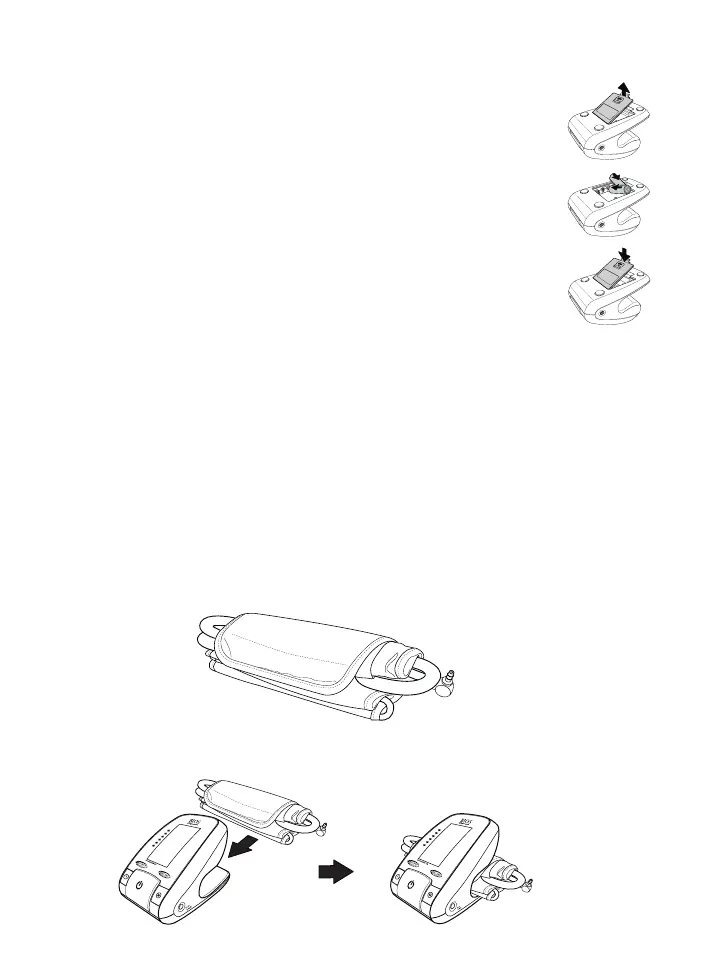
Follow these steps to insert the four “AA” batteries in the device.
1. Open the battery compartment cover
in the direction shown.
2. Insert the four “AA” batteries with
the correct polarity as indicated.
3. Replace the battery compartment
cover.
2.4 Selecting the Right Cuff
The BD850 comes with 2 cuffs, a standard and a large size cuff. Measure arm circumference around the bicep
If arm circumference measures 22 - 32 cm (8.7” - 12.6”), use the standard size cuff.
If arm circumference measures 32 - 42 cm (12.6” - 16.5”), use the large size cuff.
2.5 Storing the Cuff
The cuff used for measuring blood pressure is a delicate component of the device and should be stored carefully
when not in use. The BD850 is designed such that the cuff can be stored along with the blood pressure monitor.
Follow these steps to store the blood pressure cuff.
1. Roll up the upper arm cuff along with the inflating tube.
2. Push the folded cuff in the compartment at the back of the BD850 to store it safely.
S
Y
S
.
m
m
H
g
D
IA
.
mmHg
P
U
LS
E
/m
in
S
Y
S
.
m
m
H
g
D
IA
.
mmHg
P
U
LS
E
/m
in
to ensure you are using the proper cuff for you.














 To Next Page