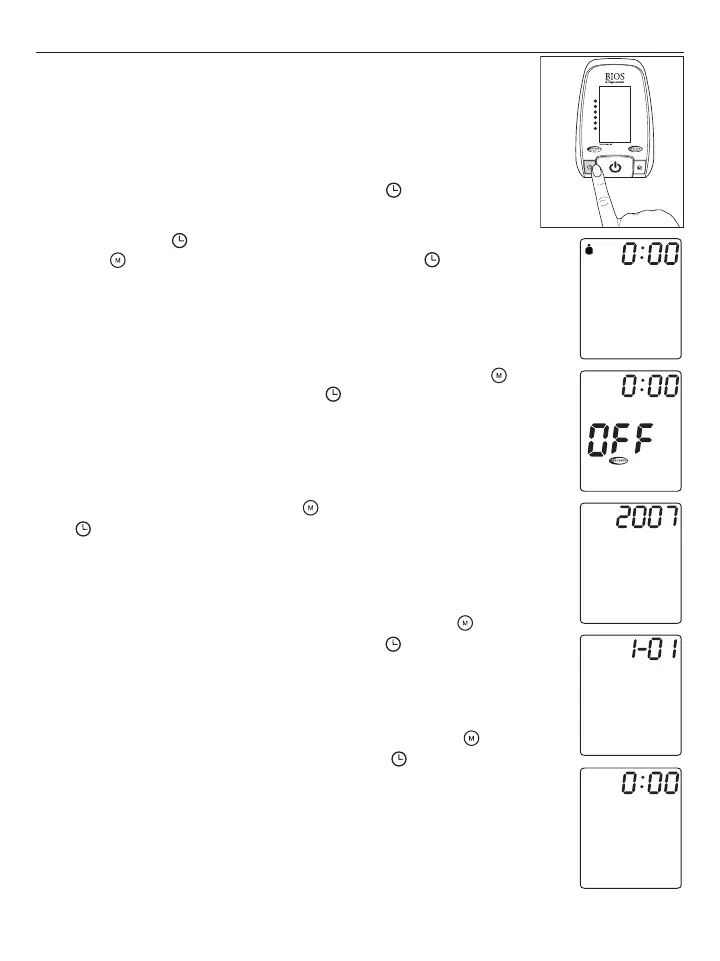
3. Using the Device
This section describes how to get the maximum benefit from your BD850 blood
pressure monitor. Follow the instructions carefully to get an accurate measurement of
your blood pressure and pulse rate.
3.1 Setting the Time, Date and User
When you insert the batteries for the first time (see “Inserting the batteries”), the
BD850 prompts you to set the current date and time. You can also adjust the date,
time and user at any time by pressing and holding down the button for over 3
seconds. Follow these steps to set the user, date and time settings:
1. When you press the button for over 3 seconds, the user icon starts flashing.
Press the button to switch between user 1 and user 2. Press to confirm.
2. You will see the MAM logo flashing along with the words “OFF”. Press the
button to toggle between on and off. Press the button to confirm.
3. Next, the year will start flashing. Press the button to adjust the year and press
the button to confirm setting.
4. Next, the screen starts flashing the month and date setting. Press the button
repeatedly to set the month and date, and then press the button to confirm the
settings.
5. Lastly, the screen starts flashing the hour and minute values. Press the button
repeatedly to set the hour and minutes and then press the button to confirm
the settings.
SYS.
mmHg
DIA.
mmHg
PULSE
/min














 To Next Page