5. Installation and Data Transmission
a) Insert CD into CD ROM drive of your PC. The installation will start automatically. If not, click on SETUP.EXE.
b) Connect the monitor via USB cable with the PC. Three horizontal bars will appear on the display and last for
3 seconds.
c) The bars will then flash to indicate that the connection between computer and device is successfully made.
As long as the cable is plugged in, the bars will keep flashing and the buttons are disabled.
During the connection, the device is completely controlled by the computer. Please refer to the ‘help’ file in
the software for detailed instructions.
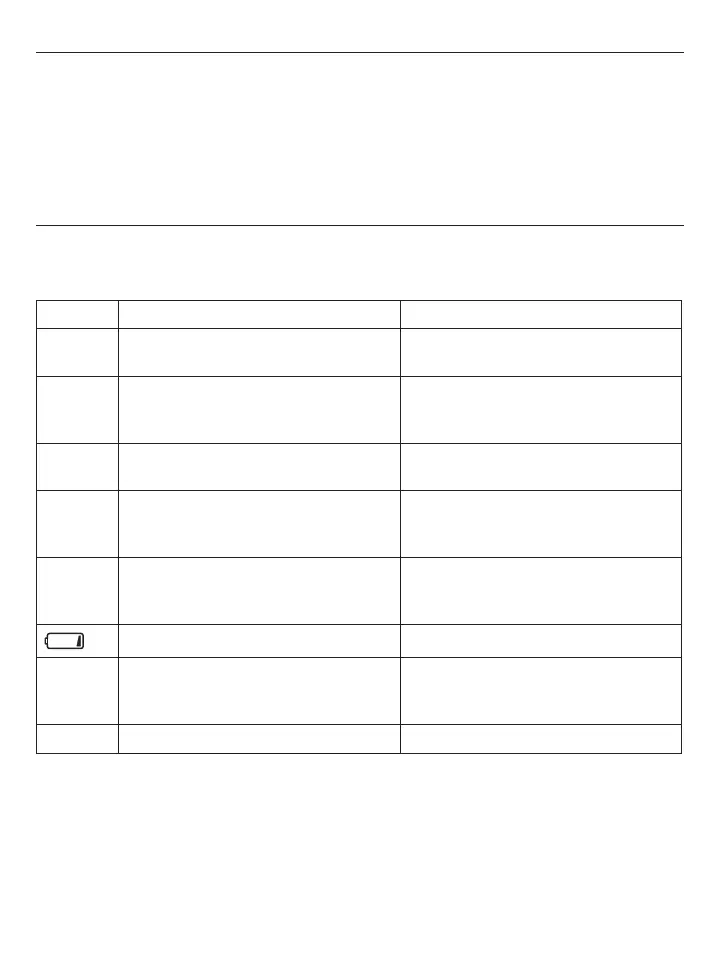
6. Error Messages / Malfunctions
If an error occurs during a measurement, a long beep followed by two short beeps is generated and the LCD
display the corresponding error code.
Error Possible Cause Remedy
Err 1 No pulse has been detected. Ensure that the cuff is being worn correctly,
and that you have your arm at the heart level.
Err 2 Unnatural pressure impulses influence the
measurement result. Reason: The arm was
moved during the measurement.
Avoid unnecessary movement or talking.
Err 3 The inflation of the cuff takes too long. The
cuff is not correctly seated.
Ensure that the cuff is being worn correctly.
Err 5 The difference between systolic pressure
and diastolic pressure is too far away from
acceptable and reasonable range.
Ensure that the cuff is being worn correctly
and that you have been inactive for a suf-
ficient time before making the measurement.
Err 6 Due to unstable conditions during measure-
ments, it is not possible to calculate an
average result.
Avoid unnecessary movement and talking.
Low battery Replace batteries.
)J
Cuff pressure is over 300 mmHg. Ensure that the cuff is worn correctly and
measure again. Avoid movement or talking
when the cuff is being inflated.
-P
Pulse below 40 is detected. Ensure that the cuff is worn correctly.
If problems occur when using the device the following points should be checked, and if necessary, the
corresponding measures should be taken.














 To Next Page