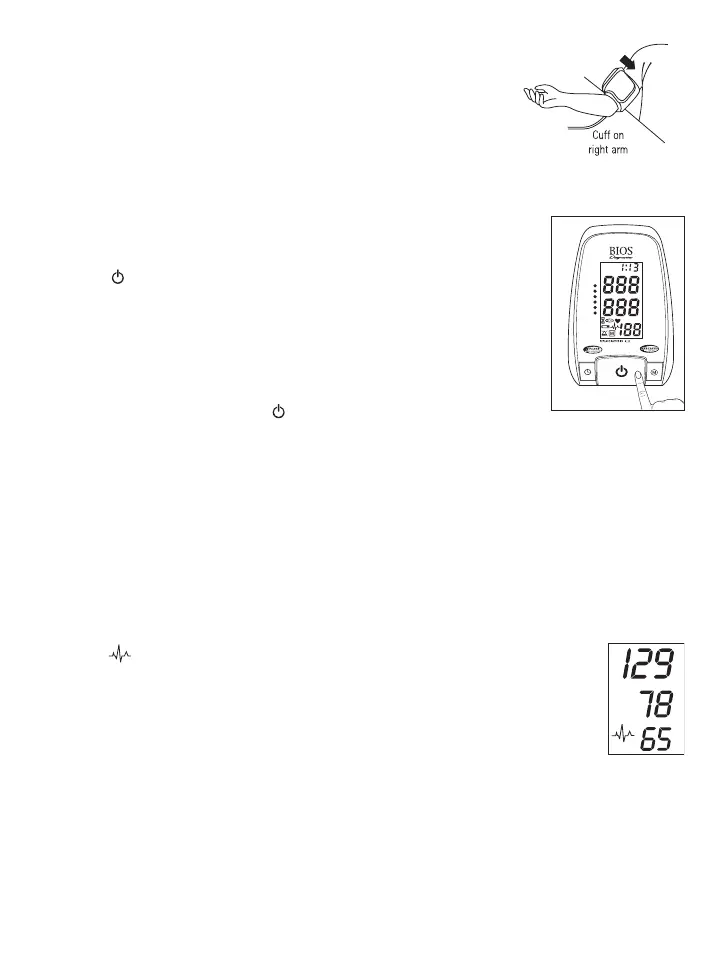
Comment:
If it is not possible to fit the cuff to your left arm, it can also be placed on the
right arm. However all measurements should be made using the same arm.
Comparable blood pressure measurements always require the same conditions
(Relax for several minutes before taking a measurement).
3.4 Measuring Your Blood Pressure
After following the guidelines described in the previous section and placing the
cuff around your upper arm, you are now ready to measure your blood pressure.
Follow these steps to record your measurement.
1. Press the button to turn on the device and start measurement. The LCD
screen is turned on. The cuff begins to inflate while the increasing cuff
pressure is displayed on the screen. After the suitable inflation pressure is
reached, the cuff stops inflating and the pressure gradually falls. A long beep
sounds when the measurement is completed. The systolic and diastolic blood
pressure values along with the pulse rate are displayed on the screen. The
measurement is displayed for approximately 3 minutes.
2. Switch off the device by pressing the button to preserve the batteries. If
no button is pressed for 3 minutes, the instrument switches the display off.
3.5 MAM - Measuring Your Blood Pressure Using the MAM Feature
When the unit is set to the MAM (Averaging Mode) setting, 3 separate measurements will take place in
succession after which your result is calculated and displayed as a single, averaged measurement. There is a 15
second resting time in-between each measurement. A count down indicates the remaining time and a beep will
sound 5 seconds before the 2nd and 3rd readings will begin.
If one of the measurements causes an error message, it will be repeated one more time. If any additional error occurs the measurement
will be discontinued and error code displayed.
3.6 PAD - Pulse Arrythmia Detector Feature
This symbol indicates that certain pulse irregularities were detected during
the measurement. In this case, the result may deviate from your normal basal blood
pressure – repeat the measurement. In most cases, this is no cause for concern.
However, if the PAD symbol appears on a regular basis (e.g. several times a week
with measurement taken daily), we advise you to consult your doctor. Please show
your doctor the following explanation:
SYS.
mmHg
DIA.
mmHg
PULSE
/min
mmHg
mmHg
M
O
N
T
H
-
D
AT
E
TIME PM














 To Next Page