2. Getting Started
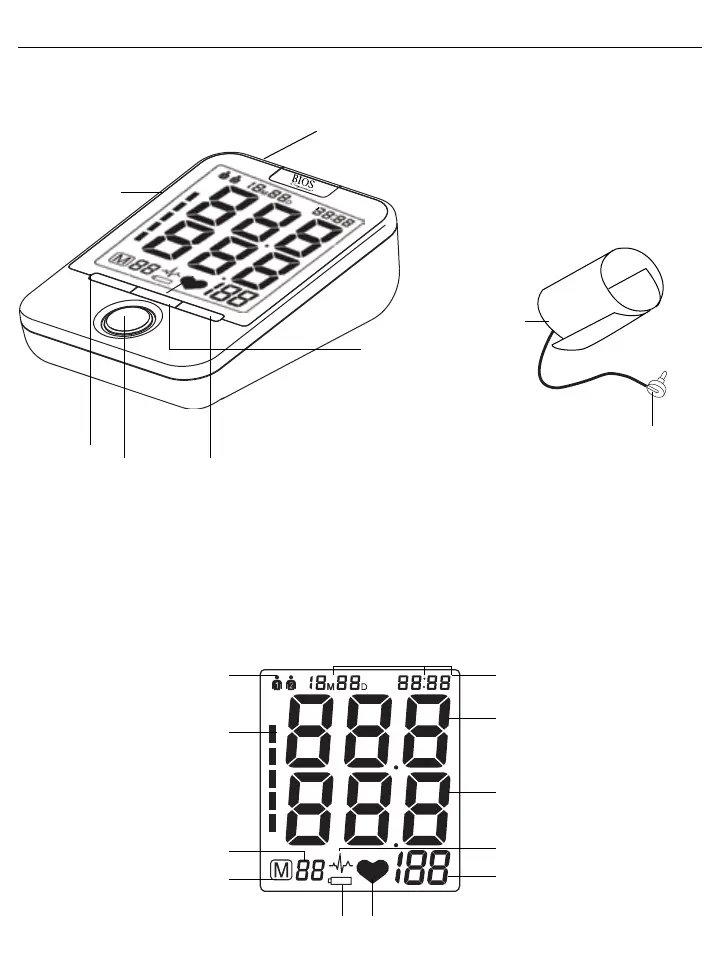
2.1 About the BD201
This section describes the various components of the Easy Read Blood Pressure Monitor.
Wide
Range Cuff
Cuff
Connector
Setting
Button
Air Socket
For Cuff
Connector
Memory
Down
Button
Memory Up
Button
Start/Stop
Button
AC/DC
Socket
Upper arm cuff:
Wide range cuff for arm circumference 24-43 cm or 9.4” - 17”.
Cuff connection:
Insert the cuff connector into the opening provided on the left side of the monitor as shown in the diagram.
2.2 About the LCD Screen
The LCD screen displays the systolic and diastolic blood pressure measurements along with your heart rate. It also
displays previously recorded measurements and the date and time, when the appropriate button is pressed.
Year / Month / Date / TimeUser
Blood Pressure Classification
Memory Symbol
Memory Times
Systolic Blood Pressure
Diastolic Blood Pressure
Pulse
Heartbeat RythymLow Battery
Irregular Heartbeat















 To Next Page