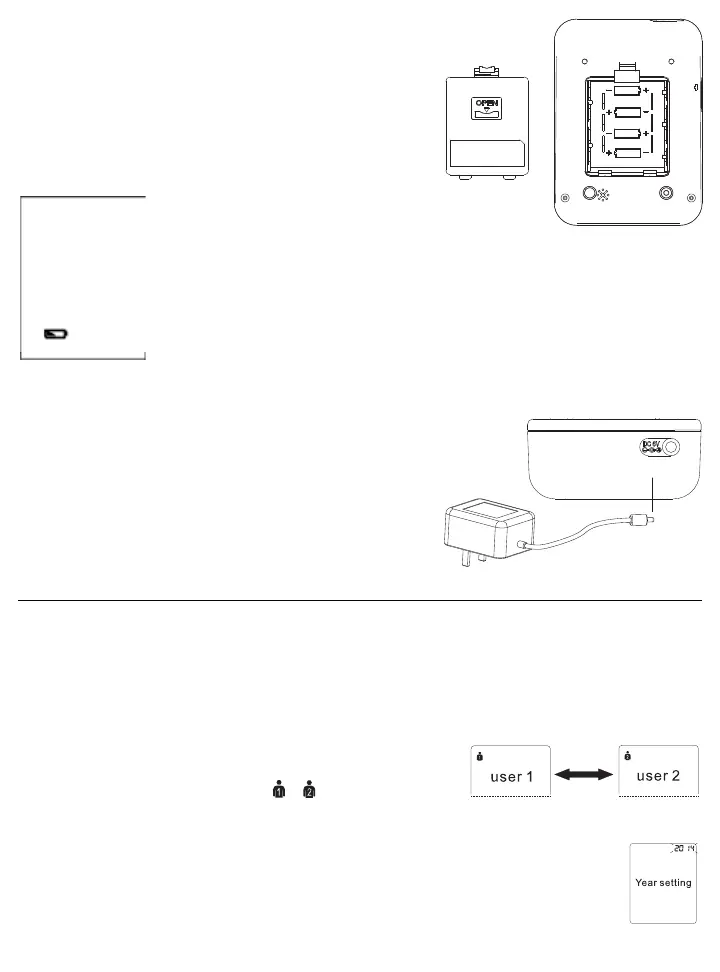
2.3 Inserting the Batteries
Follow these steps to insert four “AA” batteries in the device.
1. Open the battery compartment cover in the direction shown.
2. Insert four “AA” batteries with the correct polarity as indicated.
3. Replace the battery compartment cover.
Attention!
• After the battery warning appears, the
device is blocked until the batteries have been replaced.
• Please use “AA” Long-Life or Alkaline 1.5V batteries.
• If the blood pressure monitor is left unused for long periods, please remove the batteries
from the device.
• Do not mix old and new batteries. Do not mix alkaline, standard (carbon-zinc) or
rechargeable batteries.
2.4 Using the AC/DC Power Adapter
You may also operate this monitor using the included AC/DC adapter.
Use only the included adapter to avoid damaging the unit.
1. Ensure that the AC/DC adapter and cable are not damaged.
2. Plug the adapter cable into the AC/DC adapter port on the top of the
blood pressure monitor.
3. Plug the adapter into your electrical outlet. When the adapter is
connected, no battery current is consumed.
3. Using the Device
This section describes how to get the maximum benefit from your BD201 blood pressure monitor. Follow the
instructions carefully to get an accurate measurement of your blood pressure and pulse rate.
NOTE: Setting the user, year, month, date and time is one sequential process.
3.1 Select the User
1. Start with the power off, but with batteries or adapter inserted.
2. Press the SET button 1 time, the user will appear in the upper left corner.
Use the “+” or “-” button to choose user or
3.2 Setting the Time, Date and Year
1. Immediately after selecting the user, press the SET button, the YEAR will flash. Use the “+” or “-”
button to choose the year and press SET to store in the memory.
2. Repeat the same process to set the MONTH by using the “+” or “-” button. Press the SET button to
store it in the memory.
LR6(AA)
1.5Vx4















 To Next Page