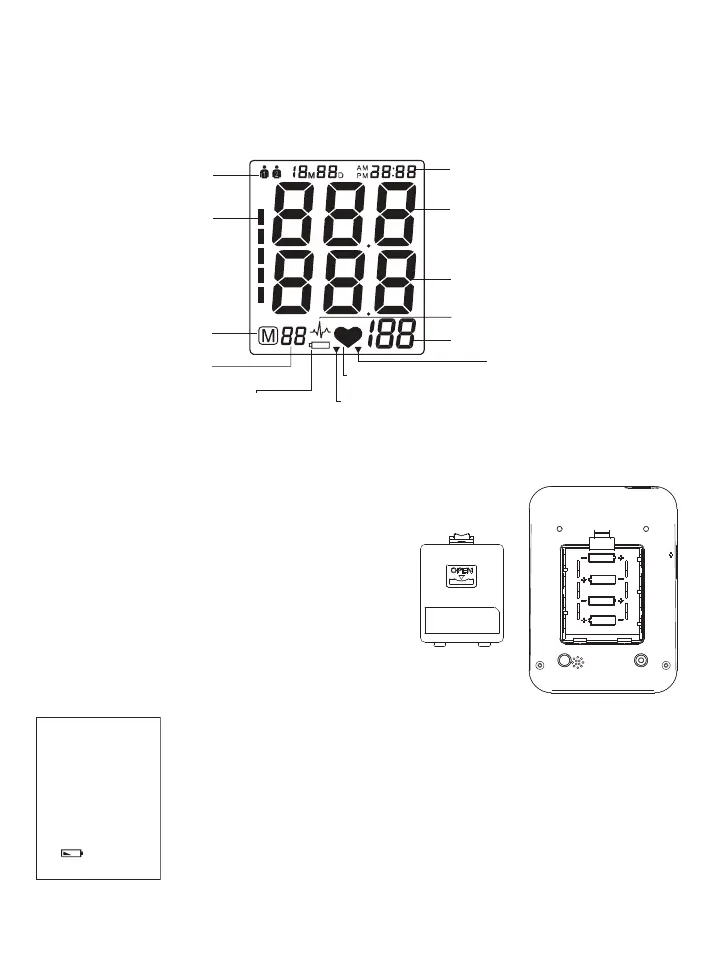
!BOUTTHE,#$3CREEN
The LCD screen displays the systolic and diastolic blood pressure measurements along with your heart rate. It
also displays previously recorded measurements and the date and time, when the appropriate button is pressed.
User
Blood pressure
classification
Memory symbol
Memory times
Low battery
Heartbeat rhythm
7D Mode
Pulse rate
General mode
Irregular heartbeat
Diastolic blood pressure
Systolic blood pressure
Date/Time
2.3 Inserting the Batteries
Follow these steps to insert four “AA” batteries into the device.
1. Open the battery compartment cover in the direction shown.
2. Insert four “AA” batteries with the correct polarity as
indicated.
3. Replace the battery compartment cover.
!TTENTION
s !FTERTHEBATTERYWARNINGAPPEARSTHEDEVICEISBLOCKEDUNTILTHEBATTERIESHAVE
been replaced.
s 0LEASEUSEh!!v,ONG,IFEOR!LKALINE6BATTERIES
s )FTHEBLOODPRESSUREMONITORISLEFTUNUSEDFORLONGPERIODSPLEASEREMOVETHE
batteries from the device.
s $ONOTMIXOLDANDNEWBATTERIES$ONOTMIXALKALINESTANDARDCARBONZINCOR
rechargeable batteries.
LR6(AA)
1.5Vx4















 To Next Page