3.5 General Mode
In General Mode, a user can take blood pressure measurements outside of the Protocol
Software (7D Mode).
1. When the monitor is OFF, press the SET button, a small triangle will appear above
7D Mode on the monitor. Press the “+” or “-“ buttons to switch between 7D Mode
and General Mode. Press SET to confirm.
2. Next, select the user. Press SET to confirm, then press 34!2434/0 button to
power off the monitor.
3. To start your measurement, see section 3.6 Measuring Your Blood Pressure.
3.6 Measuring Your Blood Pressure
!FTERTHECUFFHASBEENAPPROPRIATELYPOSITIONEDANDTHECORRECTMODEHASBEENSELECTEDTHEMEASUREMENTCANBEGIN
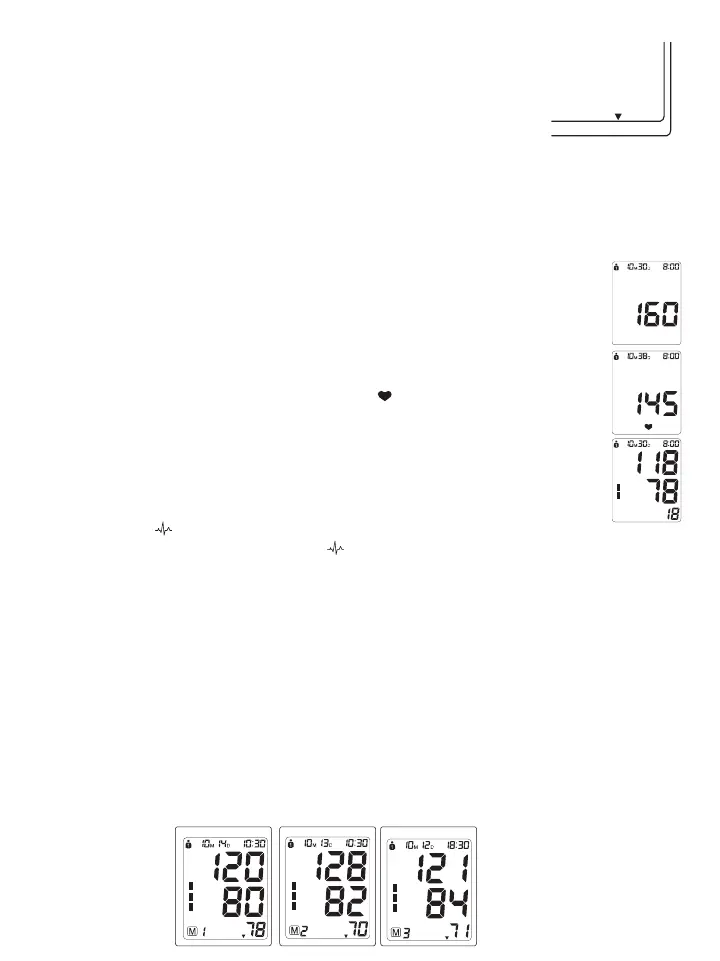
1. Press the 34!2434/0 button until all the symbols appear on the screen. You will hear 2
short beeps and after “
0vWILLmASHFORSECONDS4HEPUMPTHENBEGINSTOINmATETHECUFF4HE
increasing pressure in the cuff is shown on the display.
!FTERTHESUITABLEPRESSUREHASBEENREACHEDTHEPUMPSTOPSANDTHECUFFGRADUALLYDEmATES
4HECUFFPRESSUREWILLTHENBEDISPLAYED)NCASETHEINITIALINmATIONISNOTSUFlCIENTTHE
DEVICEAUTOMATICALLYREINmATESTOAHIGHPRESSURE
3. When the device detects a heartbeat, the heart symbol “ vONTHEDISPLAYSTARTSTOmASHAND
you can hear a beep for every heartbeat.
4. When the measurement has been completed, you will hear a long beep and the systolic,
diastolic and pulse rate will appear on the display.
5. The measurement readings remain on the display until you switch off the device. If no button
is pressed, the device switches itself off in 3 minutes.
./4% The symbol “
” will be displayed along with the reading if irregular heartbeat has been
detected during the measurement. If the “ ” symbol appears frequently (e.g. several times in a week),
it may be an indication of a more serious heart problem, and you should consult your doctor.
3.7 Discontinuing a Measurement
To stop the measurement (eg. the patient feels unwell) press the 34!2434/0 button. The device will
immediately decrease the cuff pressure automatically.
-EMORY2ECALL
This blood pressure monitor automatically stores 90 measurements for each user in its memory. The 90
MEMORIESARESPLITBETWEENTHETWOMODESMEMORIESIN$-ODEANDMEMORIESIN'ENERAL-ODE4HE
oldest record will be replaced by the latest measurement value when there are more than 90 sets for each user.
!2ECALLING-EMORYIN'ENERAL-ODE
First select General Mode, then press the “-“ button to see the most recent measurement value. Subsequent
measurements can be displayed one after the other by continuously pressing the “-“ or “+”button.
7D mode General mode 7D mode General mode
7D mode General mode
7D mode General mode















 To Next Page