BIB75-M2T
33
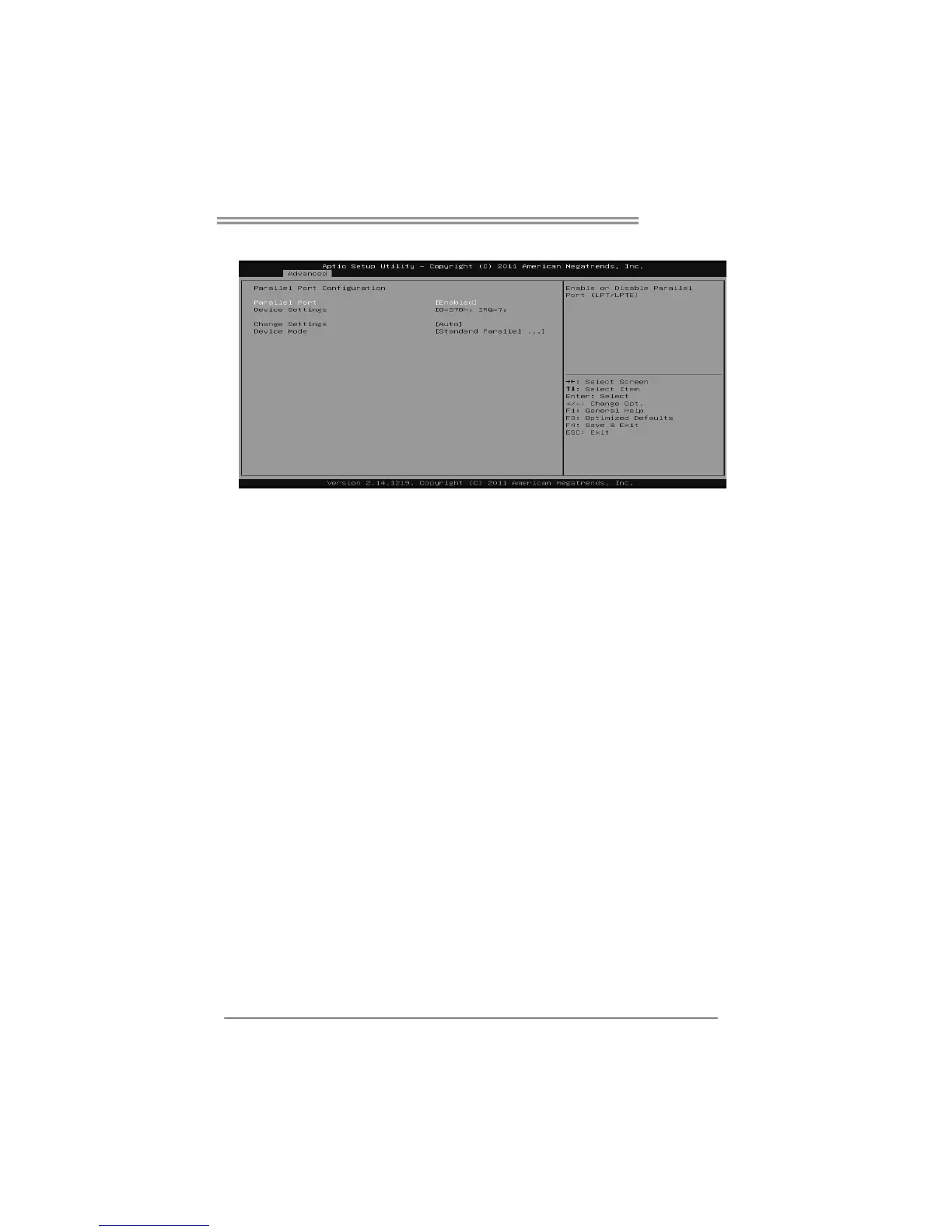
Parallel Port Configuration
Parallel Port
This item enables or disables Parallel Port (LPT/LPTE).
Options: Enabled (Default) / Disabled
Change Settings
This item allows you to select an optimal setting for Super IO device.
Options: Auto (Default) / IO=378h; IRQ=5 / IO=378h; IRQ=5, 6, 7, 9, 10,
11, 12 / IO=278h; IRQ=5, 6, 7, 9, 10, 11, 12 / IO=3BCh; IRQ=5, 6, 7, 9, 10, 11,
12
Device Mode
This item allows you to determine how the parallel port should function.
Options: Standard Parallel Port Mode (Default) / EPP Mode / ECP Mode /
EPP Mode & ECP Mode
Watch Dog Degree
This item allows you to determine the functional degree of Watch Dog.
Options: Second (Default) / Minute
Watch Dog Timer
Options: 0 for disabled (Default) / Min=1, Max=65536









 To Next Page