User’s Manual
12
2.5 ONBOARD SLOT/CONNECTOR/HEADER/JUMPER
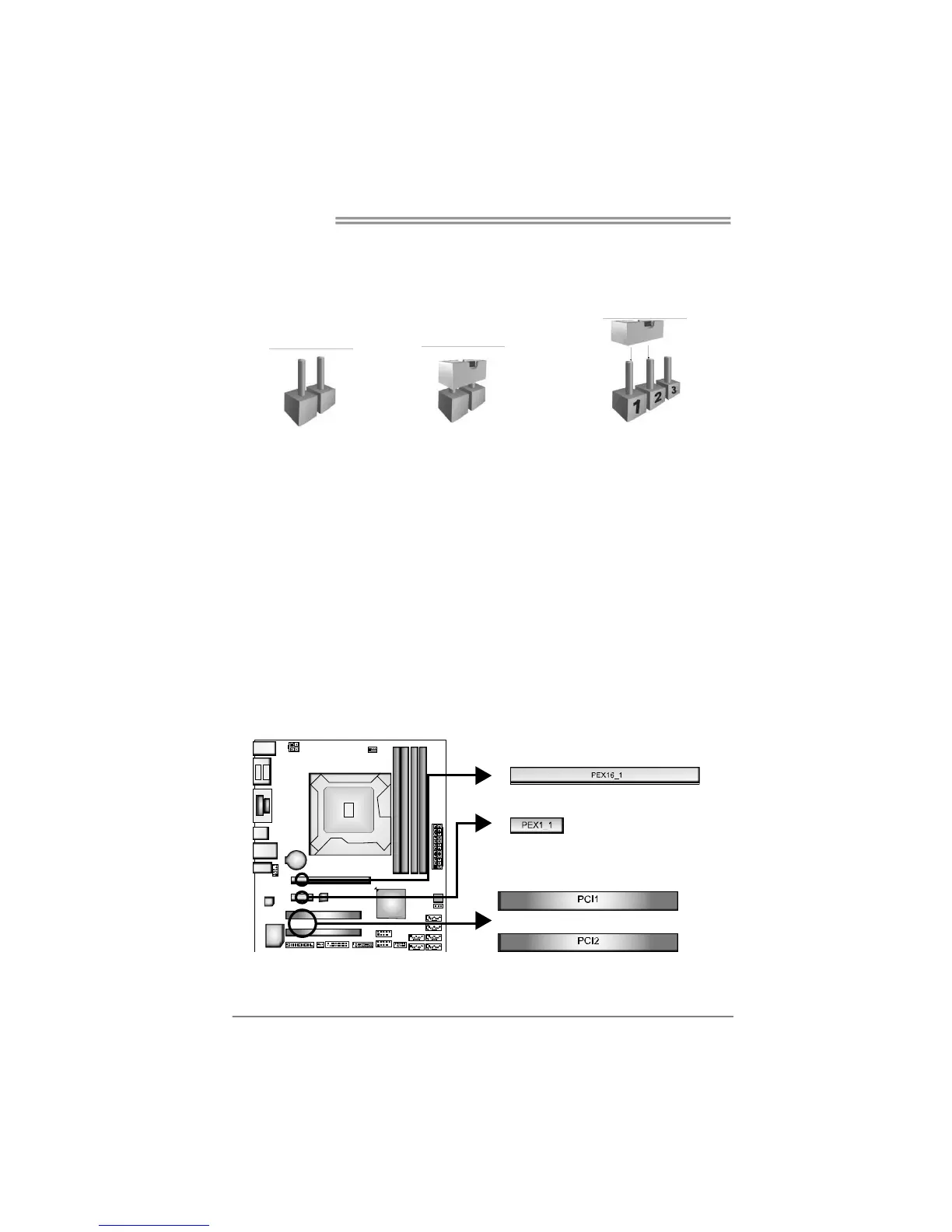
*How to Setup Jumpers
The illustration shows how to set up jumpers. When the jumper cap is placed on
pins, the jumper is “close”, if not, that means the jumper is “open”.
Pin opened Pin closed Pin1-2 closed
PEX16_1: PCI-Express x16 Slot
- PCI-Express 3.0 compliant.
- Maximum theoretical realized bandwidth of 16GB/s simultaneously per
direction, for an aggregate of 32GB/s totally.
- PCI-Express Gen3 is supported by Core i7-3xxx / i5-3xxx CPUs.
PEX1_1: PCI-Express x1 Slot
- PCI-Express 2.0 compliant.
- Data transfer bandwidth up to 500MB/s per direction; 1GB/s in total.
PCI1/2: Peripheral Component Interconnect Slots
- This motherboard is equipped with 2 standard PCI slots. PCI stands for
Peripheral Component Interconnect, and it is a bus standard for expansion
cards. This PCI slot is designated as 32 bits.









 To Next Page