BIB75-M2T
13
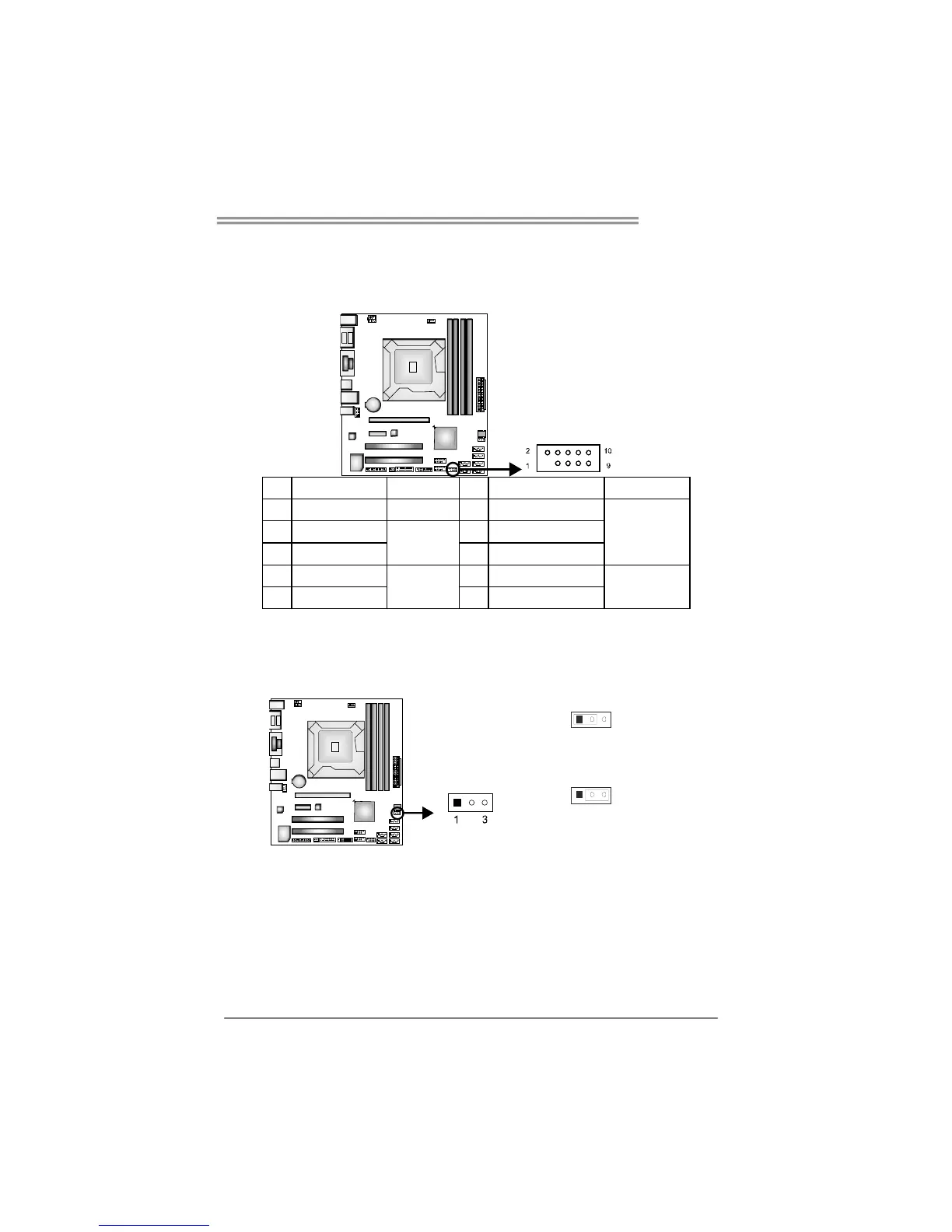
JPANEL1: Front Panel Header
This 10-pin header includes Power-on, Reset, HDD LED, and Power LED
connection. It allows user to connect the system case’s front panel switch
functions.
Pin Assignment Function Pin Assignment Function
1 Key N/A 2 Power LED+(3.3V)
3 HD LED+ 4 Power LED+(3.3V)
5 HD LED-
HDD LED
6 Power LED-
Power LED
7 Reset 8 Power
9 GND
Reset Button
10
Power GND
Power Button
JCMOS1: Clear CMOS Header
Placing the jumper on pin2-3 allows user to restore the BIOS safe setting and
the CMOS data. Please carefully follow the procedures to avoid damaging the
mainboard.
31
Pin 1-2 Close: (Default)
Normal Operation.
3
1
Pin 2-3 Close:
Clear CMOS data.
Clear CMOS Procedures:※
1. Remove AC power line.
2. Set the jumper to “Pin 2-3 close”.
3. Wait for five seconds.
4. Set the jumper to “Pin 1-2 close”.
5. Power on the AC.
6. Reset your desired password or clear the CMOS data.









 To Next Page