Printing and exporting stored data
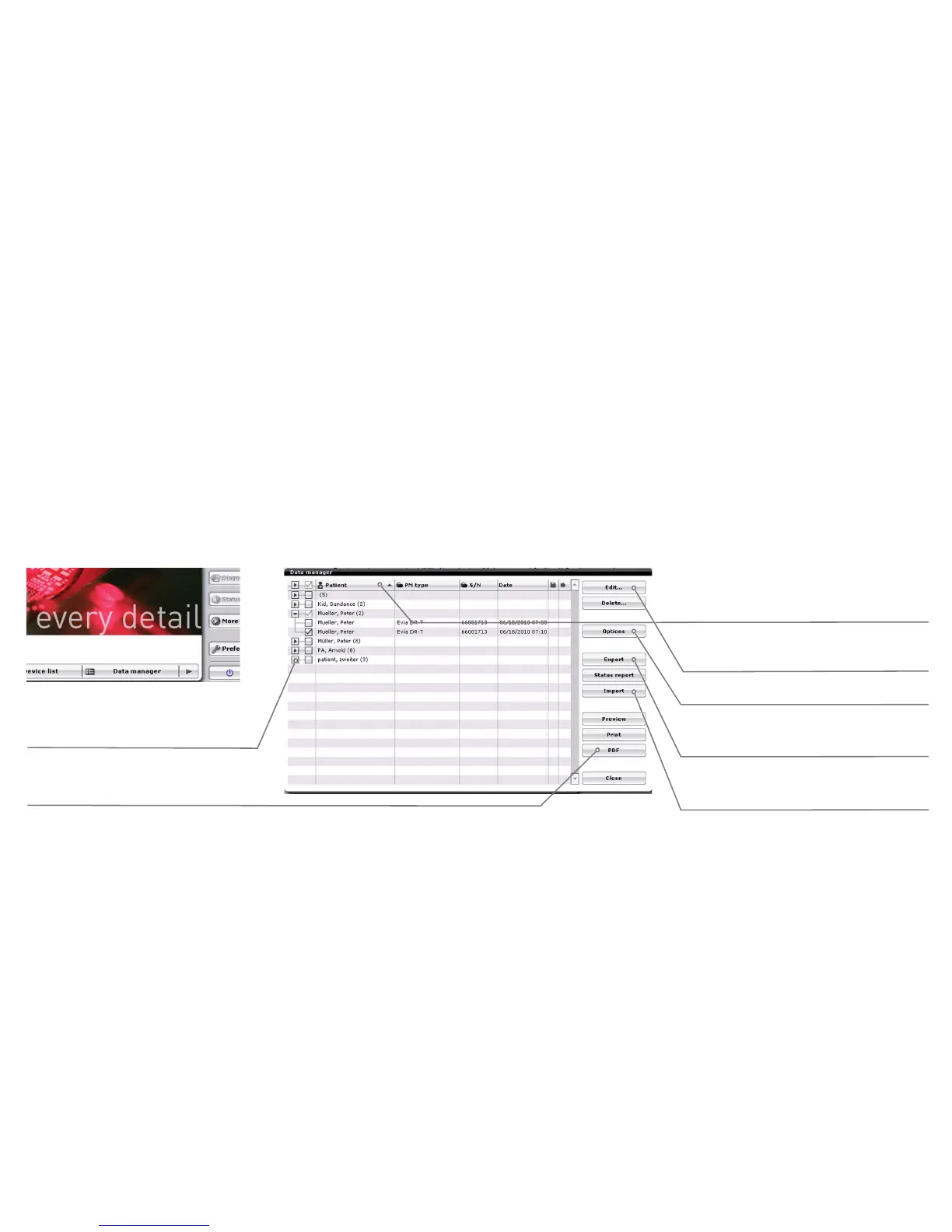
Select the [Data manager] button on the start screen. All stored follow-up data can be viewed, printed, exported and sorted according to the displayed
columns. Lines containing the same information in the sorted column are summarized. For example, if the follow-up data is sorted according to the "Patient"
column, then all follow-up data for a single patient will be summarized. However, if the "Date" column is selected for sorting, then all follow-up data will be
summarized for the same date but with various different patients.
Use the arrows to expand
or collapse the summarized
follow-up data.
Select a column header to sort and
summarize the follow-up data.
Export follow-up data that has been
selected using the check boxes.
Import follow-up data in
BIOTRONIK backup format.
Export the selected follow-up data in
Adobe PDF format.
Data export settings.
Edit the patient name
selected with a check box.
Export





 To Next Page