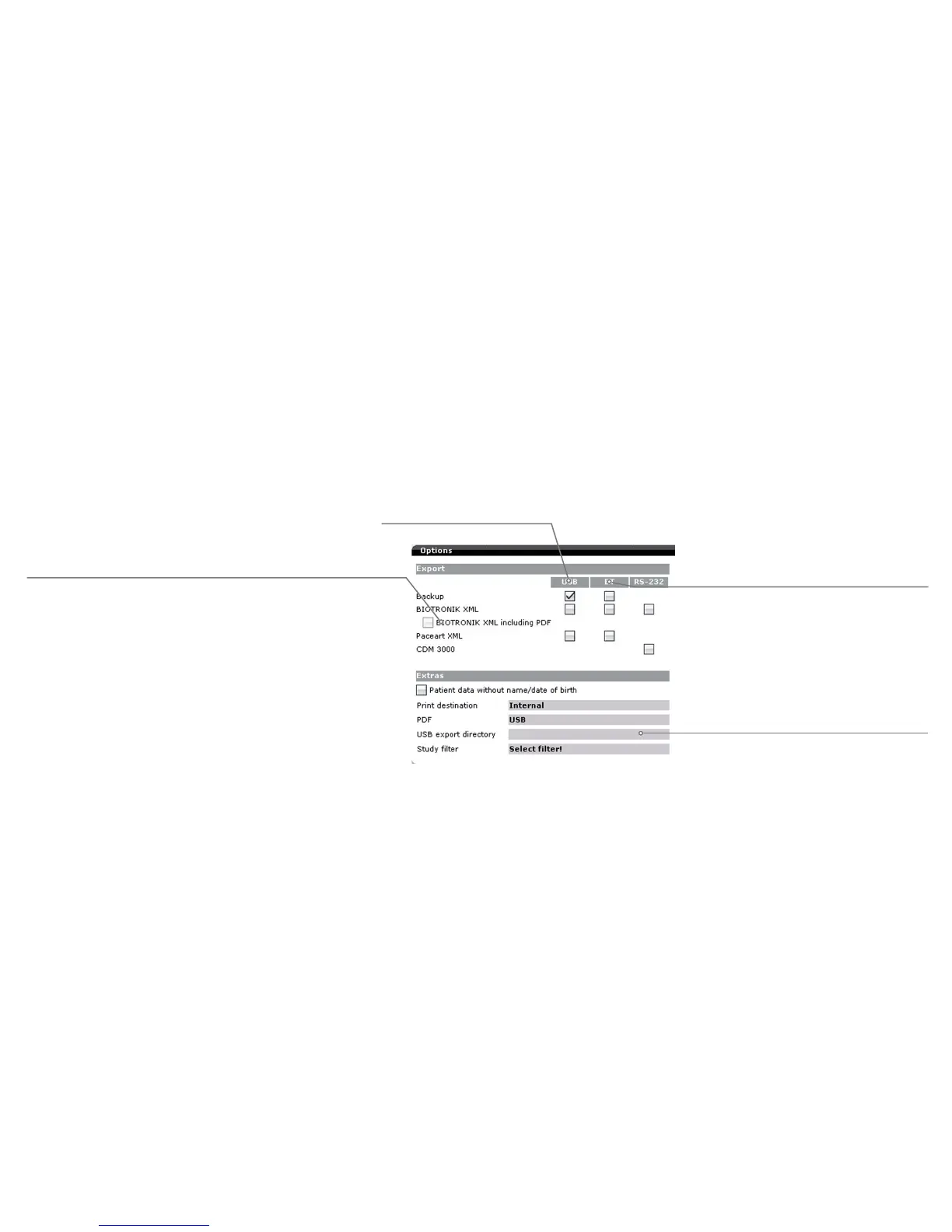
Select the [Data manager] button on the start screen and then [Options] to configure the data export settings. Activate or deactivate the check
boxes to set the format in which the follow-up data will be exported via the available interfaces (USB stick, Bluetooth adapter, serial RS 232 interface).
Data export settings
Backup: Encrypted file format only for importing backup
data on a BIOTRONIK Renamic or ICS 3000 programmer.
Paceart-XML: Paceart compatible export format.
An XML file is created for each follow-up.
BIOTRONIK-XML: Open, freely available proprietary export
format based on the XML standard. An XML file is created
for each follow-up.
Select this function to transmit the export file in
BIOTRONIK XML format and as a PDF document
with each transmission.
Export to USB stick
Export to a device connected
via a Bluetooth adapter
(See Preferences for Bluetooth PIN)
When exporting to a USB stick, you can
enter a destination directory for the data.
The top level of the destination directory
must be the "BIOTRONIK" directory.
"USB stick\BIOTRONIK\..."



 To Next Page