Bird SiteHawk Operation Manual
41
Recall Trace Data
Data in sta or cst data files can be recalled and displayed with the current data
trace.
1. Press the Menu icon.
2. Press the FILE icon to display the file menu. See
Figure 33
.
3. Press the Save Type to select file type STATUS+CAL (cst) or STATUS (sta).
4. Press Load.
5. Select the data file from the list.
6. Press Load. See
Figure 35, page 41
.
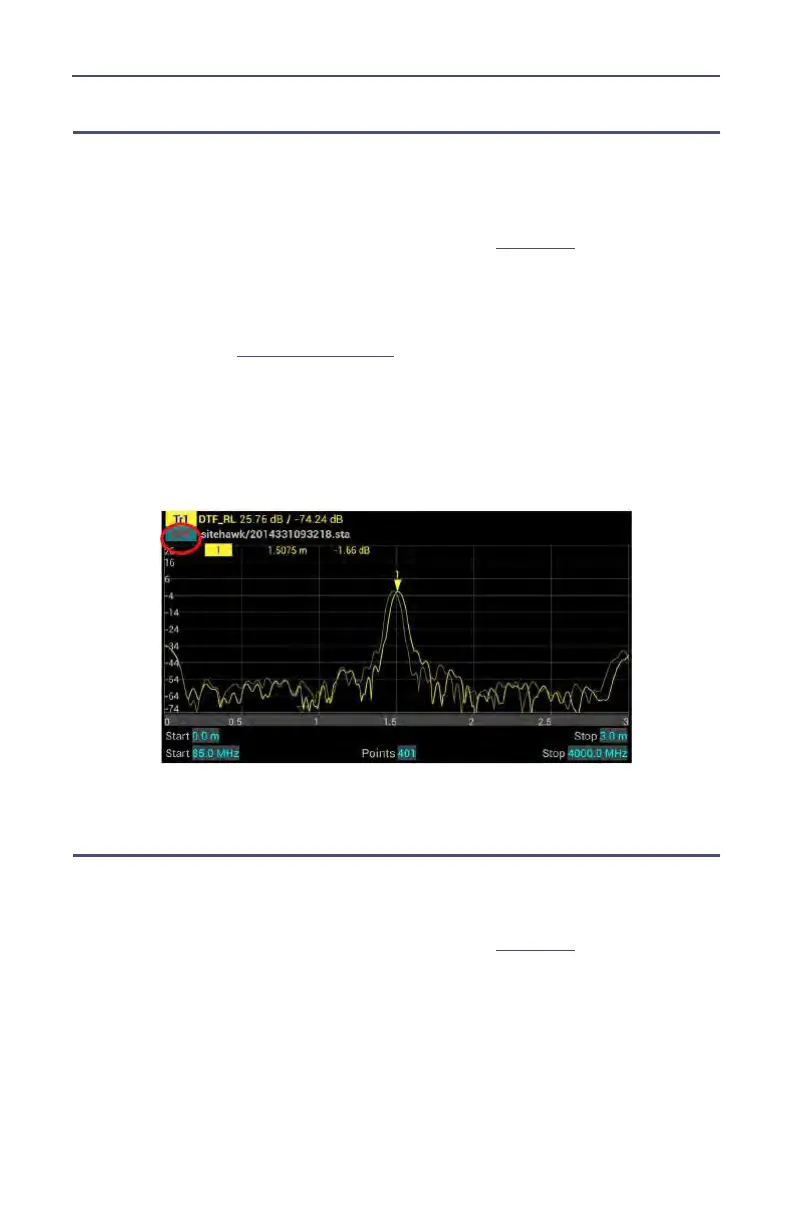
Note: The active and the recalled trace data will be displayed
together in the sweep display area. In the example, Tr1 is the
active trace, the recalled trace data is indicated with OFF and the
file name.
Figure 35 Recall Sta Data and Running Data
7. Press OFF to remove the recalled trace data.
Deleting SiteHawk Stored Data Files
This procedure can be used to delete any data files stored by the SiteHawk App.
1. Press the Menu icon.
2. Press the FILE icon to display the file menu. See
Figure 33
.
3. Press Delete User File.



 To Next Page