EasyManua.ls Logo

BIXOLON SLP-TX400E - Page 15

BIXOLON SLP-TX400E
37 pages
Print Icon
To Next Page IconTo Next Page
To Previous Page IconTo Previous Page
Loading...
Rev. 1.02
- 15 -
SLP-TX400x/TX403x
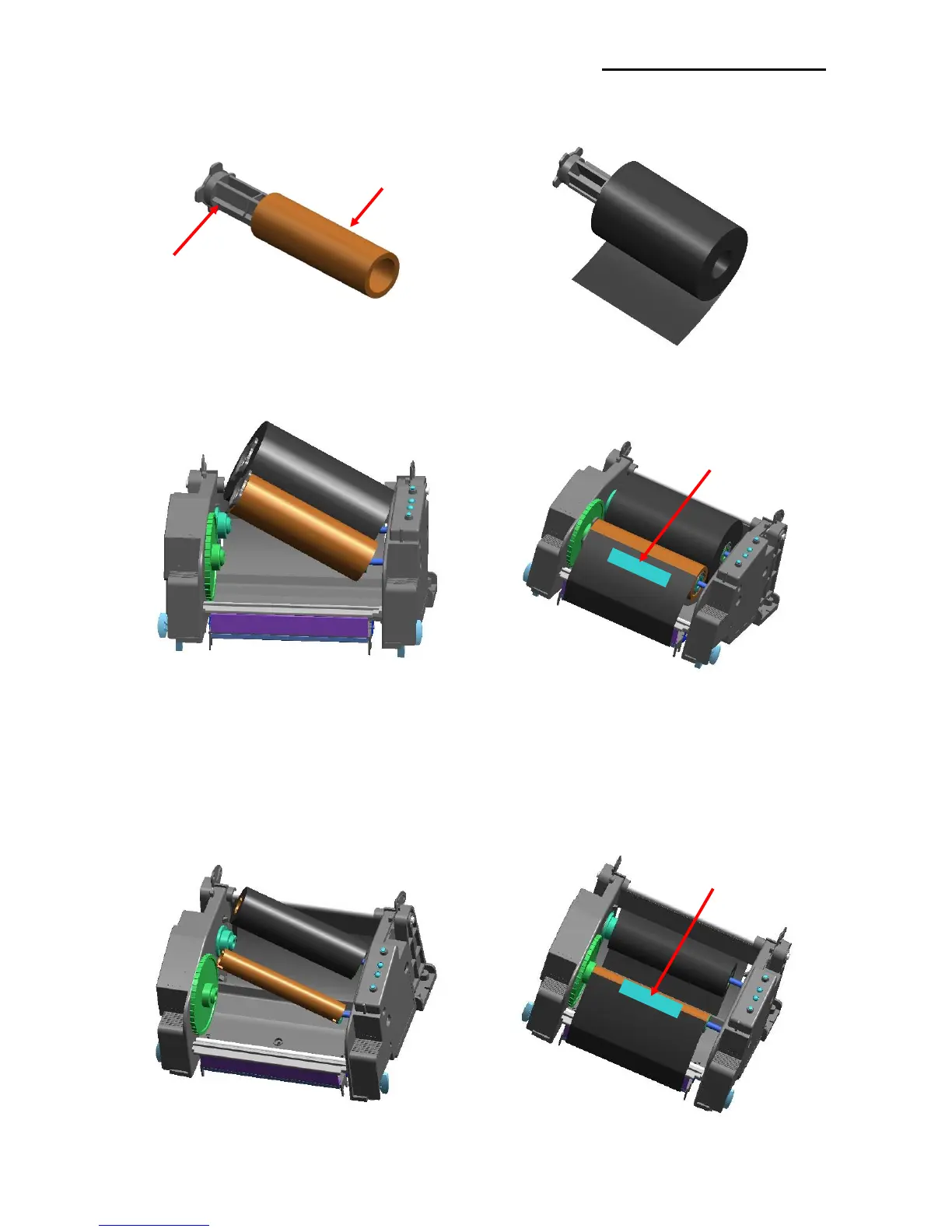
3-4-2 Inserting a One-Inch Core Ribbon
1) Insert the Holder ribbon into the core and ribbon. (keep note of ribbon printing direction)
2) Open the ribbon assembly and insert the
ribbon and core by pushing from left to
right.
3) Apply tape to the coiling portion of the
ribbon.
4) Press the Close area to shut the ribbon assembly.
3-4-3 Inserting a Half-Inch Core Ribbon
1) Open the ribbon assembly and insert the
ribbon and core by pushing from left to
right. (keep note of ribbon printing
direction)
2) Apply tape to the coiling portion of the
ribbon.
Tape
Tape
Core (one-inch)
Holder ribbon

Other manuals for BIXOLON SLP-TX400E

Related product manuals