14
RS-232↔RS-422 INTERFACE CONVERTERS
4. Installation
4.1 Connecting Cables to the RS-422 or RS-530 Interface
The Converter can communicate with another RS-422
or RS-530 device as far away as 4000 feet (1219 m). To
do this, the cable you run between them must contain
two twisted pairs of dry, unconditioned metallic wire
with a gauge between 19 and 26 AWG. Once you
terminate it properly, bulk Category 3 UTP cable such as
our product code EYN712A should do fine.
IMPORTANT NOTE
Please be aware, as you run RS-422 cable from the
Converter to the RS-422 device, that the Converter’s
polarity might be the reverse of the device’s. If connecting +
to + and – to – doesn’t work, try connecting + to – and – to +.
Different models of the Converter have different
RS-422 and RS-530 interface connectors:
• IC470A and IC473A models have a 5-position
terminal block with strain relief.
• IC471A models have a DB25 female connector.
• IC472A models have a DB25 male connector.
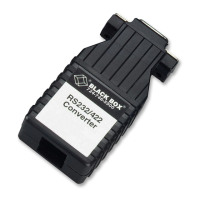
• IC630A models have an RJ-12 (“6-wire RJ-11”) jack.
• IC631A models have an RJ-45 jack.



 To Next Page