10
1. 8 7 7. 8 7 7. 2 2 6 9 BLACKBOX.COM
NEED HELP?
LEAVE THE TECH TO US
LIVE 24/7
TECHNICAL
SUPPORT
1.877.877.2269
CHAPTER 2: INSTALLING THE SWITCH
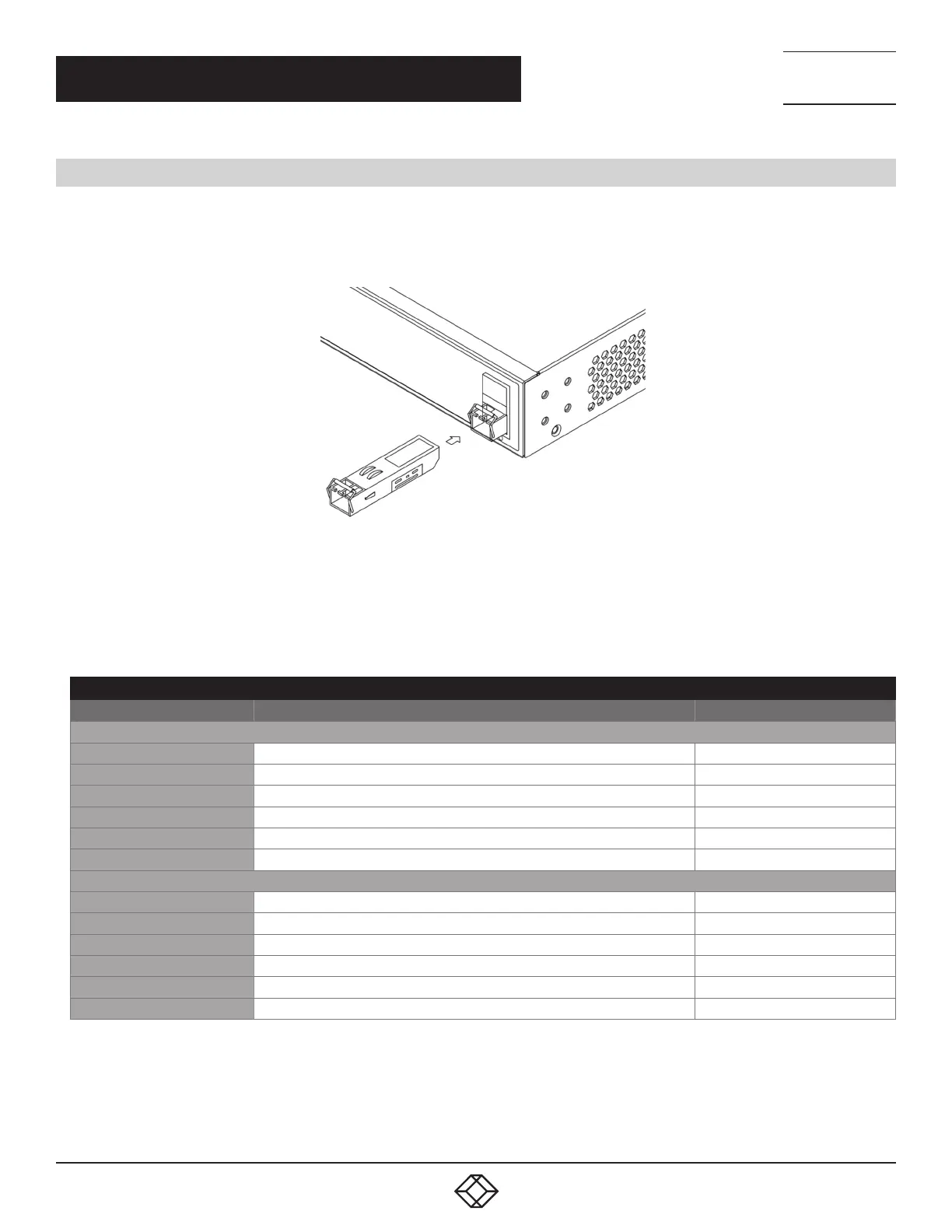
2.4 INSTALLING SFP+ MODULES
You can install or remove an SFP+ module from an SFP+ port without having to power off the switch.
Step 1: Insert the module into the SFP+ port.
Step 2: Press firmly to ensure that the module seats into the connector.
FIGURE 2-5. INSTALLING AN SFP+ MODULE INTO AN SFP+ PORT
NOTE: The SFP+ ports should use a UL Listed optional transceiver, rated 3.3 VDC, Laser Class 1. Compatible transceivers are listed
in the next table.
COMPATIBLE SFP MODULES
PART NUMBER DESCRIPTION DISTANCE
1-GBPS CONNECTIONS
LFP441 SFP 1.25-Gb, 850-nm Multimode Fiber, LC 550 m
LFP442 SFP 1.25-Gb, 1310-nm Singlemode Fiber, LC 20 km
LFP412 SFP with Extended Diagnostics - 1250-Mbps Multimode Fiber, 1310-nm 2 km
LFP413 SFP with Extended Diagnostics - 1250-Mbps Singlemode Fiber, 1310-nm 10 km
LFP414 SFP with Extended Diagnostics - 1250-Mbps, Singlemode Fiber, 1310-nm 30 km
LFP416 SFP 1250-Mbps, Extended Diagnostics, 10/100/1000BASE-T, SGMII Interface, RJ-45 100 m
10-GBPS CONNECTIONS
LS P441 SFP+ 10GBASE-SR Multimode Fiber, 850-nm, LC 300 m
LSP442 SFP+ 10GBASE-LR Singlemode Fiber, 1310-nm, LC 20 km
LSP443 SFP+ 10G Copper 100 m
LSP421 SFP+ 10GBASE-SR Multimode Fiber, 850-nm, LC, Extended Diagnostics 300 m
LSP422 SFP+ 10GBASE-LR Singlemode Fiber, 1310-nm, LC, Extended Diagnostics 10 km
LSP431 SFP+ 10GBASE-SR Multimode Fiber, 850-nm, LC, Ext. Diag., Ext. Temp. 300 m












 To Next Page