CHAPTER 3: Windows PC Media and File Transfer
111
Copying Pictures
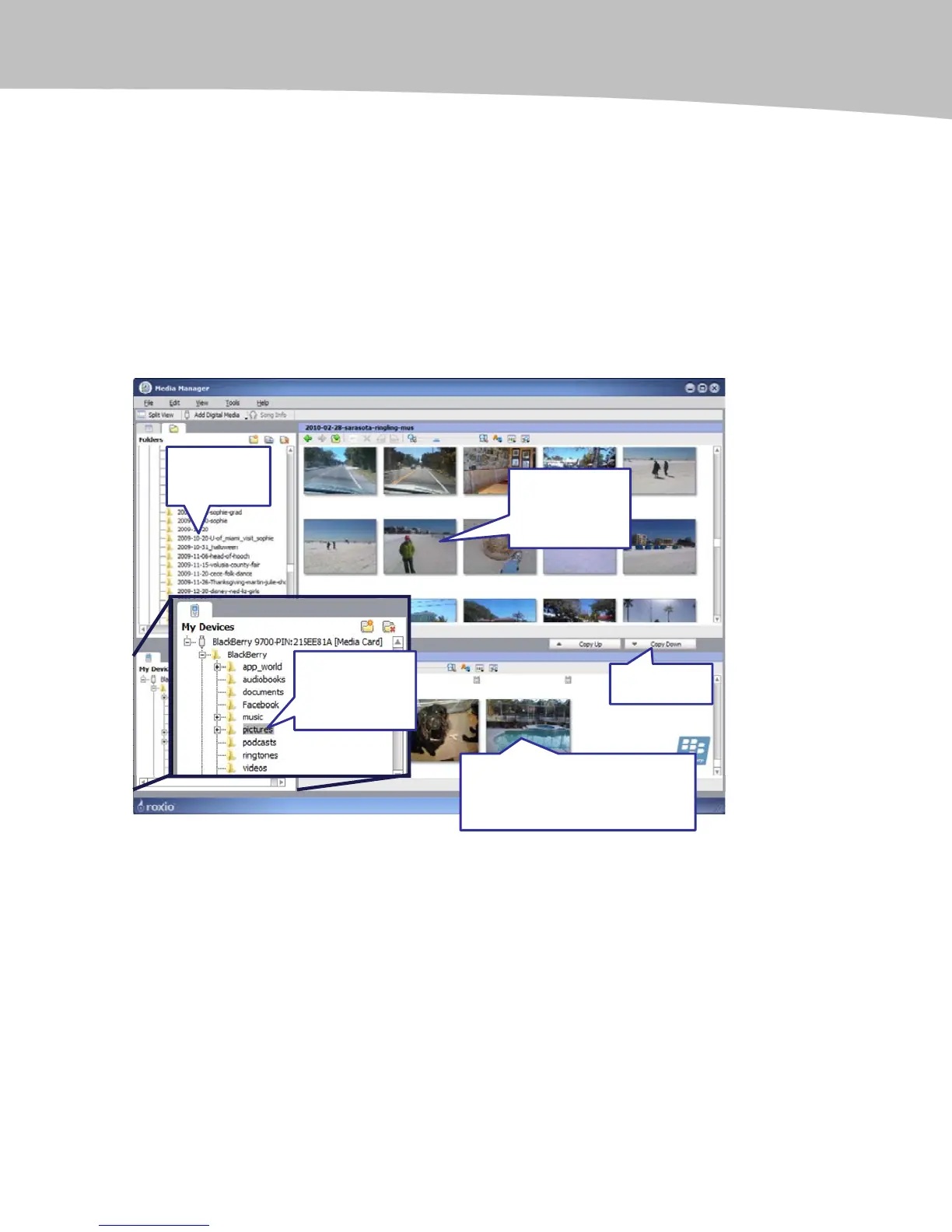
The only difference between copying pictures and copying music is that on the Media
Manager screen, in the top window, under My Media, just select Pictures and your
pictures will be displayed in the top window. Make sure that down below, you collapse
the Music menu and open up your pictures folder on your media card to ensure that
your files will be copied to that folder.
Select your pictures (if you want more than one, just hold down the Ctrl key on your
keyboard and then press and click each picture you want; they will all highlight.) Then,
click the Copy Down button and let them be converted and they will go right on your
media card (see Figure 3-2).
1. Click on
your Pictures
Folder.
2. Select any
Pictures you want
to copy to your
BlackBerry.
3. Click on
Pictures under
Media Card >
BlackBerry.
4. Click
Copy Down.
5. You may be asked about
conversion. Soon the pictures are
copied to your BlackBerry and
shown in the lower window.
Figure 3-2. Copying pictures and other items to your BlackBerry using Media Manager










 To Next Page