CHAPTER 35: Fixing Problems
2
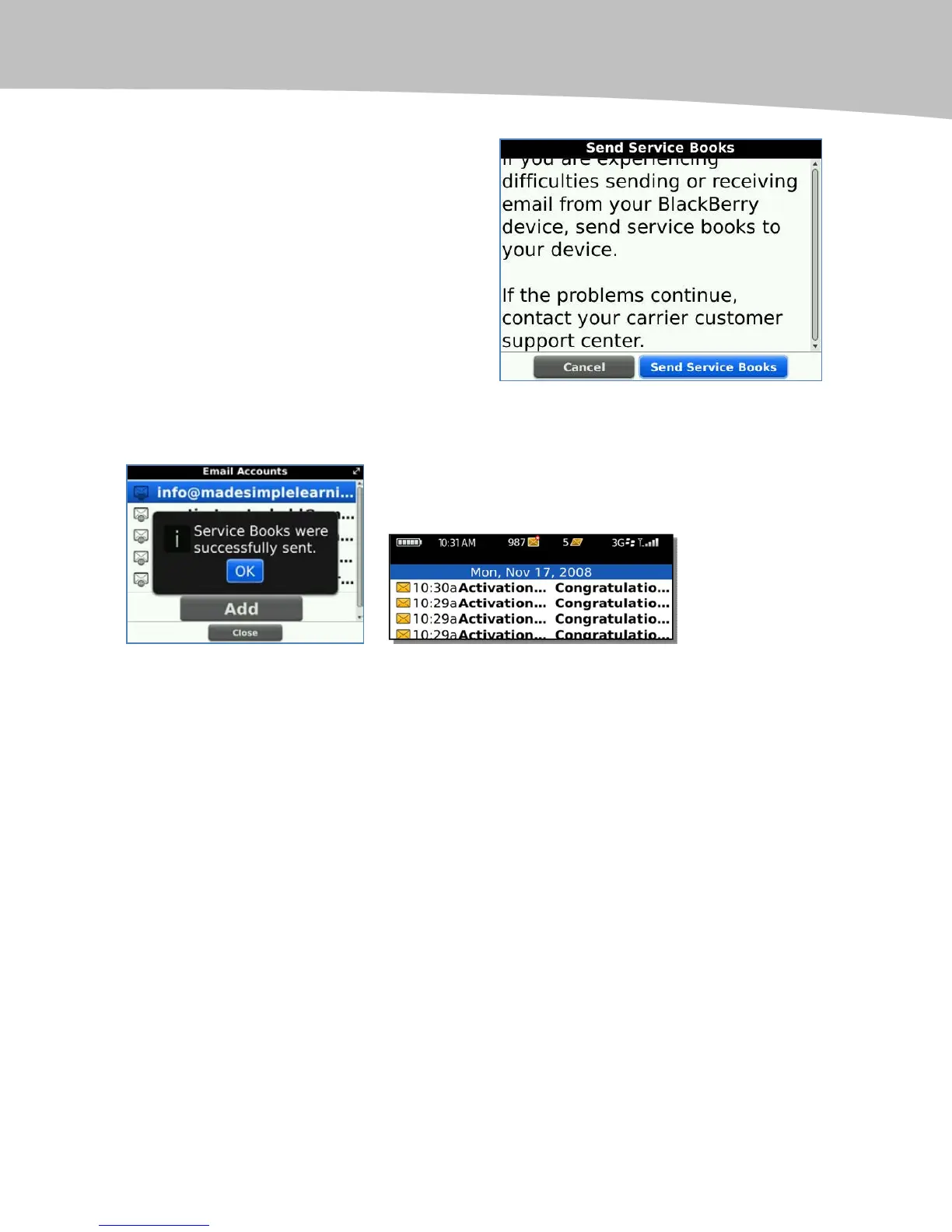
4. Roll to the bottom of the screen,
and click Send Service Books.
You should see a ‘‘successfully sent’’ message and, in your Messages icon, a number
of ‘ ‘Activation’’ m es sa ges-----one per email account, as shown in Figure 35-3.
Figure 35-3. Service Books successfully sent.
If you see any other message indicating the message was not sent, you may want to
verify that you have good coverage at your current location. You may also want to
repeat some of other the troubleshooting steps in this chapter or contact your help desk
or wireless carrier support.
Trying a Soft Reset
If you’re having trouble with general slowness in email or web applications, sometimes,
like on your computer, you simply need to try a reset or reboot (like pressing Ctrl + Alt +
Del on a Windows computer). You can do a similar soft reset on your BlackBerry by
pressing and holding three keys simultaneously ALT + CAP + DEL (Figure 35-4).










 To Next Page