9
EN
Stunt Mode
StuntModeallowsthehelicoptertoyinvertedandperformaerobatics.ThethrottlerunscontinuouslywhenStunt
ModeisON,regardlessofthrottlestickposition.TurnStuntModeOFFtoreturncontroltothethrottlestick.
UsetheAUX/ACTswitchontheDX4etransmitterorGearswitchontheDX5etransmittertoactivateStuntMode.
DX4e–AUX/ACTOFF–NormalMode DX5e–Ch5(0)–NormalMode
AUX/ACTON–StuntMode DX5e–Ch5(1)–StuntMode
Throttle Hold
Throttle hold is used to turn off the helicopter motors if the helicopter is out of control, in danger of crashing
or both. Activate throttle hold anytime the helicopter is in danger to reduce the chance of damaging the
helicopter in a crash. Throttle hold will stop the motor in normal or stunt mode.
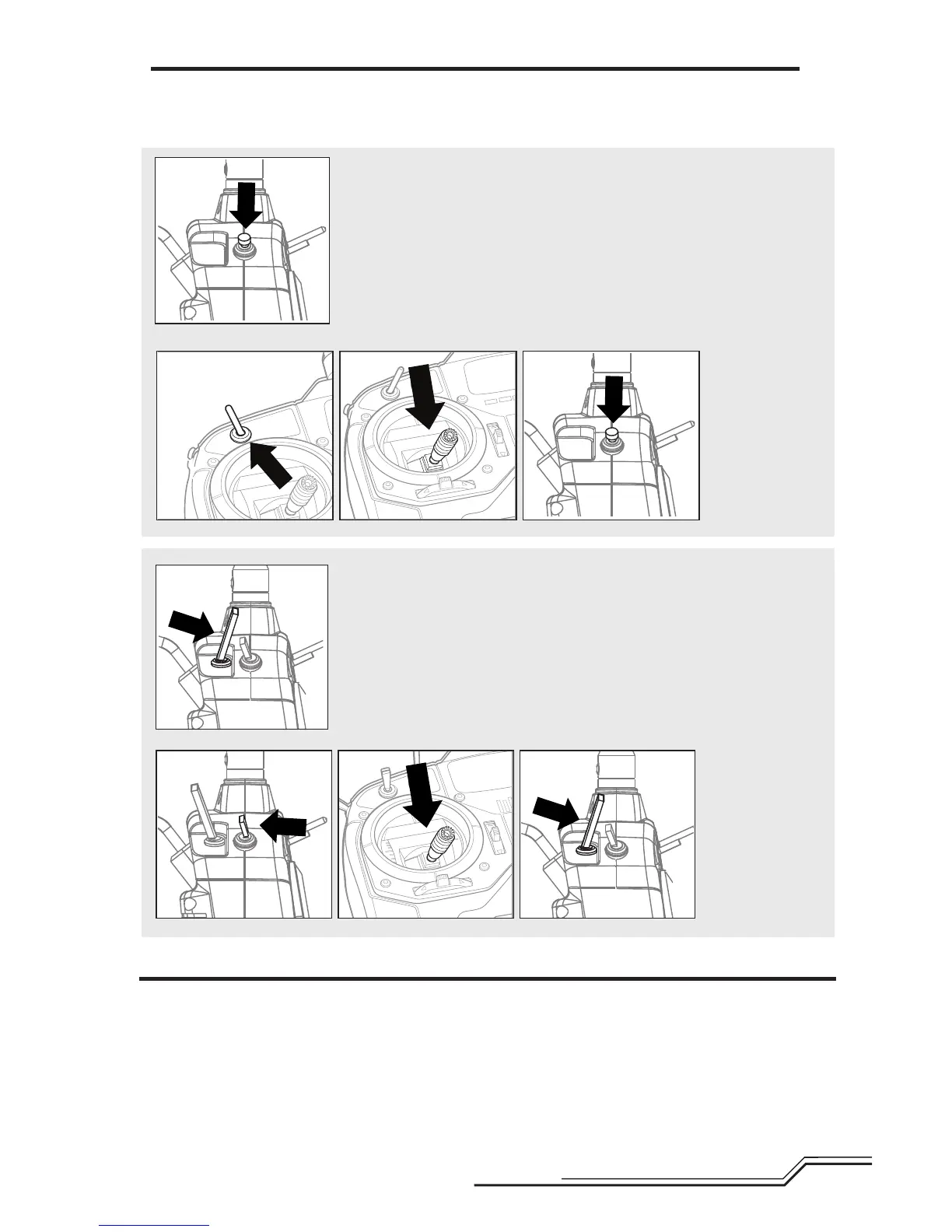
Throttle Hold ON (DX5e)
Pull the trainer switch anytime to turn throttle hold ON after connecting the
battery to the helicopter. The blue LED flashes, indicating throttle hold is ON.
Throttle Hold OFF (DX5e)
1.MakesuretheGearswitchisinthe(0)position.
2.Lowerthethrottlestick.
3.Pullthetrainerswitchthreetimeswithin3seconds.TheblueLEDissolid.
1. 2. 3.
X3
Throttle Hold ON (DX4e)
Press the trainer button anytime to turn throttle hold ON after connecting the
battery to the helicopter. The blue LED flashes, indicating throttle hold is ON.
Throttle Hold OFF (DX4e)
1.MakesuretheAUXswitchisintheOFFposition.
2.Lowerthethrottlestick.
3.Pressthetrainerbuttonthreetimeswithin3seconds.TheblueLEDissolid.
1. 2. 3.


 To Next Page