EasyManua.ls Logo

Bladelius EMBLA - Back Panel Connections; Analog and Digital I;O Ports; Communication and Power Ports

Bladelius EMBLA
31 pages
Print Icon
To Next Page IconTo Next Page
To Previous Page IconTo Previous Page
Loading...
Bladelius Embla User Manual
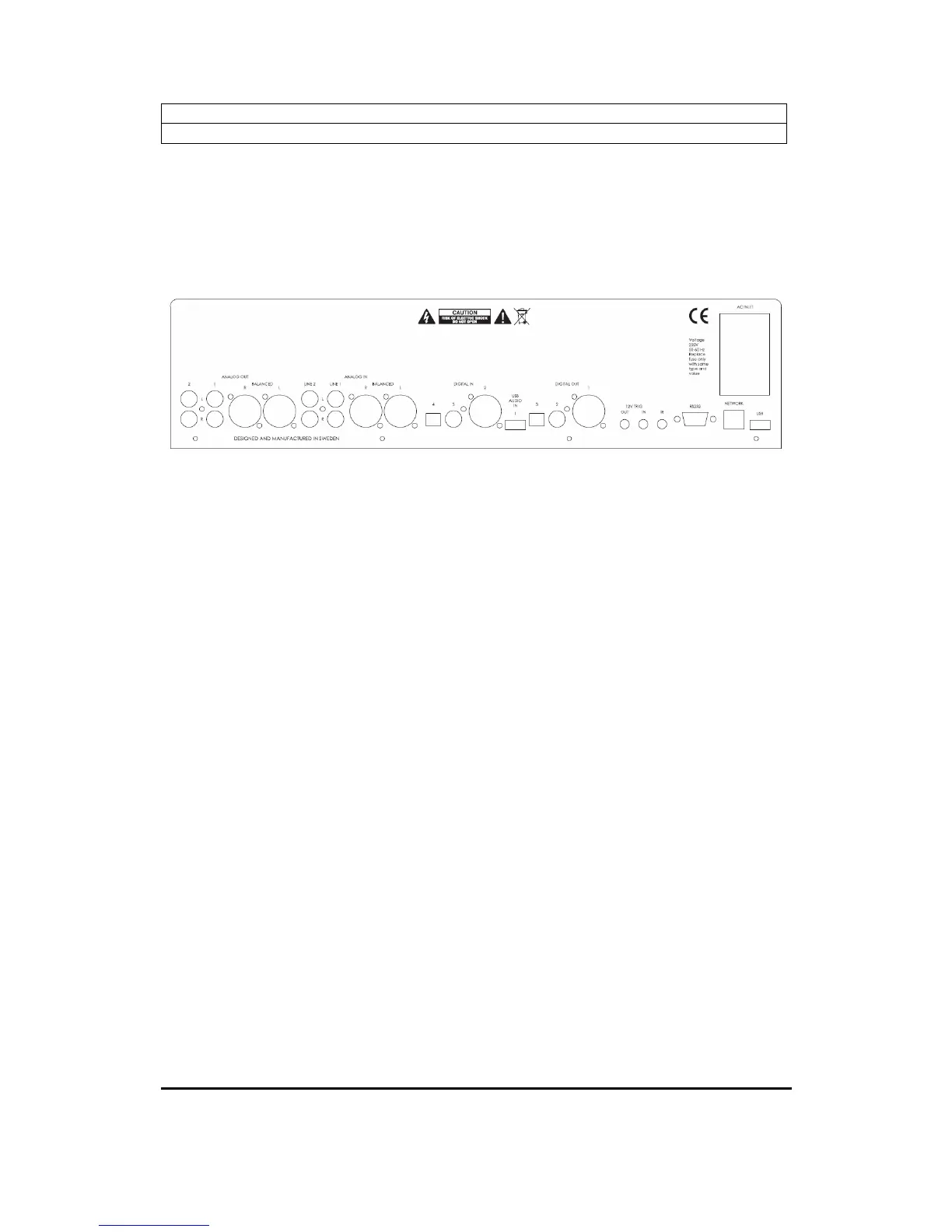
Getting started - Back panel connections
© 2009 by Bladelius Design Group. All rights reserved
1
Getting started
Back panel connections
AC INLET
Mains power switch
IEC Connector
Fuse holder
Analog Output
2. Left & Right Ch. Low
level output
1. Left & Right Ch. Normal
level output
R, L: Balanced output
Analog input
2. Left & Right Ch
analog input
1. Left & Right Ch
analog input
R, L: Balanced input
Digital input
4. TosLink
Optical
3. S/PDIF
Coaxial
2. AES/EBU
1. USB
Digital Output
3. TosLink
Optical
2. S/PDIF
Coaxial
1. AES/EBU
Communication
connectors
12 Volt trigger output
12 Volt trigger input
IR input for external IR
receiver
RS232 Software and
control port
RJ45 Network port
USB data port
Note! The USB device connected to the USB data port must be in FAT format to be recognized by Embla.

Table of Contents