6
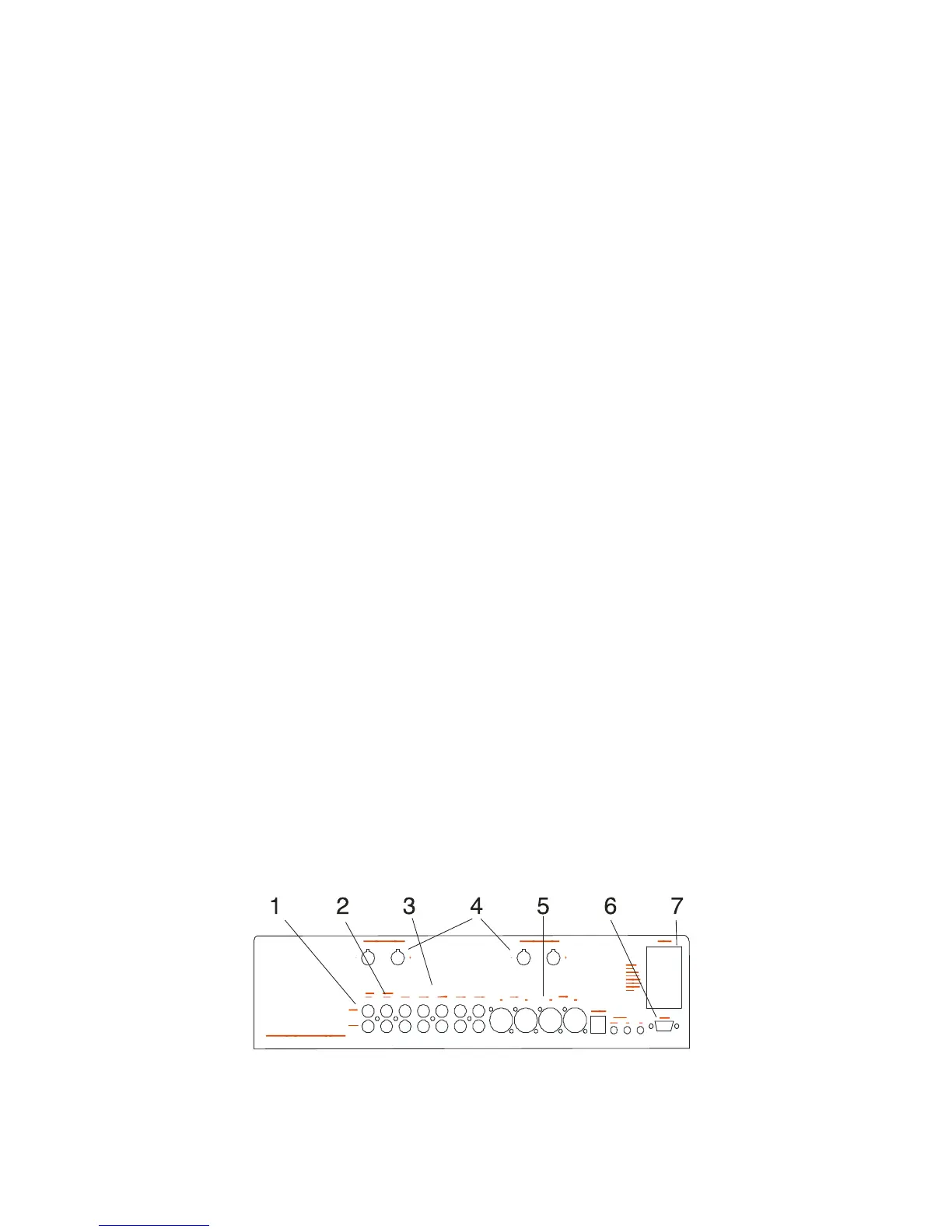
Rear Panel
1. PRE OUT
If you want to use your Thor as a pre-amp, just connect your
power amplifier to the Pre out with RCA connectors.
2. TAPE OUT
Make sure you connect your inputs and outputs of the Right
and Left channels consistently; otherwise channels could
be reversed when you replay a tape you had recorded
through this system.
3. UNBALANCED INPUTS
Each input has the same input sensitivity and impedance
and is compatible with any typical analog line level source:
DAT, MD, DVD, output of a Laserdisc or VCR, D-A converter,
tape deck or phono pre-preamplifier.
4. OUTPUT CONNECTORS
The outputs marked + or - respectively should be connected
to the corresponding connectors on your loudspeakers.
5. BALANCED INPUTS
The two balanced inputs are intended to be used if your
sources have XLR-outputs. If your source/sources are not
equipped with XLR-outputs, please use the line-inputs with
RCA-connectors.
6. RS 232 CONNECTOR
You can use this connection to control the Thor from auxil-
iary equipment like a control system or a PC. It can also be
used for service or software upgrades by qualified service
technicians.
7. AC LINE CORD RECEPTACLE
Plug the female end of the AC cord firmly into the AC re-
ceptacle and make sure that it is properly seated. Connect
the male end directly to an AC wall outlet. Avoid use of an
extension cord or power strip since these often degrade
sound quality.



 To Next Page