20
TROUBLESHOOTING
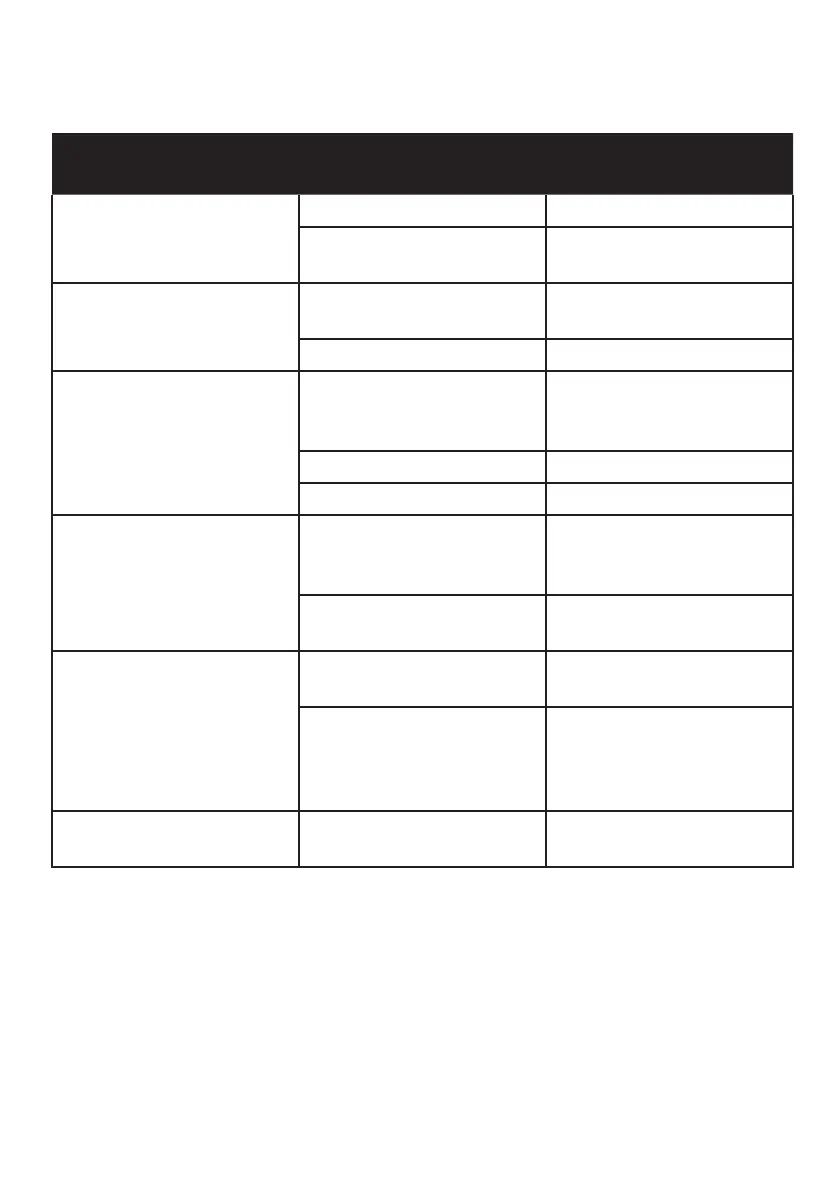
Problem Potential Reasons What to do
No picture Power isn’t connected Connect the power
The power switch is
not on
Switch on the power
Screen shows “No
Signal”
DVB-T cable not
connected
Plug in the DVB-T
cable
Incorrect setting Reset setting
No sound from
speaker
No or incorrect
connection with audio
cable
Connect the audio
cable correctly
Sound on mute Turn o mute function
Incorrect soundtrack Try another soundtrack
Only sound, no image
on the screen
No or incorrect
connection with AV
cable
Make sure cables are
connected correctly
The program is a radio
program
Press <TV/RADIO> key
to shift into TV mode
Remote Control is not
responding
The battery is
exhausted
Change battery
Remote Control is not
facing or close enough
to the Set Top Box
Adjust the position of
the Remote Control
and move closer to the
unit
The image stopped
suddenly
The signal is too weak Strengthen the signal


 To Next Page