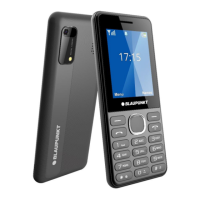
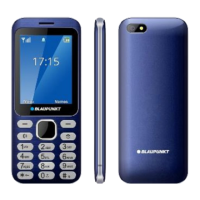
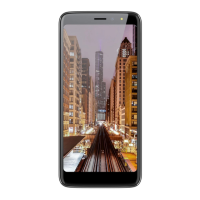
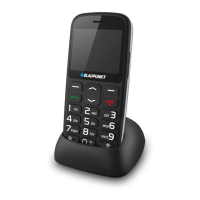
This document describes the Blaupunkt V18 mobile phone, a device designed for basic communication and entertainment. It adheres to GSM network standards and European regulations, including RoHs Directive 2014/53/EU and 2011/65/EU.
Function Description
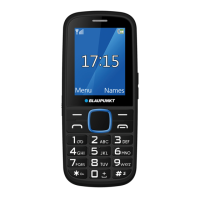
The Blaupunkt V18 is a feature phone primarily designed for making and receiving calls and sending SMS messages. It supports dual SIM cards (one mini and one micro SIM), allowing users to manage two different network connections simultaneously. The phone includes a phonebook for storing contacts, a call log to track missed, dialed, and received calls, and messaging capabilities with pre-written templates and draft saving.
Beyond core communication, the V18 offers several utility and entertainment features:
- FM Radio: Functions with or without headphones, using the earphone as an antenna. It supports auto-search, manual tuning, and background play.
- Image Viewer: Allows users to view images stored on the device or an SD card, with options to set images as wallpaper, delete, share via Bluetooth, rename, and start a slideshow.
- Camera: Equipped for taking photos, with settings for resolution, quality, banding, shutter sound, and storage location.
- Organizer: Includes an alarm clock (with three customizable alarms, repeat modes, and snooze), a calendar to view dates, and a calculator for basic math operations.
- Torch: A built-in flashlight with steady light and fast flicker modes, accessible via a dedicated menu or long-pressing the middle navigation button in standby.
- Application Menu: Features a Blacklist to block unwanted calls and messages, and a Whitelist to receive calls and messages only from specified numbers.
- Entertainment: Pre-installed games like Sokoban and Snake offer simple diversions.
The device also incorporates various settings for personalization and security:
- Phone Settings: Date and time, language, shortcut assignments for navigation buttons, auto power on/off scheduling, and a power-saving mode that adjusts screen animation, keyboard backlight, sound, contrast, and Bluetooth based on battery level.
- Security Settings: PIN code management for SIM cards, phone lock with a customizable password, and an auto keypad lock.
- Profiles: Seven predefined profiles (Normal, Silent, Meeting, Indoor, Outdoor, Headphone, Bluetooth) allow users to quickly switch between different sound and vibration settings. Profiles can be customized with specific ringtones, volumes, and alert types.
- Network Selection: Users can choose between automatic and manual network selection.
Important Technical Specifications
- Network: GSM 900/1800 MHz.
- SIM Card Support: 1 mini (normal) and 1 micro SIM card.
- Battery: Li-ion battery, 3.7V, 800 mAh.
- Power Supply:
- Input: (AC), 100-240 V - 50/60 Hz – 0.15 A
- Output: (DC), 5 V – 0.5 A – 2.5 W
- SAR Values: 0.87 W/Kg (Head) - 1.49 W/Kg (Body).
- Storage: 1000 contacts in phone memory; expandable with an SD card for images and other files.
- Display: Customizable wallpaper, idle display settings (time, date, SIM1, SIM2), adjustable backlight brightness and standby time, and keypad backlight time.
- Camera Resolution Options: 480x640px, 240x320px, 128x160px.
Usage Features
The V18 features a straightforward keypad interface:
- Left Soft Key / Right Soft Key: Opens menus in the respective corners of the screen.
- Dial Key: Initiates calls, answers incoming calls, and opens call lists in standby mode.
- End / Power Off Button: Long press to power on/off, short press to reject calls or exit menus.
- 0-9 Alphanumeric Keypad: Used for entering numbers and text. Supports speed dial for numbers 2-9.
- OK Button: Executes functions, opens selected links in standby.
- Navigation Key: Up/down/left/right arrows for menu navigation and quick menu access in standby.
- * (Star) Button: Locks keyboard in menu mode; displays "+" for international calls in standby.
- # (Dual Cross) Button: Activates/deactivates Silent Mode with a long press in standby.
Call Functions:
- Making Calls: Enter number, press dial key. Supports international format with "+".
- Receiving Calls: Answer with dial button or left soft key. Options for "Any-key answer" and "Auto answer when earphone mode". Reject calls with End/Power button.
- Conference Calls: Supported if the network allows, enabling multi-party conversations.
- In-call Functions: Handsfree mode, adding new calls, hold/unhold, mute, volume adjustment, access to contacts, call logs, messaging, and call swapping/merging.
- Missed Calls: Displayed on screen; can be redialed from the call log.
- Redial: Press dial key in standby to view recently dialed numbers.
- Speed Dial: Assign specific numbers to keypad buttons for quick dialing.
- Call Forwarding: Divert calls based on conditions (unconditional, busy, no answer, unavailable).
- Call Waiting: Receive a second call during a conversation (network dependent).
- Call Barring: Block outgoing, incoming, or international calls (network dependent).
- Hide ID: Control whether your phone number is visible to the called party.
- Special Settings: Call time minute reminder and automatic redial.
Messaging:
- Write Message: Compose SMS, switch input modes, insert special characters, templates, contact info, and save as draft.
- Inbox: Store and view received messages. Options to delete, answer, forward, call sender, move/copy to SIM/phone, add sender to phonebook, and view details.
- Drafts: View saved, unfinished messages.
- Outbox: Stores unsent messages.
- Sentbox: Stores successfully sent messages if enabled.
- Templates: Pre-written messages that can be edited or customized.
- Voicemail: Access voicemail service (network dependent).
- SMS Settings: Configure message center, validity period, status reports, and preferred storage.
Bluetooth:
- Pairing: Connect to other Bluetooth devices by searching and approving authorization codes.
- File Transfer: Send and receive files (images, music) via Bluetooth.
Maintenance Features
- Battery Care: Do not disassemble, modify, short circuit, or dispose of in fire. Keep dry and away from extreme temperatures. Charge for at least 4 hours before first use to optimize battery life. Use only manufacturer-approved chargers.
- Device Handling: Avoid placing near magnetic devices, extreme temperatures, or direct sunlight. Do not paint, shake, drop, or crush the device. Do not disassemble or modify. Clean with a damp, non-static cloth.
- SIM/SD Card Installation: Ensure correct orientation and proper insertion. Turn off the device before inserting or removing SIM/SD cards.
- Data Protection: Password-protect applications like Call log, Message, Names, File list, and Keypad lock from unauthorized access.
- Factory Reset: Restore factory settings (deletes all user data) with password "0000". This action is irreversible.
- Security: Lock SIM card and device, change passwords to prevent unauthorized use. Record IMEI number (*#06#) for theft or loss.
- Qualified Service: Repairs should only be performed by qualified personnel.
- Water Resistance: The device is not waterproof; keep it dry.
- Hearing Protection: Avoid listening to music or radio at high volume for extended periods.

 Need help?
 General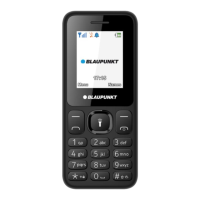

 To Next Page