6
ABOUT THE KEYS
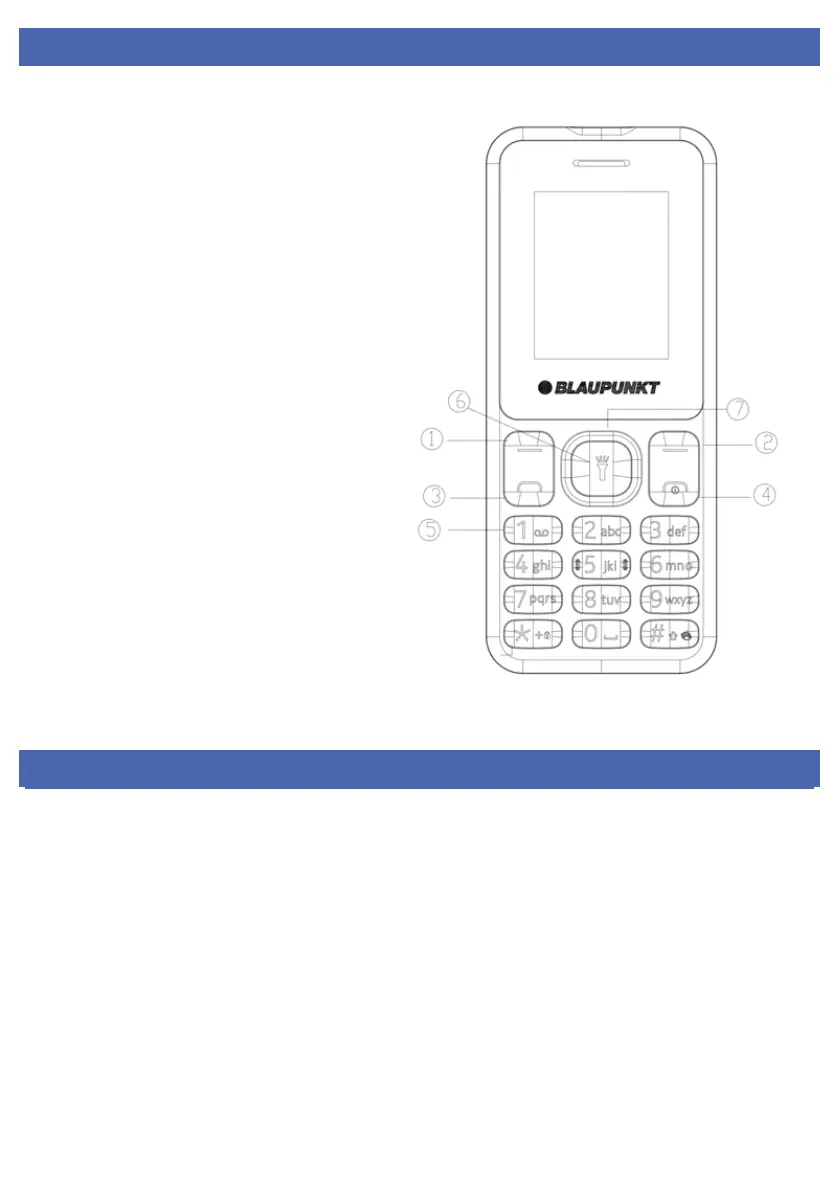
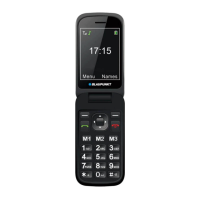
1.- 2. Left soft key / Right Soft key: opens the
menu in the left / right corner of the screen.
3. Dial key: dial / answer the call, and in
standby mode open the call lists.
4. End / Power off button: Press and hold to
turn the power on and off; briefly press it
down, reject a call, or quit it from the menu.
5. 0-9 alphanumeric keypad: press the
corresponding keys to enter numbers when
dialing or characters corresponding to
numbers when writing text.
In standby mode: by long pressing one of the
buttons from "2" to "9", you can use the
speed dial function (if you have set it in the
menu [Contacts / Option / Others / Speed
dial]).
6. Ok button: long press to execute the
indicated function. In standby mode, press to
open the selected link.
7. Navigation key: Press up / down / left /
right directions to scroll through the menu. In
standby mode, press the up / down / left /
right arrows to access the quick menu at the
top of the screen and press OK to execute.
*(Star) button: in menu mode, press the *
key to lock the keyboard. In standby mode
press the * button twice to display the “+”
international call sign.
# (Dual cross) button: in standby mode, long
press to activate/deactivate Silent Mode.
GETTING STARTED
INSERT SIM CARD
To use your phone, you need to insert a valid SIM card to connect to the GSM network.
To avoid missing or damaged the contents of the SIM card, please DO NOT hold the metal part of the SIM
card with your hands free and keep it away from electromagnetic devices. If the SIM card is damaged, it can
not be connected to the GSM network. Before inserting or removing the SIM card, make sure that the device
is turned off and the back of the device removed.



 To Next Page