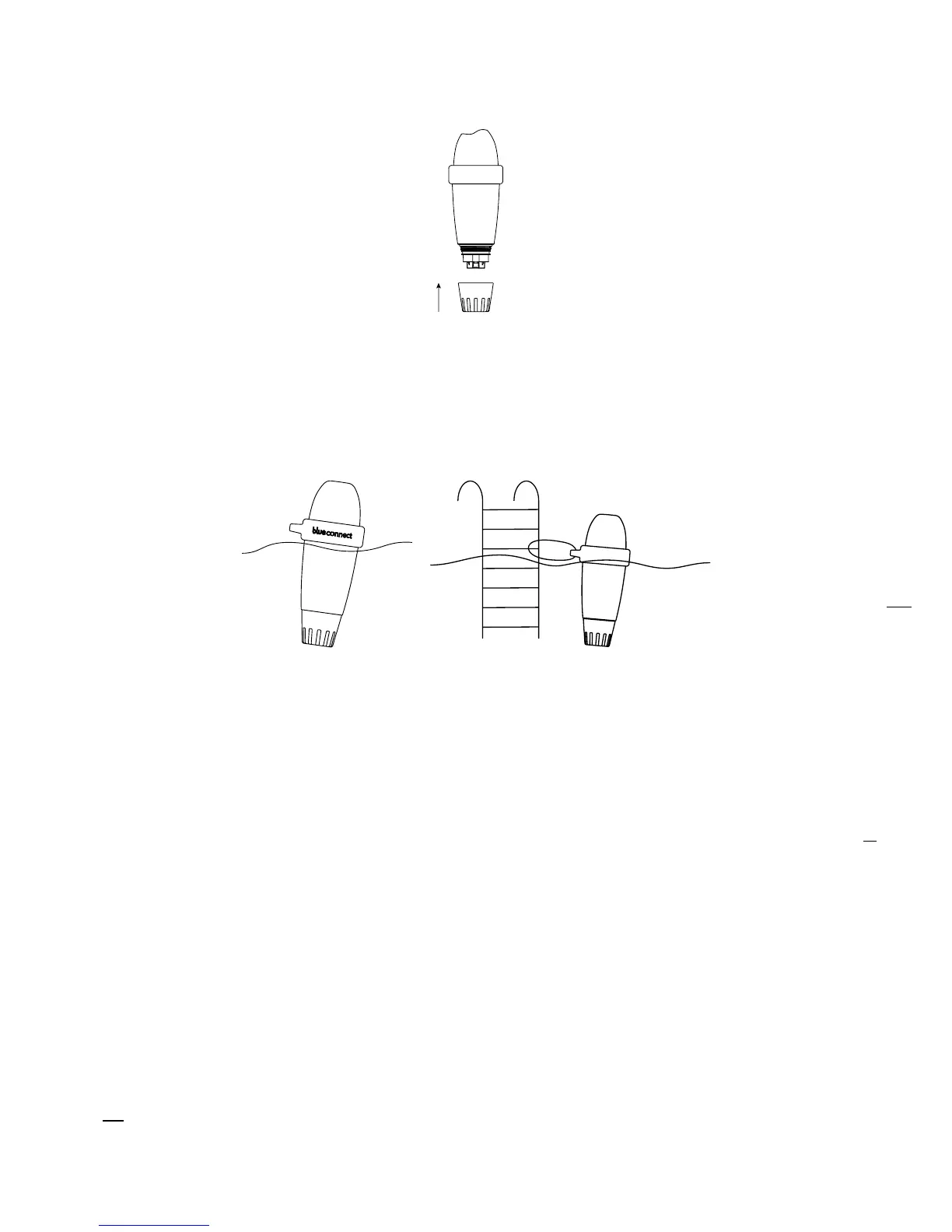
Rinse the probe in clear water and place the usage cap in the external part of the device to
protect the probes.
Place Blue Connect in the swimming pool:
In the pool: Leave it floating in the pool. If needed, you can secure by fixing it to a point of
attachment with the cord and the rubber ring.
In the technical room with Blue Fit50*: For further information, please check our website
www.blueconnect.io or contact your reseller.
NB: Make sure the device is in vertical position and the top part out of the water to allow a
correct communication.
B. Notes
» Do not leave the sensor exposed to air.
» The Sigfox® network connects automatically and sends measurements at regular intervals.
» The sensor may take a few hours to stabilise its parameters after its first immersion in the swimming
pool.
» In case of non-existent Sigfox® coverage, there are two options:
» Blue Connect operates in Bluetooth®. In such case, you must take daily Bluetooth®
measurement(s) for the device to perform its analyser work.
» Blue Extender** allows Blue Connect to connect to your Wi-Fi network. For further information,
visit our website or contact your reseller.
Feel free to watch our Blue Connect start-up video available on www.blueconnect.io (help).
6.
7.
*
Blue Fit50 is a Blue Connect accessory. It is available in the Blue Plus pack, or sold separately.
**
Sold separately.


 To Next Page