13ENGLISH
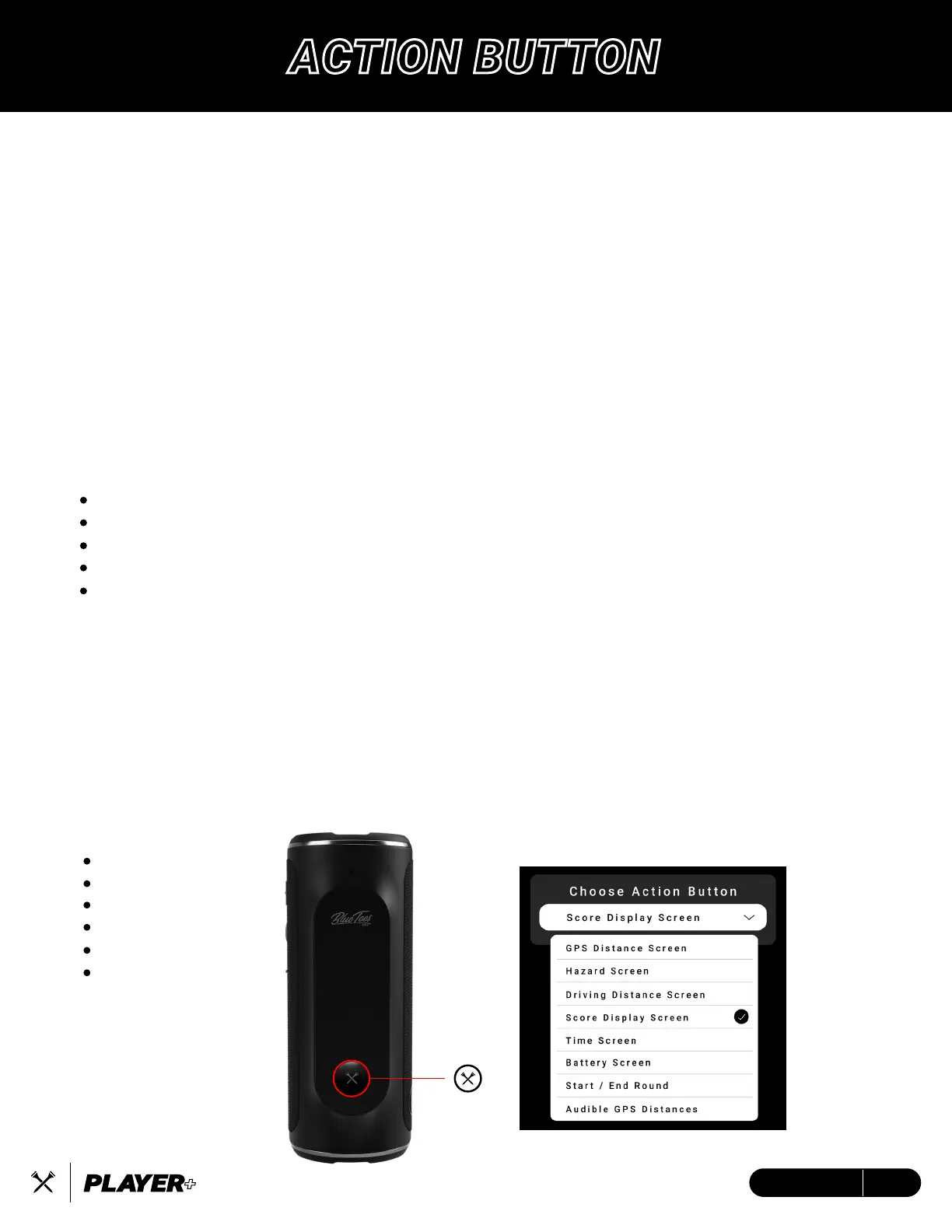
Customize a single-press shortcut for golf mode in your Blue Tees Game app device settings.
Press and hold the button for 3s to Power ON/OFF the device.
The Action Button gives you the choice to utilize audible announcements (GPS Distances, Club
Recommendations, Driving Distance) or create a shortcut to your favorite screen.
1. Open and connect Player+ to the Blue Tees Game app
2. Select ‘Device Settings’
3. Scroll down to ‘Choose Action Button’
ACTION BUTTON – AUDIBLE ANNOUNCEMENTS
When ‘Audible GPS Announcement” is selected as your Action Button,
select from the following options:
Front / Center / Back
Center Only
Center Distance with Club Suggestions *Must be saved in the mobile app
Club Suggestions Only
*Must be saved in the mobile app
Driving Distance
CLUB SUGGESTIONS
In the Blue Tees Game app, you have the option to add your distances to your profile for quick
and simple club suggestions to be made from anywhere on the golf course.
To add your stock distances on the mobile app, navigate to the ‘Club Distances’ section in your
main menu and select ‘My Bag’ to customize your setup.
ACTION BUTTON – SCREEN SHORTCUTS
GPS Distance
Hazards
Driving Distance
Score Display
Time
Battery
ACTION BUTTON


 To Next Page