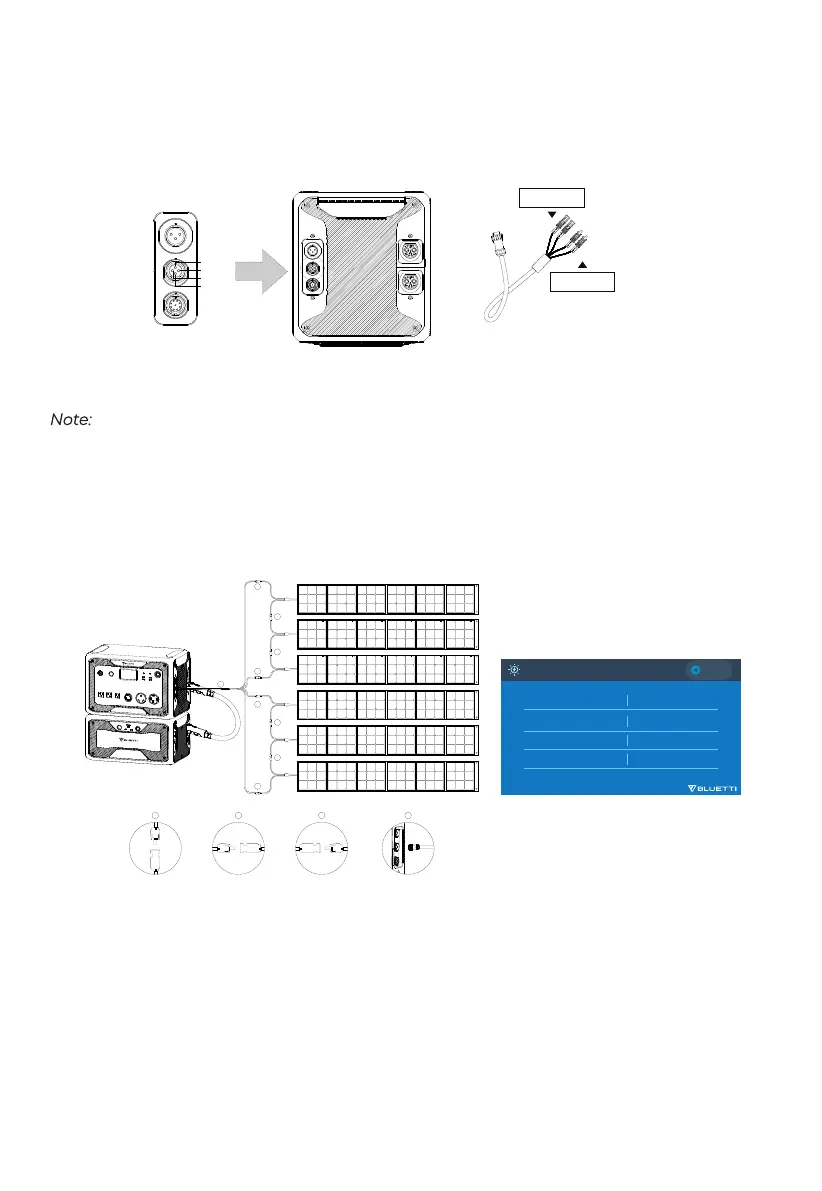
AC500 supports dual PV input with the DC input cable. Connect the solar panels (in series or
parallel) to AC500 and CHECK the PV connection on LCD screen.
PV Charging
Note:
Please make sure your solar panels at each input comply with:
OCV: 12-150V Vmp: 12-150V Power: 1500W Max.
E.g. Connect three BLUETTI PV350 solar panels in series to DC1/DC2.
BLUETTI PV350: Voc=46.5V Vmp=37.5V Current=9.2A Max.
Total: Voc=46.5×3=139.5V Vmp=37.5×3=112.5V Current=9.2A Max.
Roof panel can charge AC500. If the panel’s OCV falls in 150-550V, use D300S to lower the voltage.
Find details in D300S PV Voltage Step Down Module User Manual.
OCV: Open circuit voltage, also for Voc. The maximum voltage that the solar panel can produce
with no load on it.
Vmp: Voltage at maximum power. The voltage available when the panel is operating at its peak
performance output.
15
(Side) (DC Input Cable)
DC1 PV+/PV-
DC2 PV+/PV-
DC1 PV+
DC2 PV+
DC1 PV-
DC2 PV-
4
1
1
3
3
2
2
1
1
1
3
4
2
4+>:
6HWWLQJV
(')1
4+>:
(')1
/DQJXDJH6HWWLQJ
$&2XWSXW9ROWDJH
$&2XWSXW)UHTXHQF\
'&,QSXW6RXUFH
'&,QSXW6RXUFH
(QJOLVK
᪥ᮏㄒ
(QJOLVK
᪥ᮏㄒ
21 2))39
2WKHUV
21 2))
+] +]
(QJOLVK
᪥ᮏㄒ
9 9
21 2))39
2WKHUV
(')1
(')1
(')1
39&KDUJH
(')1
(')1
(')1
'&,QSXW
:'&,QSXW3RZHU
:
'&,QSXW3RZHU
'&,QSXW9ROWDJH 9
'&,QSXW9ROWDJH 9


 To Next Page