13
Just Power On
07. User Interface
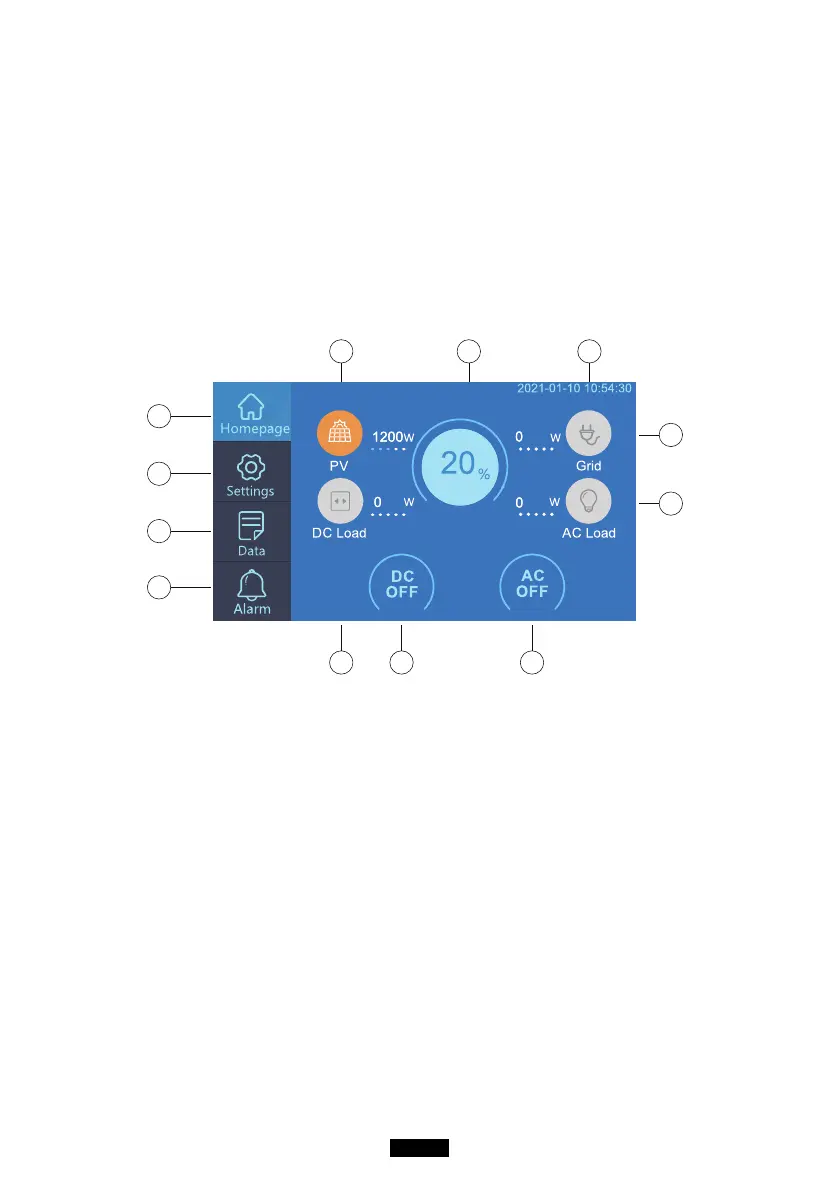
7.1. Home Page
Tip: The LCD display is a resistive touchscreen. It is recommended when
operating the touchscreen that you press lightly with the edge o your
ngernail until it "beeps" when it registers a press. (NOTE: Touchscreen
sounds can be disabled in the Settings menu).
e f g
k
l
ih j
a
b
c
d
. Homepage
. Settings
. Data
. Alarm
. PV Charging Information
. BMS Information
. Date/Time
. DC load Information
. DC ON/OFF
. AC ON/OFF
. AC load Information
. AC Charging Information
a
b
c
d
e
f
g
h
i
j
k
l
7.2. Settings
● You can customize the working mode of EP500 and tweak the equipment’
s parameters such as language, voltage, frequency, current (UPS In-Grid
Mode), working type, date/time, etc.
● Click the Settings Button in the homepage to enter the setting interface.



 To Next Page