Option indicator 4 is high-
lighted.
After the operating readiness is
switched off, the DWA indicator
light in the upper area of the
display flashes.
Press button 3 briefly to switch
off the anti-theft alarm.
Option indicator 4 is not high-
lighted.
Setting time
Switch on operational readi-
ness ( 40).
Entering Setup menu ( 48).
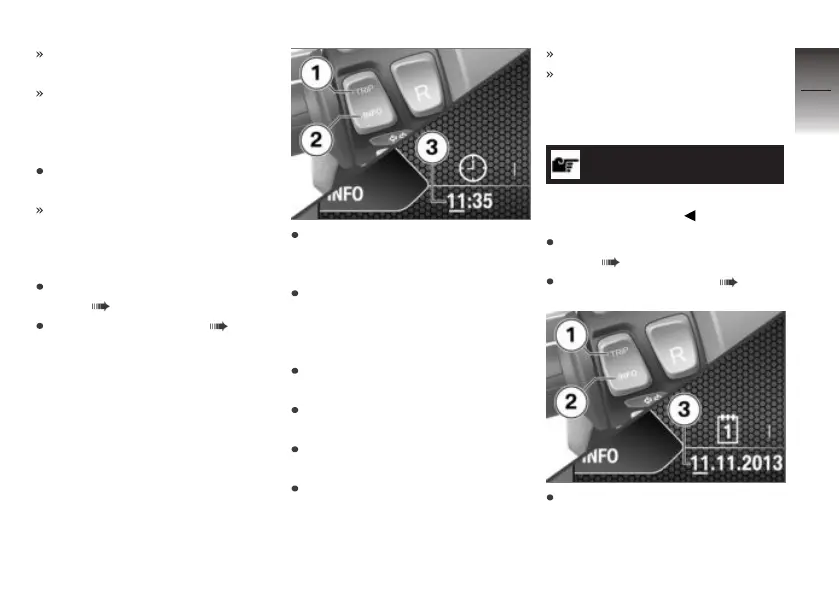
Repeatedly short-press but-
ton 1 until the clock symbol
appears.
Hold down button 2 until
the first number you want
to change in the time 3 is
underscored.
Short-press button 2 to set the
number.
Hold down button 2 until the
next number is underscored.
Short-press button 2 to set
this number as well.
Press and hold down button 2
until the underscore disap-
pears.
This completes the process.
The settings you made are ac-
cepted.
Setting the date
NOTICE
You can change the date format
in the Expert menu.
Switch on operational readi-
ness ( 40).
Entering Setup menu ( 48).
In the Setup menu, repeatedly
short-press button 1 until the
calendar symbol appears.
4
49
z
Operation



 To Next Page