Eco points
High voltage
On-board voltage
Operating period
Time travelled at at least
10 km/h
Setting the format and
unit
Switch on operational readi-
ness ( 40).
Entering Setup menu ( 48).
Calling up Expert menu ( 50).
There is an option in the Ex-
pert menu to change formats
and units; these changes af-
fect the multifunction display,
as shown in this example.
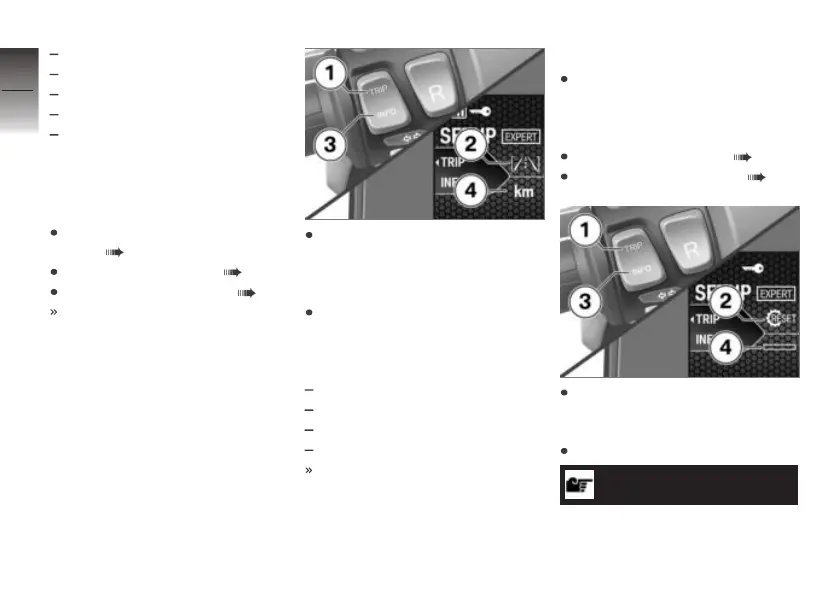
Press button 1 briefly until the
desired information type 2,
such as the distance covered,
is selected.
Press button 3 briefly to adjust
this information type. The fol-
lowing formats and units can
be adjusted:
Time-of-day format
Date format
Distance covered
Temperature
The unit can be changed from
km to mi at position 4.
Restoring factory defaults
This function resets all para-
meters to their factory default
settings, in other words to their
as-delivered condition.
Entering Setup menu ( 48).
Calling up Expert menu ( 50).
Repeatedly short-press but-
ton 1 until symbol 2 is selec-
ted.
Press and hold down button 3.
NOTICE
The reset process is aborted if
you release the INFO button be-
4
52
z
Operation


 To Next Page