70 TFT DISPLAY
Operating instructions 5: The right end
has been reached.
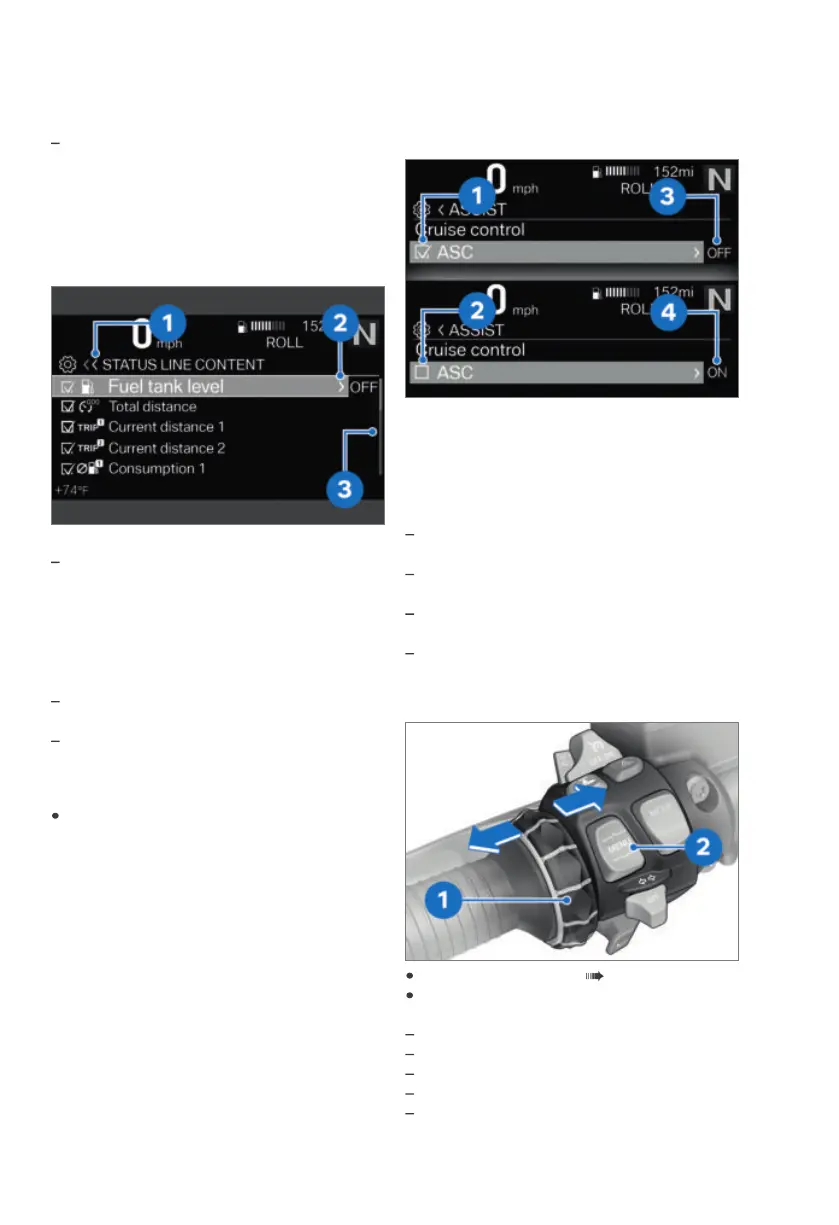
Operating instructions in submenus
In addition to the operating instructions in
the main menu, there are additional operat-
ing instructions in submenus.
Meaning of the operating instructions:
Operating instructions 1: The current
display is in a hierarchical menu. One icon
indicates one submenu level. Two icons
indicate two or more submenu levels. The
color of the icon changes depending on
whether there is an option to return to the
top.
Operating instructions 2: You can go to
another selection.
Operating instructions 3: There are more
entries than can be displayed.
Show Pure Ride view
Press and hold the top MENU rocker but-
ton.
Switching functions on and off
Some items are preceded by a box. The box
indicates whether the function is turned on
or off. Action icons after the menu items
illustrate what is switched by briefly tilting
the Multi-Controller to the right.
Examples for switching on and off:
Icon 1 indicates that the function is
switched on.
Icon 2 indicates that the function is
switched off.
Icon 3 indicates that the function can be
switched off.
Icon 4 indicates that the function can be
switched on.
Go to the menu
Show Pure Ride view ( 70).
Briefly press button 2 downward.
You can go to the following menus:
My vehicle
Radio
NAVIGATION
Media
Telephone



 To Next Page