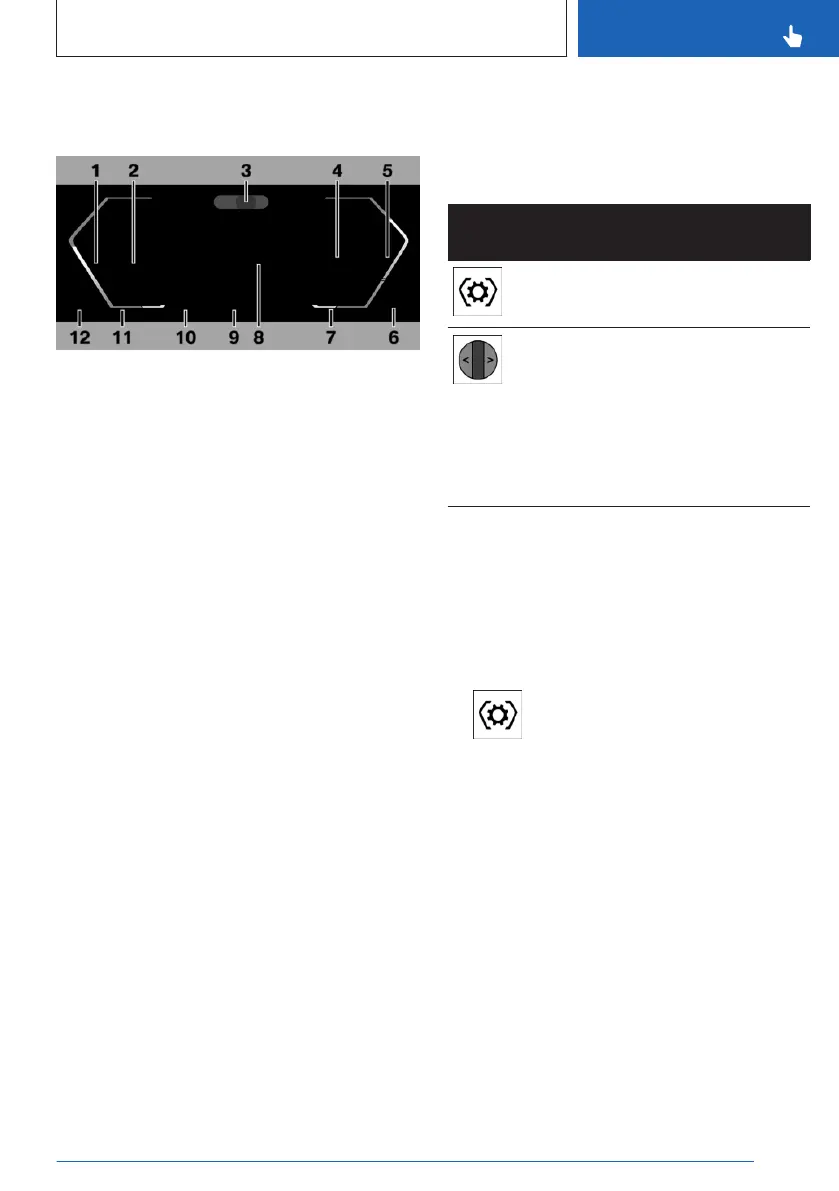
Display ranges on the instrument
cluster
1 Speedometer
2 Driver assistance systems 207
Parking assistance systems 234
3 Driver Attention Camera 201
4 Check Control 131
Selector lever display 117
Gear shift indicator 138
Selection lists 137
Efficiency trainer 309
5 Power gauge 139
Tachometer 140
6 Engine temperature 140
7 Outside temperature 141
8 Central display range 141
Shift lights 141
9 My Modes drive mode 123
10 Speed Limit Info 207
Speed Limit Assistant 228
11 Time 144
12 Fuel gauge 145
Range 145
The positions of some displays may vary,
e.g., the selector lever display.
Some of the displays in the instrument cluster
may differ from the illustrations in the Owner's
Manual.
Additional information:
Indicator/warning lights, refer to page
131.
Operating elements on the steering
wheel
Operating
element
Function
Display the menu bar on the in-
strument cluster.
Turn knurled wheel: scroll selec-
tion up or down.
Tilt knurled wheel in corre-
sponding direction: Move selec-
tion to left or right.
Press knurled wheel: confirm
selection.
Configuring the layout
The layout of the instrument cluster adapts to
the respective driving mode.
In Personal Mode drive mode, the layout in
the instrument cluster can be individually con-
figured and displayed.
1.
Press the Settings button on the
steering wheel.
A menu bar is displayed in the instrument
cluster.
2. "LAYOUT"
Select the menu by tilting the thumbwheel
on the steering wheel where applicable.
3. Select the desired setting using the thumb-
wheel on the steering wheel.
Seite 45
BMW iDrive
CONTROLS
45
Online Edition for Part no. 01405A8A536 - VI/23



 To Next Page