NOTE: Tests are automatically stored in memory after subject data has been
entered and the BODYSTAT 1500MDD unit has successfully performed a
measurement.
Data is not lost after the unit is switched off or during battery
replacement.
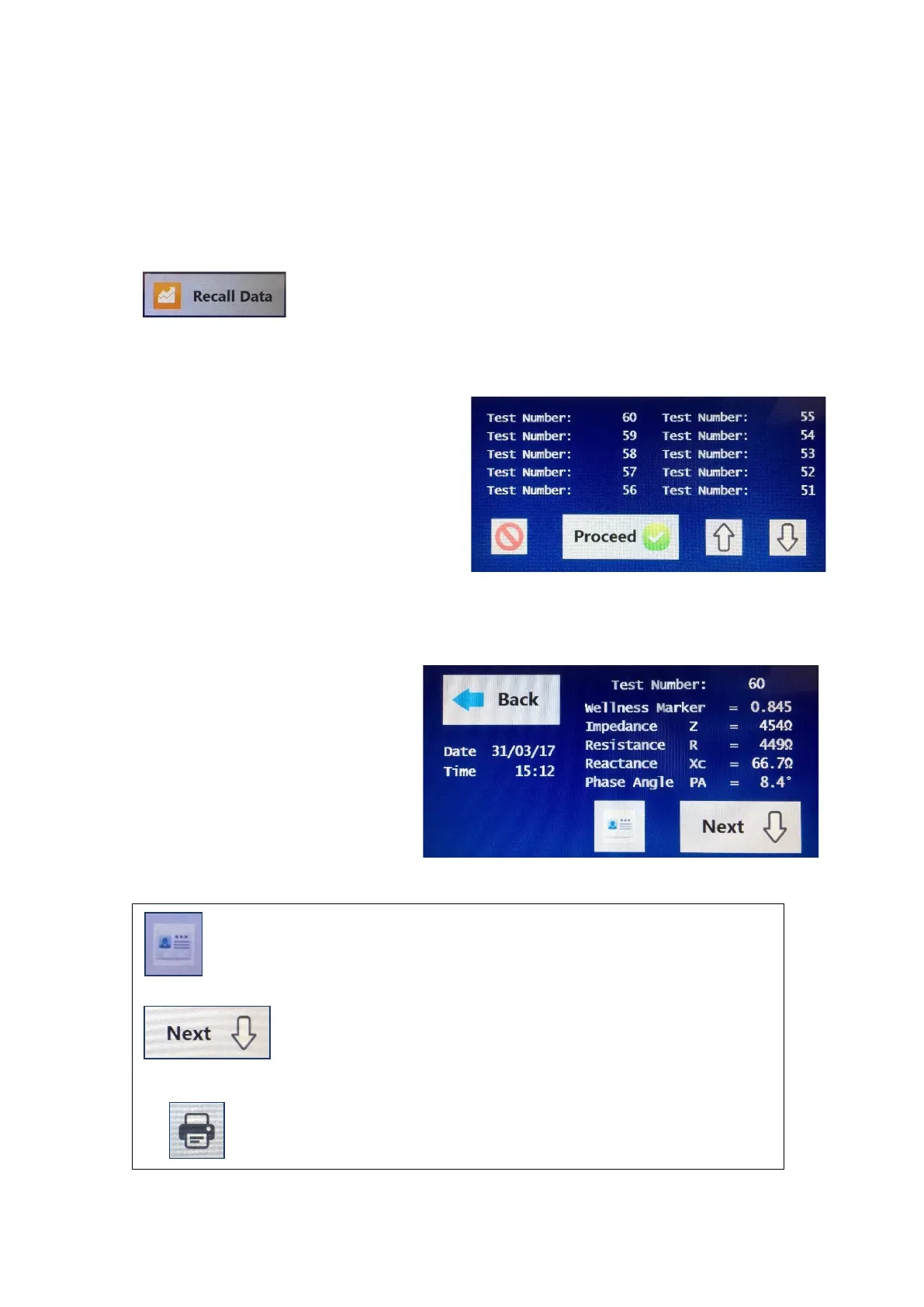
To access this recall option, select the recall data button
from the home screen.
The screen on the right is displayed on the LCD screen:
The number that will be displayed at
the top shall be the most recent test
that was tested and saved
immediately prior to selecting this
option. Ten tests are displayed per
page, and it may be necessary to use
the up and down arrow keys at the
bottom to scroll through the pages.
Select the test to display and press the proceed button to view the Input details
and Results information.
The first screen displayed is the
test summary screen which
shows the Wellness Marker,
Impedance, Resistance,
Reactance and Phase Angle at
50 kHz.
The results for that particular test can be viewed by
selecting the results icon.
To view the results for that particular test without viewing
the input data, select the next button.
To print the results to the paired thermal printer, select the
print icon.



 To Next Page