To Program Your Trip
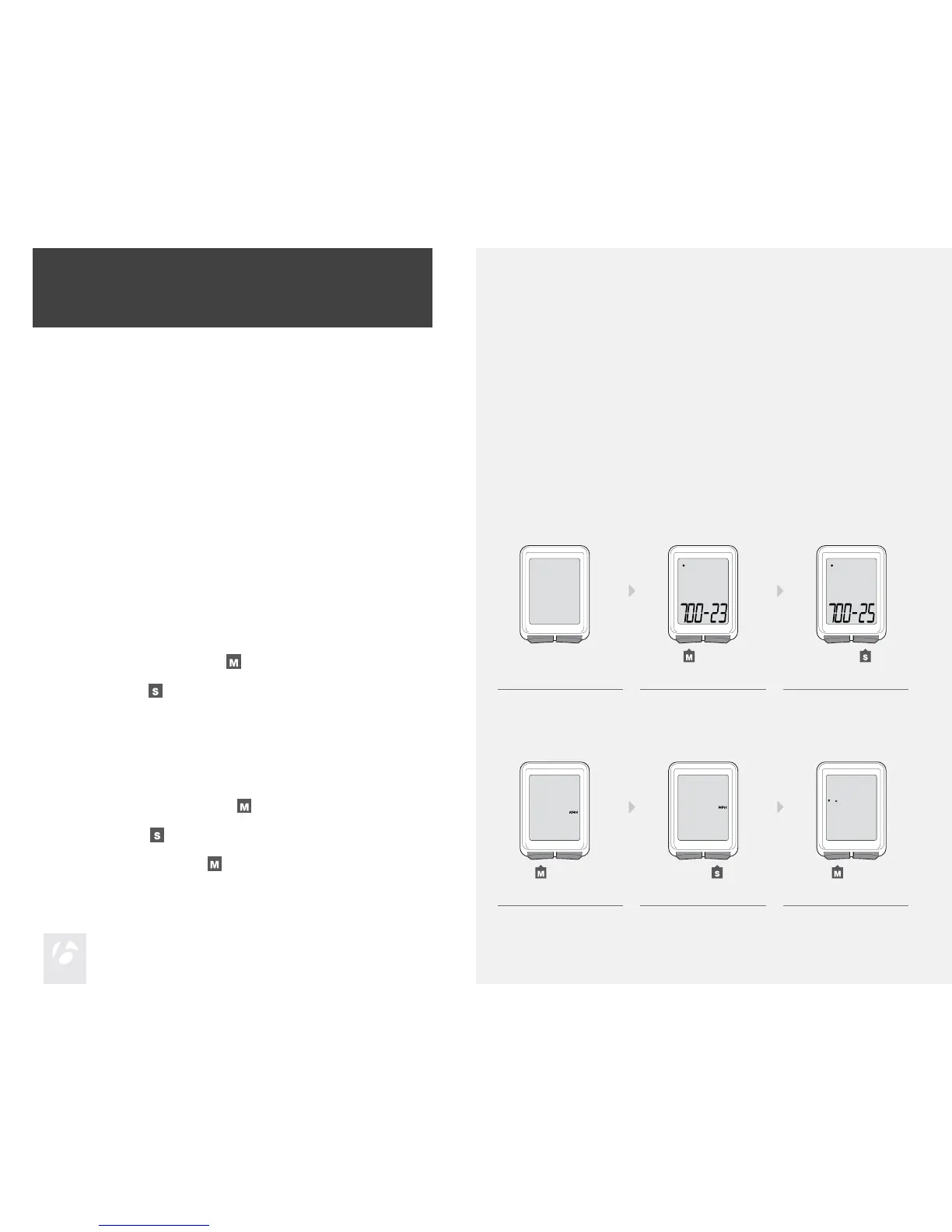
This procedure programs your Trip cycle computer for the rst time or after a
Reset. If you would like to program individual features or advanced settings, see
the sections Additional Information & Features and Advanced Settings.
Install the battery (or push the Reset button—see Figure 12 at end of
manual).
The wheel size appears on the display.
To change the wheel size, press
.
To select, press
.
To scroll between units of measurement, Miles per Hour (MPH) or
Kilometers per Hour (KMH), press
.
To select, press
.
To change to ˚F or ˚C, press
.
1.
2.
3.
4. 5. 6.
1. 2. 3.
4.
5.
6.
Easy Setup
After you install the battery, you can program the wheel size and units.
Install the Battery
To prolong the life of the battery, it is not installed at the factory. (See Figures 10
and 11 at the end of the manual for further help installing the battery.)











 To Next Page