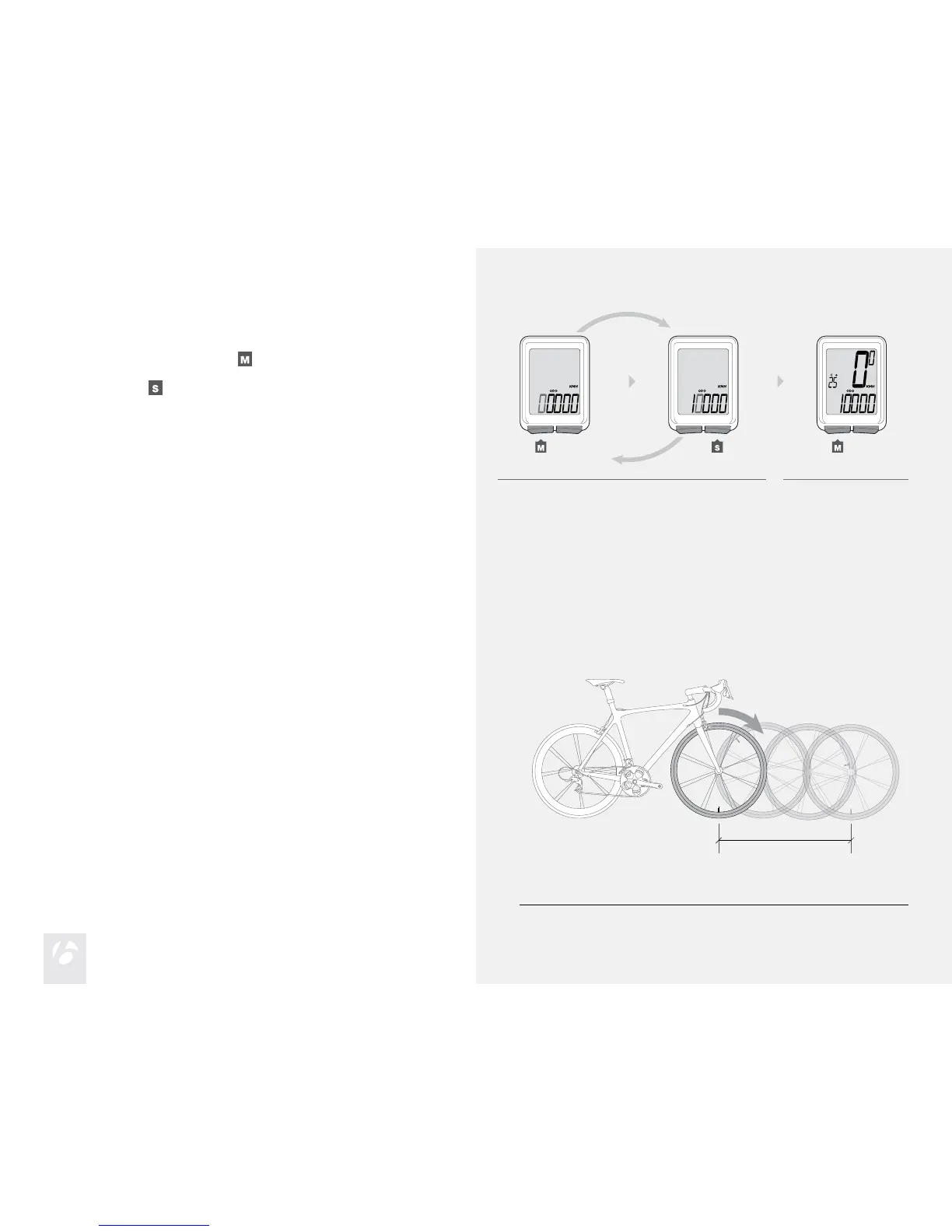
To change the ashing digit, press
.
To select, press
.
Repeat step 3 to change the other digits.
The Trip returns to ODO.
3.
4.
3. 4.
The menu on your computer for tire size is based on averages, but there is
some variation in actual tire size even between tires marked as the same.
You can make your computer more accurate by setting a custom wheel size.
Custom Wheel Size
Measure the roll-out (Figure 7).
Roll-out is the distance your bicycle travels in exactly one revolution of the
wheel. If one wheel on your bicycle is bigger, measure the wheel with the
magnet.
To Set a Custom Wheel Size
Start with the valve stem of the wheel directly perpendicular to the oor.
Mark the oor at the valve stem. Placing an object on the oor makes a
good mark.
Roll the bike straight forward one revolution of the wheel, so that the valve
stem is again directly over the oor.
Mark the new location of the valve stem.
Measure the distance between the marks in millimeters. The result is your
Custom Wheel Size.
1.
2.
3.
4.
5.
Figure 7. Measuring Roll-out.











 To Next Page