en
|
14
|
User Manual
|
ADS 325
582819 | REV. A | 07.2018
Bosch Automotive Service Solutions Inc
Language
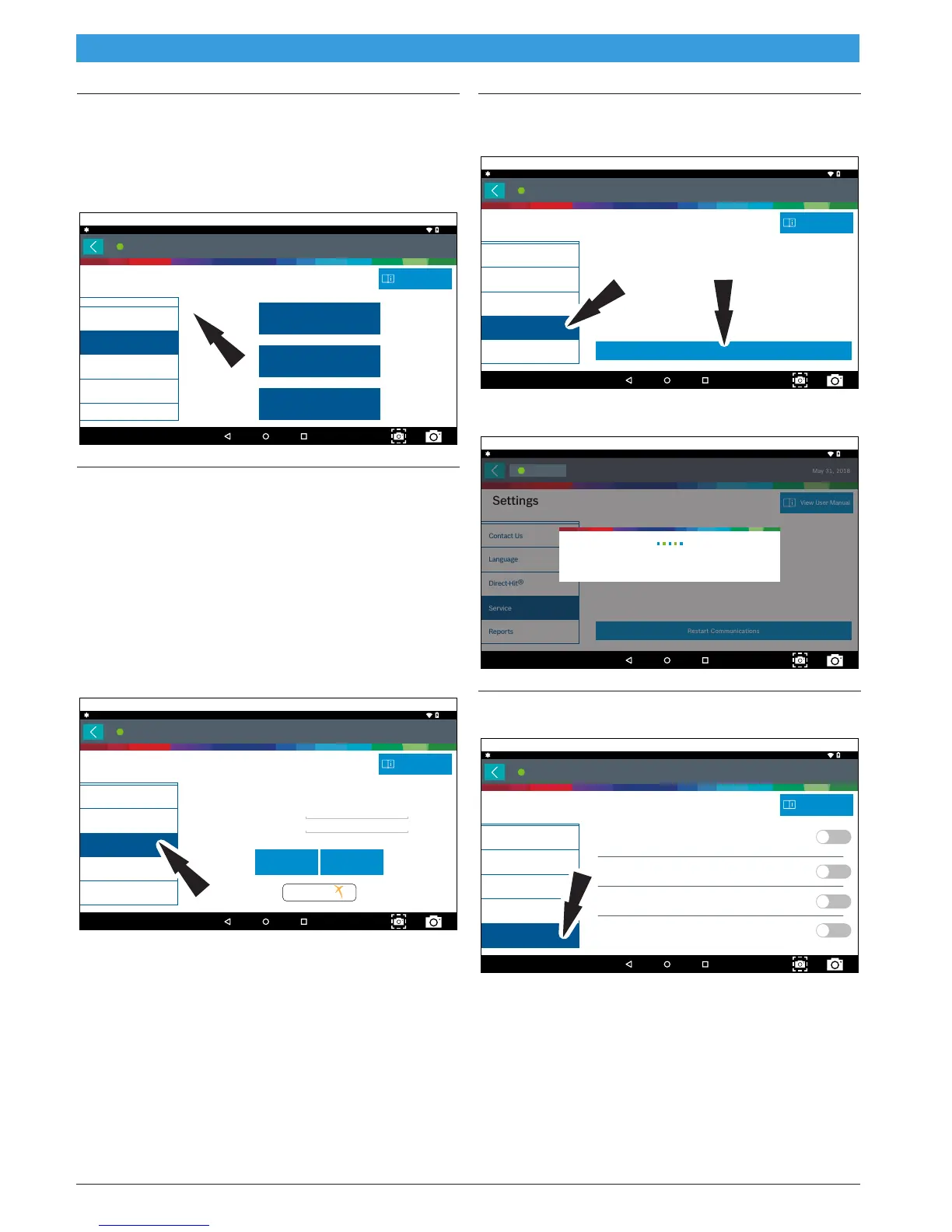
1. From the Settings screen select Language
2. Follow the prompts on the screen
• English
• Spanish
• French
Settings
Language
Contact Us
Service
Reports
Direct-Hit
®
English
10:40
May 31, 2018
Connected
View User Manual
Español
Français
ss03083
Direct-Hit®
Identifix® Direct-Hit® provides:
• OEM specific information.
• Wiring diagrams.
• Technical Service Bulletins (TSBs).
• Diagnostic procedures.
• Past reported fixes.
Subscription is required to access Identifix®. To obtain
username and password, select Identifix® link and sub-
scribe.
1. From the Settings screen select Direct-Hit®.
2. Follow the prompts on the screen.
Language
Contact Us
Service
Reports
Direct-Hit
®
Direct-Hit
®
User Name
Password
SaveReset
IDENTIFI
FIND AND FIX FASTER
10:40
May 31, 2018
Connected
View User Manual
Settings
ss03084
Service
1. From the Settings screen select Service.
2. Select Restart Communications.
Restart Communications
Language
Contact Us
Service
Reports
Direct-Hit
®
10:41
May 31, 2018
Connected
View User Manual
Settings
ss03085
3. Handset will Restart Communications.
Restart Communications
Language
Contact Us
Service
Reports
Direct-Hit
®
10:41
May 31, 2018
View User Manual
Settings
Connected
Initializing Communication
ss03085
Report Options
1. Follow the Prompts on the screen.
Remove systems that could not be communicated with on AST /
ASDTC reports
Include Shop Info
Include Shop Logo
Prompt for extra fields when saving reports
Language
Contact Us
Service
Reports
Direct-Hit
®
10:41
May 31, 2018
View User Manual
Settings
Connected
ss03087



 To Next Page