en
|
22
|
User Manual
|
ADS 325
582819 | REV. A | 07.2018
Bosch Automotive Service Solutions Inc
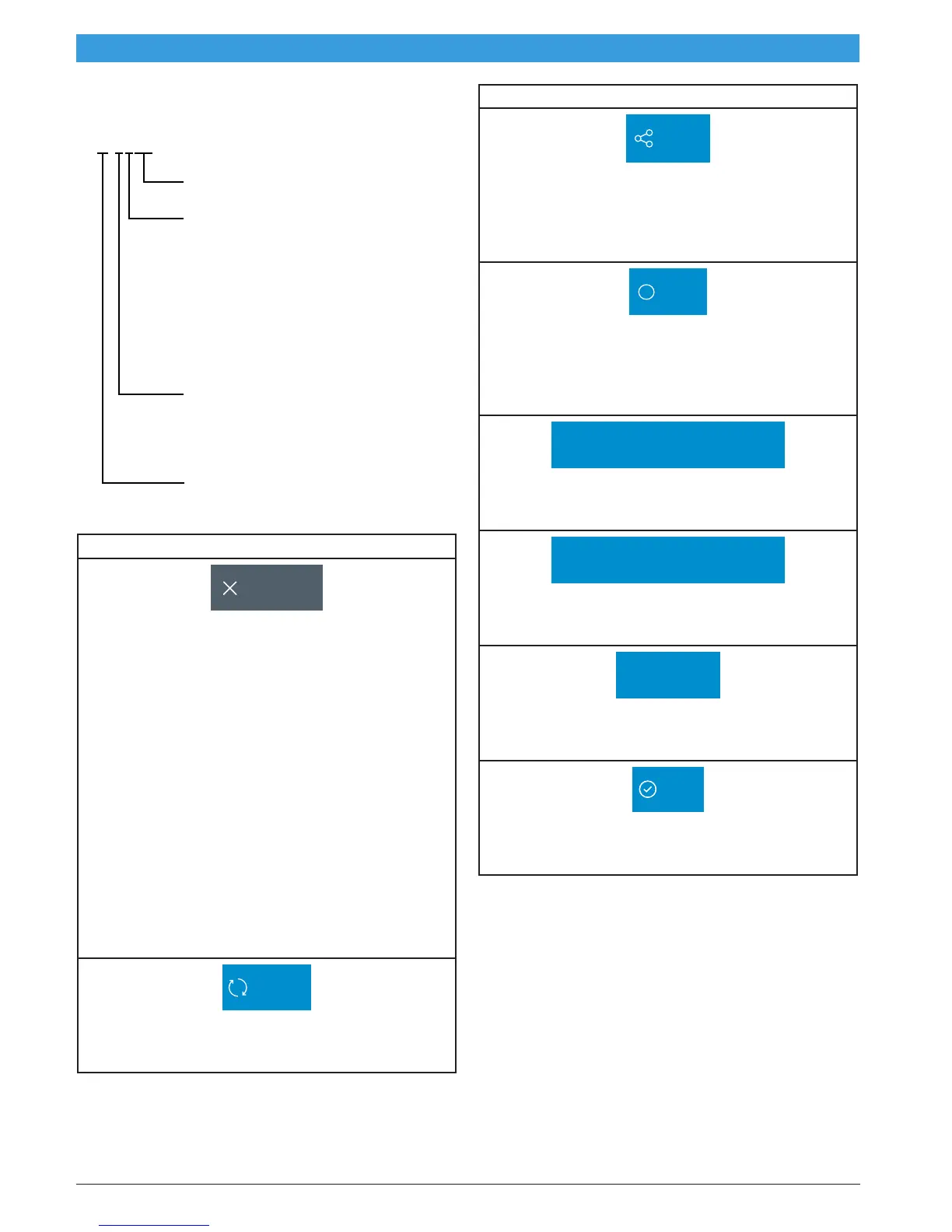
OBDII DTC Nomenclature
P-0102
Fault (00-99)
1 - Fuel & Air Metering
2 - Fuel & Air Metering (Injector Circuit)
3 - Ignition Systems or Misfire
4 - Auxilary Emission Control
5 - Vehicle Speed Control and
Idle Control System
6 - Computer Output Circuit
7 - Transmission
8 - Transmission
0 - SAE
1 - MFG
B - Body
C - Chassis
P - Power Train
ss01521
Example: P0102 Mass Air Flow Performance
DTCs Modes 3, 4, 5, A Button Definitions
Clear DTCs
Clear DTCs Button
The Clear DTCs button is used to clear codes and re-
move all but permanent DTCs on the selected control-
ler. To clear codes, complete the following:
NOTE:
• Clearing DTCs will erase current Mode 1 Readi-
ness monitor information and require the user
go through necessary drive cycles over again.
So, if Mode 1 information needs to be reviewed,
be sure to view it before clearing codes.
• If a code will not clear, turn the ignition off for
at least 10 seconds; turn it back on to KOEO,
then retry. Some controllers will go to sleep
after a period of inactivity and prevent clearing
DTCs. This key cycle may be needed when
attempting to communicate with other control-
lers after a period of time on a different control-
ler.
Refresh
Refresh DTCs Button
Tapping the Refresh button initiates a fresh scan of
DTCs from the vehicle.
DTCs Modes 3, 4, 5, A Button Definitions
Share
Share Button
Tapping the Share button opens the app and initiates
options. Depending on what’s available at the time.
Share a list containing all the DTCs set by email or
Bluetooth or USB.
Other
Other Button
Tapping the Other button displays a pop-up link that
takes the user to help content related to reading
DTCs.
Note: An active internet connection will be required.
Use Metric Units
Use Metric Units
Selecting Metric Units will switch from English/Stan-
dard Units to Metric Units.
Use English/Standard Units
Use English/Standard Units
Selecting English/Standard Units will switch from
Metric Units to English/Standard Units.
Screen Capture
Screen Capture
Selecting Screen Capture will save a copy of the cur-
rent open screen.
Save
Save
Tapping the Save button will save DTC and test data
reports from Automated System test



 To Next Page