en
|
36
|
User Manual
|
ADS 325
582819 | REV. A | 07.2018
Bosch Automotive Service Solutions Inc
Display Types
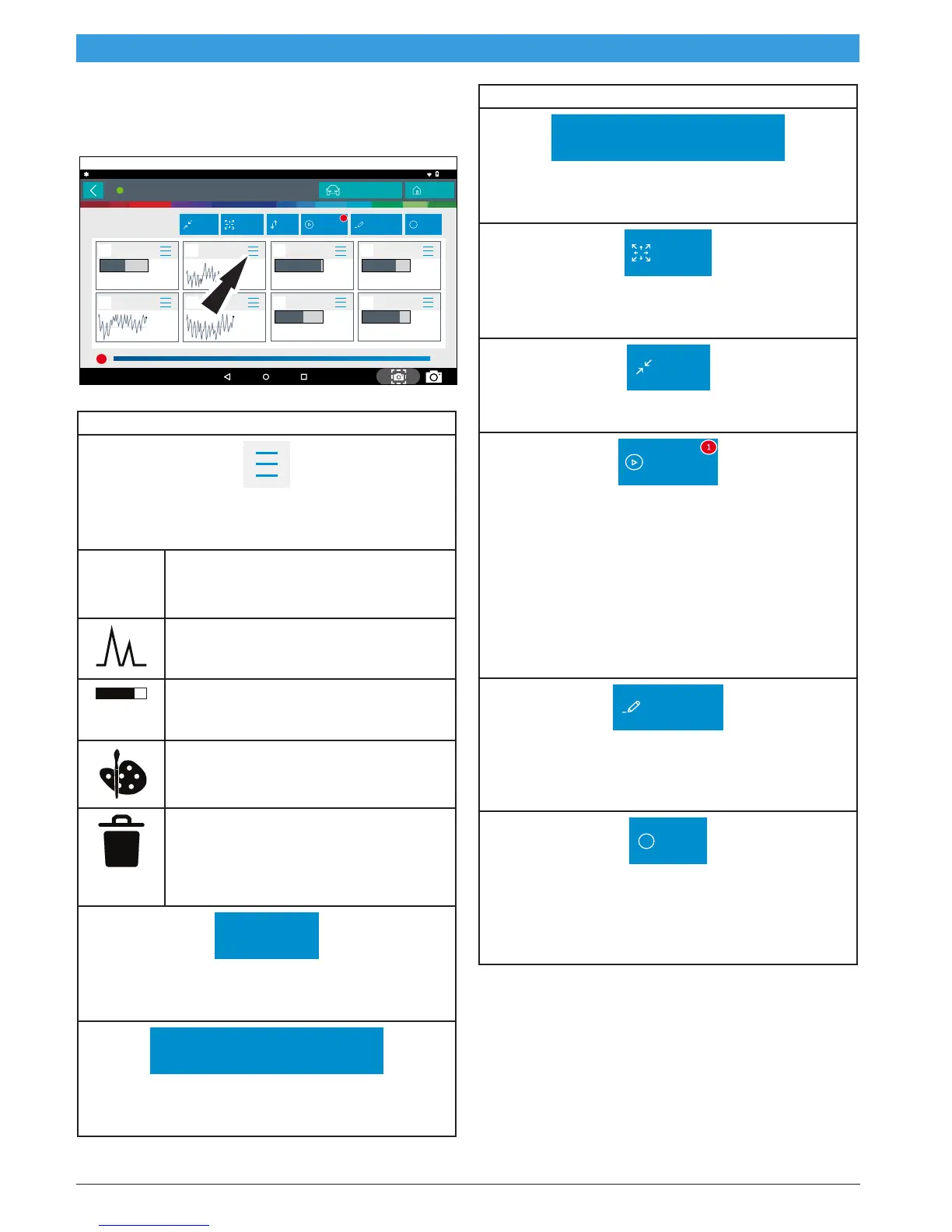
To change data item display types, select the data item
menu button located in upper right.
All Data Ite...
12:03
Connected to 2003 Cadillac CTS Luxury Sport 3.2L | ENGINE
Fuel Level
1.43
Low
15.48
Avg
gal
26.63
2158
-54
High
15.06
1 of 3
BUFFERING DATA..
200 / 200 frames
Expand
Shrink
Sort OtherPlayback Customize
Change Vehicle
Home
1
Heated Oxygen
Sensor Heater
Bank 1 Sensor 1
0.8
Low
45.6
Avg
%
99.5
High
70.6
Heated Oxygen
Sensor Heater
Bank 1 Sensor 2
5.1
Low
52.9
Avg
%
98.3
High
77.8
Del Torque PWM
Duty
2
Low
51
Avg
%
98
High
94
Generator F-
Terminal Signal
2
Low
41
Avg
%
94
High
58
Calculated
Converter
Temperature
°F
°F
1753
12.6
-11.0
Fuel Tank
Pressure
inH2O
9.6
235
-49
Startup Engine
Coolant
Temperature
208
ss03160
NOTE: Not all display types are available for all data items.
Display Type Button Definitions
Menu Button
Tapping the Menu button displays a pop-up link that
takes the user to more buttons.
Digital
To change to digital form, select the ##
Digital button.
Line Graph
To change to line graph, select the Line
Graph button.
Bar Graph
To change to bar graph, select the Bar
Graph button.
Change Color
To change the color of a graph, select the
Change Color button.
Clear All Data
Select Clear Data to clear displayed
data stream. This function will reset the
timeline frame counter and clear graphed
data.
Screen Capture
Screen Capture
Selecting Screen Capture will save a copy of the cur-
rent open screen.
Use Metric Units
Use Metric Units
Selecting Metric Units will switch from English/Stan-
dard Units to Metric Units.
Display Type Button Definitions
Use English/Standard Units
Use English/Standard Units
Selecting English/Standard Units will switch from
Metric Units to English/Standard Units.
Expand
Expand button
To view the data in the enlarge view, press the Expand
button.
Shrink
Shrink Function
To zoom out press the Shrink button.
Playback
Playback:
• Select Playback to view previously recorded
data streams.
• Recordings are listed from newest to oldest.
When the folder is full, the newest recording
pushes the oldest one out of the list. Currently,
there is no way to manually delete recordings.
• To view recordings, select the Recordings but-
ton near the top of the display.
• Select the desired recording.
Customize
Customize:
1. Choose only the data you want to view by check-
ing the box in front of each desired data item.
2. Select the Sort button.
Other
Other Button
Tapping the Other button displays a pop-up link that
takes the user to help content related to reading
DTCs.
Note: an active internet connection will be required.



 To Next Page