154
Software Setup
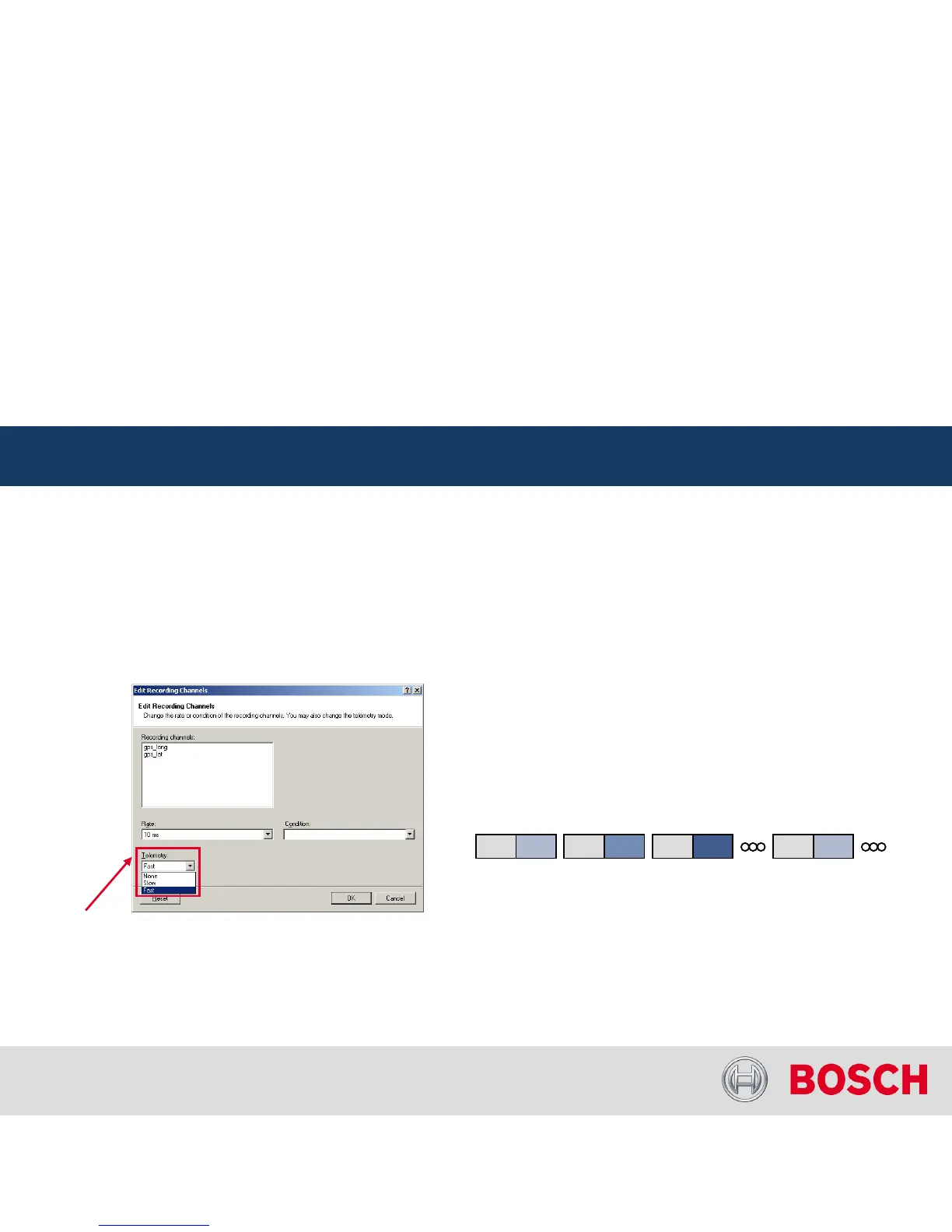
Adding channels to telemetry
In the ‘Edit Recording Channels’
dialog: choose ‘Telemetry’
C 60 Recording and Telemetry
Internal | BEG/EMS1 CsM
| 6/4/2010 | ©
Bosch Engineering GmbH 2009. All rights reserved, also regarding any disposal, exploitation,
reproduction, editing, distribution, as well as in the event of applications for industrial property rights.
Motorsport
Configuration of Online Telemetry
• None –
channel(s) are not transferred
• Slow –
channel(s) are transferred in the slow telemetry block
• Fast –
channel(s) are transferred in the fast telemetry block
Why fast block / slow block
C 60 telemetry uses available FM40 bandwidth
(19200 baud -> approx. 1700 bytes/s)
Channels are grouped into blocks
Fast block (block 1): transferred every cycle
Slow blocks (block 2..n): transferred every n
th
cycle
Block 1 Block 2 Block 1 Block 3 Block 1 Block 4 Block 1 Block 2
Transmission Scheme




 To Next Page