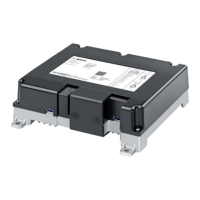
The Bosch Router CM-R 19 is a mobile WLAN access point designed for use in commercial vehicles, specifically buses, operating on either a 12 V or 24 V electrical system. Its primary function is to provide passengers with internet connectivity and access to audio/video content from other devices within the coach infotainment system. The device is available in two main variants: 7 620 320 032 and 7 620 320 034 (NAFTA).
Function Description:
The Router CM-R 19 acts as a central hub for wireless communication within the vehicle. It integrates mobile radio capabilities (LTE-FDD, LTE-TDD, UMTS/DC-HSPA+, WCDMA) to establish an internet connection, which is then distributed via WLAN (IEEE 802.11a/b/g/n/ac) to passenger end devices. The device supports two SIM card slots, allowing for automatic switching between cards to optimize connectivity and potentially reduce roaming costs on international routes.
Beyond internet routing, the CM-R 19 also functions as a media server. It can make media content available to end devices via WLAN by connecting USB data carriers to its front USB sockets (one of which is specifically recommended for content protected by digital rights management, DRM). This allows passengers to access stored audio and video files directly from the router.
The device features a user-friendly web-based interface, accessible via a standard internet browser (http://bosch.router), which allows for comprehensive configuration and monitoring. This interface is password-protected by default for security.
Important Technical Specifications:
- Power Supply: 12 V/24 V (operating range 8 V to 36 V).
- Current Consumption: Max. 2 A (at 12 V) or 1 A (at 24 V); Standby current < 150 µA.
- Fuse: 5 A.
- WLAN Standards: IEEE 802.11a/b/g/n/ac.
- WLAN Frequencies: 2.4 GHz and 5 GHz.
- WLAN Encryption: WPA2 (AES), WPA, WPA2, WPA2 mixed, or Open.
- Mobile Radio Standards: UMTS/DC-HSPA+, WCDMA, LTE-FDD, LTE-TDD.
- LTE FDD Bands (7 620 320 032): B1, B3, B7, B8, B20, B28, B32.
- LTE TDD Bands (7 620 320 032): B38, B40.
- UMTS Bands (7 620 320 032): B1, B3, B8.
- LTE FDD Bands (7 620 320 034): B2, B4, B5, B7, B12, B13, B25, B26, B29, B66.
- LTE TDD Bands (7 620 320 034): B41.
- WCDMA Bands (7 620 320 034): B2, B4, B5.
- Positioning: GPS, Glonass, Galileo, Beidou (for 7 620 320 032); GPS, Galileo (for 7 620 320 034).
- Antenna Connectors: LTE (2x FAKRA D, claret violet), GPS (FAKRA C, blue).
- WLAN Antenna: Internal.
- LTE Antenna Peak Gain: 5 dBi (617-960 MHz), 9 dBi (1710-3800 MHz), 10 dBi (4900-6000 MHz) – External.
- GPS/GNSS Antenna Gain: 26 dB LNA (1562-1612 MHz) – External.
- WLAN Antenna Peak Gain: 3.6 dBi (2400-2485 GHz), 5.1 dBi (5150-5825 GHz) – Internal.
- Radiated Power (WLAN 2.4 GHz): 20 dBm (032), 23 dBm (034).
- Radiated Power (WLAN 5 GHz): 16 dBm (032), 11.8 dBm (034) for 5.150-5.350 GHz; 24.0 dBm for 5.470-5.725 GHz.
- Radiated Power (Mobile Radio Modem): 23 dBm (LTE-FDD/TDD), 24 dBm (WCDMA).
- Protection Rating: DIN 40050-9 to IP40.
- Operating Temperature: -20°C to +70°C.
- Storage Temperature: -40°C to +85°C.
- Relative Humidity: 25% to 75%, non-condensing.
- Dimensions (WxHxD): 226.9 x 61.5 x 206.9 mm.
- Weight: Approx. 1,267 g.
- Certifications: CE, UKCA, UN ECE R10, UN ECE R118, Israel and Serbia (for 032); FCC/IC, NOM, IFT, FMVSS 302, PTCRB, AT&T (for 034).
Usage Features:
- Easy Start-up: The device can be started by inserting a SIM card and turning on the vehicle ignition. WLAN connection is established using the SSID and WLAN key found on the device label.
- Dual SIM Card Support: Allows for automatic switching between two SIM cards to optimize network connectivity and manage costs, particularly for international travel.
- Web-based User Interface: Accessible via
http://bosch.router for comprehensive device configuration, status monitoring, and media server management.
- Internet Router Functionality: Provides internet access to connected devices via WLAN, leveraging mobile network connectivity.
- Media Server Functionality: Enables sharing of media content from USB data carriers to WLAN-connected devices, supporting UPnP for easy access.
- Text Messaging: Allows sending and receiving SMS text messages using the currently selected SIM card through the device's web interface.
- Device Status Monitoring: Provides detailed information on modem status, WLAN status, and overall device status.
- Customizable Settings: Extensive configuration options for WLAN (network name, SSID visibility, encryption, network key), mobile network (SIM card selection, roaming, minimum RAT generation, country list filtering, network profiles, APN, authentication type), and system settings.
- Admin/Passenger Language: Allows setting default languages for different user interfaces.
- Custom Logo: Option to display a custom customer logo on the interface instead of the Bosch logo.
- Device Mode Selection: Can be configured to operate independently (standalone mode) or as part of a coach infotainment system.
- Voltage Mode Selection: Supports operation with either 12 V or 24 V vehicle voltage.
- Shutdown Delay: Configurable delay for the device to remain active after the vehicle ignition is turned off.
- Domain Filtering: Allows restricting or excluding access to specific internet domains (blacklist/whitelist).
- Password Protection: The web interface is password-protected, with options to extend protection to all pages for enhanced security. Automatic logout after inactivity.
- Theft Protection: Can be activated to send email or text messages with the device's location upon power-on and power-off events.
Maintenance Features:
- Firmware Update: Supports manual firmware updates via USB stick in standalone mode. In Cls mode, updates are part of the Cls system update process. Bosch provides software updates on its online portal.
- Backup/Restore Configuration: Allows creating and restoring backups of the device configuration, facilitating easy setup replication or recovery.
- Device Information Display: Provides access to current software and hardware versions, as well as the serial number, which is useful for troubleshooting and support.
- Reset Function: The device can be reset to factory settings, indicated by simultaneously flashing WLAN and power supply LEDs.
- Password Management: Users can change the default admin password for improved security.

 Need help?
 General



 To Next Page