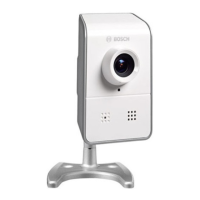
The MicroDome Camera 200 Series is a ready-to-use, complete network video surveillance system housed within a compact camera. Designed to offer a cost-effective solution for a broad range of applications, this camera utilizes H.264 compression technology to deliver clear images while minimizing bandwidth and storage requirements. It can function as a standalone video surveillance system without additional equipment or seamlessly integrate with Bosch DVR 700 Series recorders.
Key usage features of the MicroDome Camera 200 Series include:
- Edge Recording: The camera is equipped with a microSD/SDHC/SDXC card slot, supporting edge recording up to 2 TB. For optimal performance, especially with HD recording, it is recommended to use high-speed SD cards (Class 6 or above), with higher read/write speeds yielding better results.
- Video Streaming: It offers tri-streaming capabilities, providing two H.264 streams and one M-JPEG stream simultaneously. The progressive scan feature ensures sharp images of moving objects, enhancing surveillance effectiveness.
- Audio Capabilities: The NDC-274-P model includes a built-in microphone for audio input, supporting G.711 and L16 audio compression for both live monitoring and recording.
- Detection Features: The camera incorporates tamper, motion, and audio detection functionalities, allowing for proactive monitoring and alerts in response to suspicious activities.
- Network Connectivity: It connects to a 10/100 Base-T network and supports Power over Ethernet (IEEE 802.3af compliant), simplifying installation by allowing power and data to be transmitted over a single Ethernet cable. For PM versions, an M12 connector is used, requiring a shielded UTP Category 5e cable with RJ45 connectors.
- Power Options: The camera can accept power from both DC12/24V power input and the Ethernet input concurrently. However, it's important to note that changing the power source might cause the camera to reboot. A power supply is not included in the package.
- Compatibility: The MicroDome Camera 200 Series conforms to the ONVIF standard, ensuring wide compatibility with various network video products and systems.
- Configuration and Control: The camera can be configured and controlled via a web browser using Microsoft Internet Explorer, allowing users to receive live images, control camera functions, and replay stored sequences. Alternatively, it can be configured using the supplied Bosch Video Client or the Bosch Video Management System.
- Protected Network Support: For networks utilizing a RADIUS server for 802.1x authentication, the camera must be pre-configured. This involves connecting it directly to a PC via a crossed network cable to set the Identity and Password parameters before integrating it into the protected network.
- Installation Aid: For easier setup, a monitor can be connected to the miniature 2.5 mm jack socket using an optional S1460 monitor cable. This socket provides a composite video signal (NTSC) specifically for installation purposes.
- Camera Positioning: The camera module's position can be adjusted along two axes (horizontal pan up to 350° and vertical tilt up to 55°). During adjustment, it's crucial to ensure the picture display on the monitor is level.
Maintenance features for the MicroDome Camera 200 Series include:
- Disassembly and Assembly: The camera/housing unit can be disassembled by loosening three tamper-resistant screws in the dome using the supplied special screwdriver bit, allowing the dome to be removed from the base. Reassembly involves aligning the dome with the base and tightening the screws.
- Memory Card Installation: To install a microSD card, the camera needs to be disassembled, and the card slid into the designated slot.
- Desiccant for Rugged Cameras: For PT and PM camera versions, a desiccant package is provided to prevent moisture buildup. This package should be stuck to the inside of the dome cover after removing its backing.
- Cleaning: While a dry cloth is generally sufficient for cleaning, a moist, fluff-free cloth or leather shammy may also be used. Liquid or aerosol cleaners should be avoided. If necessary, the inner surface of the dome should be cleaned with a soft cloth before closing the unit.
- Reset Functionality: If the camera cannot be connected due to an altered IP address, pressing and holding the reset button for approximately 7 seconds will restore the factory default values, including the IP address of 192.168.0.1.
- Professional Servicing: The casing of the camera should never be opened by the user, as it contains no user-serviceable parts. All maintenance or repair work must be performed by qualified personnel, such as electrical engineering or network technology specialists. In case of doubt or fault, users are advised to contact their dealer's technical service center or Bosch Security Systems Customer Service directly.
- Disposal: The camera contains environmentally hazardous materials and must be disposed of according to local laws. Defective or superfluous devices and parts should be professionally disposed of or taken to a local collection point for hazardous materials. The camera should be transferred with its installation guide.
Important safety precautions and warnings are provided to ensure safe operation and prevent damage. Users are cautioned against exposing the camera/lens to direct sunlight or bright spotlights, as this can damage the image sensors and shorten their lifespan. Installation should only be carried out by qualified service personnel in compliance with the National Electrical Code or applicable local codes.



 To Next Page
 General