EasyManua.ls Logo

Bosch NIN-73023 - User Manual

Bosch NIN-73023
40 pages
Print Icon
To Next Page IconTo Next Page
Loading...
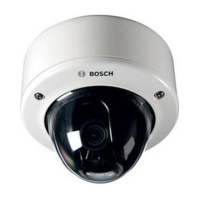
FLEXIDOME IP starlight
7000 VR
NIN-73013 | NIN-73023
en Installation Manual

Questions and Answers

  • P
    patriciadavisAug 7, 2025
    Why my Bosch Security Camera has no connection?
    • B
      Blake TaylorAug 7, 2025
      If your Bosch Security Camera isn't connecting or transmitting images, several factors could be responsible. The unit configuration might be incorrect, so check all configuration parameters, and reset to factory default if necessary. There may be a faulty installation, so check all cables, plugs, contacts, and connections. Also, the IP address could be wrong, so verify the IP addresses. Faulty data transmission within the LAN can be a cause, so check the data transmission with ping. Finally, the maximum number of connections might have been reached, so wait until there is a free connection and call the transmitter again.
  • M
    michelle23Aug 11, 2025
    How to fix Bosch NIN-73023 that does not operate?
    • D
      Dylan TorresAug 12, 2025
      If your Bosch Security Camera isn't operating, the issue could stem from a power failure. Check the power supply. Alternatively, faulty cable connections could be the culprit, so check all cables, plugs, contacts, and connections.
  • H
    Hailey MontgomeryAug 17, 2025
    What to do if there is no audio transmission to remote station on Bosch NIN-73023?
    • F
      fwrightAug 17, 2025
      If you're experiencing no audio transmission to a remote station with your Bosch Security Camera, several factors could be at play. There might be a hardware fault, so check that all connected audio units are operating correctly. Faulty cable connections could also be the cause, so check all cables, plugs, contacts, and connections. An incorrect configuration might be the issue, so check audio parameters on the Audio configuration and LIVE page functions pages. Finally, the audio voice connection might already be in use by another receiver, so wait until the connection is free and then call the sender again.
  • J
    John BlankenshipAug 22, 2025
    What to do if Bosch NIN-73023 is not operational after firmware upload?
    • T
      Tim AllenAug 22, 2025
      If your Bosch Security Camera isn't operational after a firmware upload, it could be due to a power failure during programming by firmware file. Have the unit checked by Customer Service and replace if necessary. Another possibility is an incorrect firmware file. In this case, enter the IP address of the unit followed by /main.htm in your Web browser and repeat the upload.
  • D
    David BriggsAug 27, 2025
    Why Bosch Security Camera does not report an alarm?
    • D
      Donna ShepardAug 27, 2025
      If your Bosch Security Camera isn't reporting an alarm, it might be because the alarm source is not selected. Select possible alarm sources on the Alarm sources configuration page. It could also be that no alarm response is specified. Specify the desired alarm response on the Alarm connections configuration page; if necessary change the IP address.
  • M
    Mrs. Michelle HensonSep 1, 2025
    How to fix empty fields in web browser for Bosch NIN-73023?
    • J
      Jennifer LloydSep 1, 2025
      If your web browser contains empty fields when accessing your Bosch Security Camera, it may be due to an active proxy server in the network. Create a rule in the local computer's proxy settings to exclude local IP addresses.

Summary

Safety

Safety precautions

Details general safety precautions and warnings for operating the device.

Installation

Wiring

Provides cautions and notices regarding wiring connections, wet installations, and surge suppression.

Earthing

Instructions and caution regarding the mandatory connection of the device to earth (ground).

Network (and PoE power)

Details on connecting the camera to a 10/100 Base-T network using STP Category 5e cable and PoE.

Auxiliary power

Instructions for connecting a 12 VDC power supply as an auxiliary power source.

Mounting the camera module

General guidance for mounting the camera module to various surfaces.

Mounting flush to ceiling

Step-by-step guide for flush mounting the camera module to a ceiling, including drilling and securing.

Mounting to ceiling with SMB-IP

Instructions for mounting the camera using a Surface Mount Box (SMB) and cable conduit.

Camera positioning and field-of-view

Explains how to adjust the camera module position and set the field-of-view using a monitor.

Connection via Web Browser

Configuration

Troubleshooting

Resolving problems

A table identifying common malfunctions, their possible causes, and solutions.

Testing the network connection

Explains how to use the ping command to test network connectivity between the camera and other devices.

Maintenance

Technical Data

Bosch NIN-73023 Specifications

General IconGeneral
BrandBosch
ModelNIN-73023
CategorySecurity Camera
LanguageEnglish

Related product manuals