6 720 606 990 (2014/06)Remote Control
Remote control installation for: GWH C920 ES/GWH C920ESC /GWH C800 ES/GWH
5 Remote control installation for: GWH C920 ES/GWH C920ESC /GWH C800 ES/GWH 715
ES/ GWH 2700 ES/GWH2400ES/EVOLUTION500/INTEGRA500/C1210ES/C1210ESC/
C1050ES/C950ES/940ES/940ESO/830ES
5.1 Remote control transceiver PCB installation
WARNING: For safety reasons, disconnect
the power supply to the water heater before
performing installation.
Pre-installation preparation
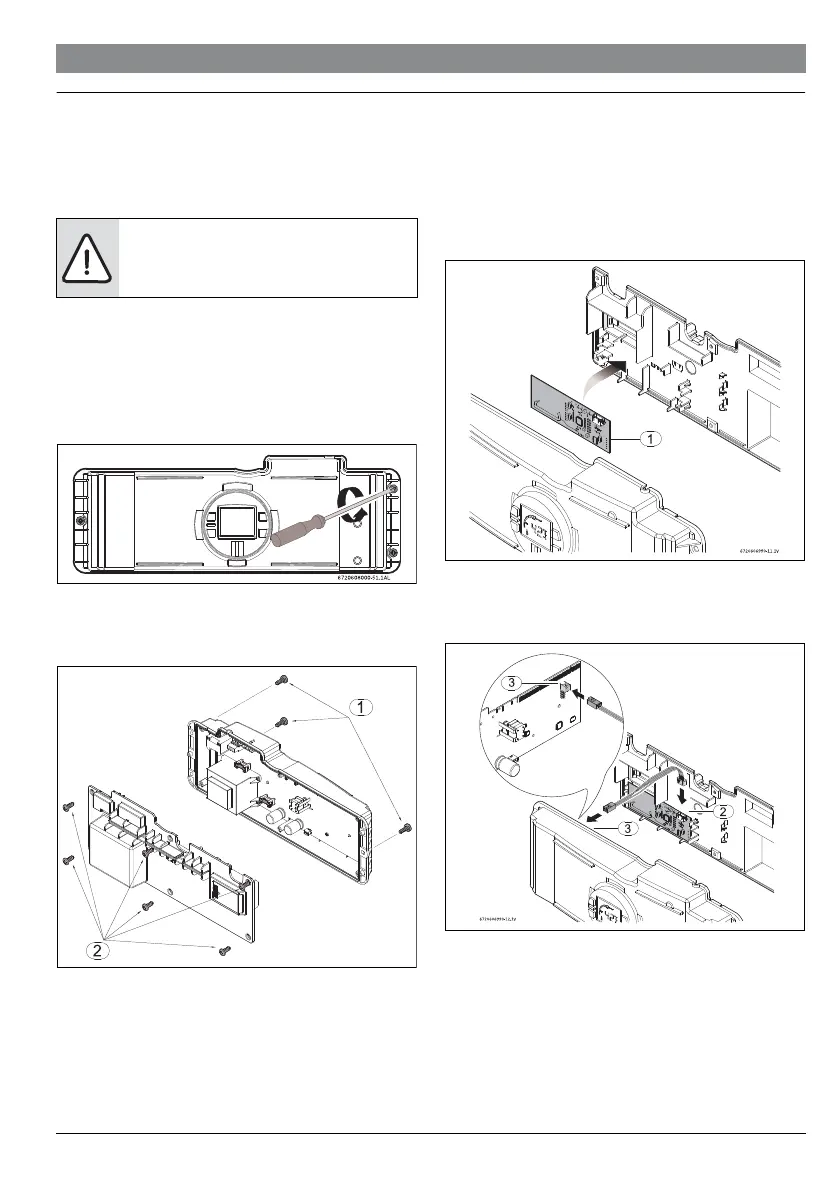
▶ Loosen the two Philips head screws located on bottom rear
of cover.
▶ Lift front cover upward and remove.
▶ Remove the three screws from the control unit (Fig. 8,
[1]).
Fig. 7
▶ Remove the 6 screws from the back cover of the control
unit, to access the electronic board (PCB) (Fig. 8, [2]).
6720606990-10.1AL
Fig. 8
Remote control transceiver PCB installation
▶ Place the remote control PCB in the back cover of the
control unit as shown in Fig. 9.
Fig. 9
▶ Connect the supplied cable between the main PCB and the
remote control PCB as shown in Fig. 10.
Fig. 10
▶ Reassemble all parts in the reverse order.


 To Next Page